
Manufacturing Control Plans and Inspection Management Software
SimpleManufacturing™ Control Plans software helps manufacturers define, schedule, perform, and retain receiving, First Article, in-process, final, and supplier-specific inspection requirements within one integrated manufacturing ERP and quality-management system.
A manufacturing control plan defines what must be inspected, when the inspection must occur, which measurement method or equipment should be used, the applicable specification or tolerance, the required sample size, and the action to take when a result does not meet requirements.
Inspection requirements can be connected with purchased items, approved suppliers, customer requirements, Work Orders, routing operations, product revisions, equipment, lot and serial numbers, and finished products.
SimpleManufacturing™ connects quality planning with inspection execution so employees receive the correct inspection requirements at receiving, during production, and before shipment.

Manufacturing control plans connect supplier-specific receiving inspection, AQL sampling, First Article, in-process inspection, final inspection, calibrated equipment, nonconformance, and quality records.
What Is a Manufacturing Control Plan?
A manufacturing control plan is a structured set of inspection and process-control requirements used to verify that purchased materials, manufacturing operations, and finished products meet defined specifications.
A control plan may define:
- Item or product number
- Product revision
- Supplier
- Inspection stage
- Work Order operation
- Characteristic to inspect
- Drawing or specification reference
- Nominal value
- Upper and lower tolerances
- Inspection method
- Required measurement equipment
- Sample size
- Inspection frequency
- Acceptance criteria
- Reaction plan
- Required documentation
Control Plans Turn Requirements into Inspection Instructions
Customer drawings, product specifications, supplier requirements, quality clauses, and internal procedures become actionable inspection steps employees can follow and document.
Why Manufacturing Control Plans Matter
Without controlled inspection instructions, different inspectors or departments may apply different methods, sample sizes, tolerances, or acceptance decisions to the same product.
Effective control plans help manufacturers:
- Standardize inspection methods
- Communicate product requirements clearly
- Identify defects earlier
- Reduce scrap and rework
- Prevent nonconforming shipments
- Apply supplier-specific inspection levels
- Maintain inspection traceability
- Verify calibrated equipment usage
- Support ISO 9001 and AS9100 processes
- Retain objective quality evidence
Consistent Inspections
Provide every inspector with the same characteristics, tolerances, methods, and acceptance requirements.
Risk-Based Sampling
Apply Dock-to-Stock, Skip Lot, AQL, tightened sampling, or 100% inspection according to risk and supplier performance.
Earlier Defect Detection
Identify problems at receiving or during production before additional cost is added.
Improved Traceability
Connect results with suppliers, receipts, material lots, Work Orders, operations, employees, and finished products.
Controlled Reactions
Define what employees must do when an inspection result fails to meet requirements.
Audit-Ready Records
Retain requirements, actual results, approvals, equipment, users, dates, and related quality records.
Inspection Types Supported by Manufacturing Control Plans
| Inspection Type | Purpose |
|---|---|
| Receiving Inspection | Verifies purchased materials, components, quantities, certifications, and supplier requirements before inventory acceptance. |
| First Article Inspection | Verifies the first production output or initial product configuration before normal production continues. |
| First-Piece Inspection | Confirms the initial item produced at an operation meets requirements before the remaining quantity is processed. |
| In-Process Inspection | Evaluates product characteristics during manufacturing operations. |
| Final Inspection | Confirms completed products meet requirements before release or shipment. |
| Source Inspection | Allows the customer or an authorized representative to inspect product before shipment. |
| Functional Test | Verifies product performance or operation against defined criteria. |
| Reinspection | Confirms product meets requirements after rework, repair, sorting, or corrective activity. |
Manufacturing Control Plan Workflow
Identified
Created
Triggered
Results Recorded
or Investigate
Retained
- Identify the requirement. Review drawings, specifications, customer clauses, supplier requirements, and process risks.
- Create the inspection characteristic. Define the measurement, tolerance, method, sample size, and acceptance criteria.
- Assign the control plan. Link it with the applicable item, supplier, receipt, routing operation, or finished product.
- Trigger the inspection. Generate the required inspection during receiving, production, or completion.
- Record the result. Enter actual measurements, attributes, equipment, inspector, date, and comments.
- Apply the reaction plan. Accept conforming product or initiate containment and nonconformance processing.
- Analyze performance. Use inspection history to improve suppliers, processes, sampling levels, and control plans.
Receiving Inspection Software
Receiving inspection verifies that purchased materials and externally provided services meet Purchase Order, Item Master, supplier, drawing, specification, quality-clause, and certification requirements.
Receiving inspection may evaluate:
- Supplier identity
- Purchase Order number and line
- Part number and revision
- Manufacturer and manufacturer part number
- Quantity received
- Packaging and visible condition
- Lot, heat, batch, date code, or serial number
- Material certifications
- Special-process certifications
- Dimensions and characteristics
- Country of origin
- Shelf life or expiration
- Customer and quality-clause requirements
Material awaiting required receiving inspection should remain unavailable for production until acceptance is recorded.
Supplier-Specific Receiving Inspection Plans
SimpleManufacturing™ allows inspection requirements to be defined according to both the purchased item and the supplier providing it.
The same component may therefore have different inspection requirements depending on supplier performance, approval status, history, product risk, customer requirements, and certification controls.
| Supplier Condition | Possible Inspection Requirement |
|---|---|
| New or Unproven Supplier | 100% inspection or tightened sampling until acceptable performance is demonstrated. |
| Approved Supplier with Stable Results | Normal AQL sampling or reduced inspection. |
| High-Performing Supplier | Skip Lot or Dock-to-Stock when permitted by organizational policy. |
| Supplier with Recent Failure | Increased sample size, tightened inspection, or 100% inspection. |
| Critical Material or Process | Defined mandatory inspection regardless of general supplier performance. |
| Customer-Directed Source | Inspection according to customer and contractual requirements. |
Inspection Should Reflect Supplier Risk
A single inspection plan for every supplier may create unnecessary inspection cost for proven suppliers while providing insufficient protection against new or underperforming sources.
Dock-to-Stock Receiving
Dock-to-Stock allows eligible material from approved, high-performing suppliers to move directly into available inventory without routine dimensional receiving inspection.
Dock-to-Stock eligibility may consider:
- Supplier approval status
- Historical acceptance rate
- Consecutive accepted receipts
- Certification accuracy
- Product criticality
- Customer requirements
- Recent supplier corrective actions
- Audit performance
- Material risk
Dock-to-Stock Does Not Eliminate All Receiving Controls
Employees may still need to verify supplier identity, Purchase Order, part number, quantity, packaging, lot information, required documentation, and visible shipping condition.
100% Receiving Inspection
A 100% inspection requirement directs the organization to inspect every received unit or every applicable characteristic.
This inspection level may be appropriate for:
- Critical components
- New suppliers
- Suppliers with recurring failures
- Short production quantities
- Customer-mandated inspection
- High-severity product risks
- Material without reliable history
- Containment following a supplier defect
100% Inspection Is Not Automatically Error-Free
Complete inspection still depends on clear requirements, suitable equipment, qualified inspectors, controlled methods, and reliable result recording.
AQL Sampling Plans
Acceptance Quality Limit sampling uses a defined lot size, inspection level, sample size, and acceptance or rejection number to evaluate a received or manufactured lot.
An AQL sampling configuration may include:
- Lot-size range
- General or special inspection level
- Normal, tightened, or reduced inspection
- Sample-size code
- Required sample quantity
- AQL value
- Acceptance number
- Rejection number
- Defect classification
- Switching rules
| Sampling Result | Typical Action |
|---|---|
| Defects at or Below Acceptance Number | Accept the lot when all other requirements are met. |
| Defects at or Above Rejection Number | Reject or hold the lot for nonconformance review. |
| Critical Defect Detected | Apply the defined critical-defect reaction regardless of total defect count. |
| Repeated Failed Lots | Move to tightened sampling or 100% inspection according to policy. |
The selected sampling plan should match product risk, supplier history, contractual requirements, and the organization’s approved quality procedures.
Skip Lot Inspection Programs
Skip Lot inspection reduces receiving-inspection frequency for suppliers and items demonstrating sustained acceptable quality performance.
A Skip Lot program may define:
- Qualification criteria
- Required consecutive accepted lots
- Inspection frequency
- Maximum skipped lots
- Product restrictions
- Supplier restrictions
- Disqualification criteria
- Return-to-normal rules
- Audit or verification requirements
Inspection
Supplier Performance
Qualification
Inspection
or Disqualify
Inspection Must Increase After Significant Failure
A supplier or item experiencing a failed receipt, customer escape, certification issue, or corrective-action problem may need to return to normal, tightened, or 100% inspection.
Supplier Performance-Driven Inspection Levels
Inspection requirements can change as actual supplier performance improves or deteriorates.
Supplier performance may be evaluated using:
- Accepted and rejected receipts
- Rejected quantity
- Defect rate
- Consecutive accepted lots
- Certificate accuracy
- Corrective-action responsiveness
- Customer escapes linked to supplier material
- Audit results
- Delivery performance
- Repeat defect categories
| Performance Trend | Possible Inspection Change |
|---|---|
| Improving and Stable | Consider normal, reduced, Skip Lot, or Dock-to-Stock inspection when permitted. |
| New Supplier without History | Use 100% or tightened inspection until sufficient performance evidence exists. |
| Single Significant Failure | Temporarily increase inspection and evaluate supplier corrective action. |
| Recurring Failures | Use 100% inspection, supplier corrective action, and reevaluation of approval status. |
| Documentation Failures | Require certificate review even when dimensional inspection is reduced. |
Learn more in our Approved Vendor List guide.
First Article Inspection
First Article Inspection verifies that the initial production output and manufacturing process can produce a product meeting applicable requirements.
First Article requirements may be triggered by:
- New product introduction
- New customer part number
- New or revised drawing
- Significant engineering change
- New manufacturing location
- New supplier or special processor
- Changed tooling or process
- Extended production interruption
- Customer requirement
The inspection record may contain:
- Drawing characteristics
- Balloon or characteristic number
- Specification reference
- Nominal dimension
- Tolerance
- Actual result
- Measurement equipment
- Inspector
- Product lot or serial number
- Approval status
- Supporting reports
First Article approval should confirm both the product result and the manufacturing configuration used to produce it.
In-Process Inspection
In-process inspection evaluates product characteristics during manufacturing rather than waiting until the product is complete.
Control plans may be assigned to:
- Routing operations
- Work centers
- Specific machines
- Setup approval
- First-piece approval
- Timed inspection intervals
- Quantity-based intervals
- Operator self-inspection
- Independent Quality inspection
- Special-process verification
Detect Problems Before Additional Value Is Added
Finding a process issue during an early routing operation can prevent additional labor, material, outside processing, and inspection from being added to nonconforming product.
Final Inspection and Product Release
Final inspection confirms that completed products meet defined requirements before release or shipment.
Final inspection may verify:
- Product identity and revision
- Completed quantity
- Dimensional characteristics
- Functional requirements
- Visual workmanship
- Required inspections and tests
- Nonconformance closure
- Serial and lot records
- Material and process certifications
- Packaging and labeling
- Customer documentation
- Certificate of Conformance
Prevent Shipment Until Required Acceptance Is Complete
Products should not be released when required inspections, customer approvals, certifications, nonconformance dispositions, or documentation remain incomplete.
Inspection Characteristics and Requirements
Each control-plan characteristic defines what the inspector must evaluate and how the result will be accepted.
| Characteristic Field | Purpose |
|---|---|
| Characteristic Number | Provides a unique sequence or drawing reference. |
| Description | Explains the feature or requirement being inspected. |
| Specification Reference | Identifies the applicable drawing, standard, or customer requirement. |
| Nominal Value | Defines the target measurement. |
| Lower and Upper Limits | Define acceptable measurement boundaries. |
| Inspection Method | Defines how the characteristic should be evaluated. |
| Equipment Requirement | Identifies the type or specific calibrated device required. |
| Sample Size | Defines how many units or observations must be inspected. |
| Frequency | Defines when or how often the inspection occurs. |
| Reaction Plan | Defines the required action after a failed result. |
Recording Inspection Results
The inspection record should retain the actual evidence used to make the acceptance decision.
Results may include:
- Measured value
- Pass or fail result
- Attribute result
- Sample quantity
- Accepted quantity
- Rejected quantity
- Defect classification
- Inspector
- Inspection date and time
- Measurement equipment
- Lot or serial number
- Comments
- Photographs
- Certificate or report attachments
Inspection evidence should remain linked with the supplier receipt, Work Order, operation, product lot, serial number, or shipment it supports.
Calibrated Measurement Equipment Integration
Control plans can identify the measurement-device type, measurement range, accuracy, or specific equipment required for an inspection.
Before a device is selected, the system may verify:
- Device status
- Calibration due date
- Measurement range
- Accuracy or resolution
- Assigned location
- Availability
- Restriction or intended use
- Employee authorization
Do Not Accept Results from an Unavailable Device
Overdue, failed, inactive, out-for-calibration, or otherwise unsuitable equipment should be prevented from use in controlled inspection records.
Learn more in our Calibration Management Software guide.
Reaction Plans for Failed Inspections
A reaction plan defines what must occur when an inspection result does not meet requirements.
The reaction may include:
- Stop production
- Place inventory or Work in Process on hold
- Notify Quality or supervision
- Segregate affected material
- Inspect additional units
- Increase sampling level
- Perform 100% sorting
- Create a nonconformance record
- Return material to the supplier
- Issue a supplier corrective action
- Rework or repair product
- Obtain customer authorization
Failure
and Process
Created
Corrective Action
Approved Release
Nonconformance Management Integration
Failed inspection results can create or link with a nonconformance record containing the affected product, requirement, actual condition, quantity, location, and disposition.
The nonconformance may include:
- Supplier receipt or Work Order
- Part number and revision
- Inspection characteristic
- Actual result
- Quantity affected
- Lot or serial number
- Immediate containment
- Material Review Board activity
- Disposition
- Rework instructions
- Approval
- Reinspection result
- Corrective-action relationship
Learn more in our Nonconforming Material Processing guide.
Supplier Corrective Action Integration
Recurring or significant supplier inspection failures may require a formal Supplier Corrective Action Request.
The supplier corrective-action record may connect:
- Supplier
- Purchase Order
- Receipt
- Part and revision
- Inspection result
- Rejected quantity
- Material lot or serial number
- Containment requirement
- Supplier response
- Root-cause analysis
- Corrective actions
- Effectiveness verification
- Supplier performance status
Inspection Results Should Influence Supplier Decisions
Supplier inspection history can support approval, reevaluation, sampling changes, corrective actions, sourcing decisions, and Dock-to-Stock qualification.
Control Plan Revision Management
Control plans should remain aligned with current product drawings, specifications, customer requirements, manufacturing processes, and inspection methods.
Revision controls may include:
- Control-plan revision
- Product revision
- Effective date
- Obsolete date
- Approval status
- Approved by
- Approval date
- Reason for change
- Related Engineering Change Order
- Affected items and suppliers
- Affected Work Orders
- Required employee retraining
Preserve Historical Inspection Requirements
Existing inspection records should retain the control-plan revision used when the inspection was performed, even after a newer plan becomes effective.
Inspection Traceability
Inspection history provides evidence connecting product acceptance with its supplier, material, Work Order, process, equipment, and customer shipment.
or Work Order
Plan Revision
Calibrated Equipment
Acceptance
and Shipment
Traceable inspection records may identify:
- Supplier
- Purchase Order and receipt
- Part and revision
- Material lot, heat, batch, or serial number
- Work Order and operation
- Control-plan revision
- Inspector
- Measurement equipment
- Actual results
- Nonconformance records
- Finished-product lot or serial number
- Customer shipment
Control Plan and Inspection Reports
| Report | Purpose |
|---|---|
| Pending Receiving Inspections | Shows receipts waiting for inspection and acceptance. |
| Supplier Inspection History | Shows accepted, rejected, sampled, skipped, and Dock-to-Stock receipts. |
| Failed Inspection Report | Identifies failed characteristics, items, suppliers, processes, and Work Orders. |
| Inspection by Product | Provides inspection history for a selected part number or revision. |
| Inspection by Work Order | Shows receiving, operation, and final inspection evidence supporting production. |
| Inspector Activity | Displays inspections performed by employee and period. |
| Equipment Usage | Identifies inspections performed with selected calibrated devices. |
| AQL and Sampling History | Shows lot sizes, sample quantities, acceptance numbers, and results. |
| Supplier Performance | Summarizes defect rates, accepted receipts, rejections, and inspection-level changes. |
| Control Plan Revision History | Shows revisions, approvals, effective dates, and affected products. |
Control Plan and Inspection KPIs
| KPI | What It Measures |
|---|---|
| Receiving Acceptance Rate | Percentage of supplier receipts accepted. |
| Supplier Defect Rate | Rejected supplier quantity compared with quantity received or inspected. |
| Dock-to-Stock Percentage | Percentage of eligible receipts accepted without routine inspection. |
| Skip Lot Qualification | Suppliers and items currently approved for reduced inspection. |
| First Article Approval Rate | First Article submissions accepted without additional correction. |
| First-Pass Yield | Products accepted without rework or repeated processing. |
| In-Process Defect Rate | Defects detected during manufacturing operations. |
| Final Inspection Failure Rate | Completed products failing before shipment. |
| Customer Escape Rate | Nonconforming products detected after shipment. |
| Average Inspection Cycle Time | Time from inspection requirement to completed disposition. |
| Inspection Backlog | Receipts or products waiting for inspection. |
| Inspection Cost | Labor and resources used to perform inspection activity. |
Control Plans for ISO 9001 and AS9100
ISO 9001 and AS9100 quality-management systems require organizations to determine appropriate monitoring, measurement, inspection, and acceptance activities for purchased, manufactured, and completed products.
Control Plans software can support:
- Defined inspection requirements
- Supplier monitoring
- Receiving acceptance
- Production-process control
- Product inspection and testing
- Calibrated measurement equipment
- Product traceability
- Nonconforming-output control
- Documented acceptance evidence
- Customer-specific requirements
- First Article Inspection
- Final product release
Software Supports the Quality System
Control Plans software provides structured requirements, workflows, records, traceability, and reporting. Compliance depends on the organization’s approved procedures, implementation, employee competency, and objective evidence.
Common Control Plan and Inspection Problems
| Problem | Potential Result | Recommended Control |
|---|---|---|
| Inspection Instructions Stored in Spreadsheets | Inspectors may use different or outdated requirements. | Use controlled, revision-specific inspection plans. |
| One Inspection Plan for Every Supplier | Inspection effort does not reflect supplier quality risk. | Use supplier-specific inspection requirements. |
| Failed Results Recorded Only in Notes | Nonconforming product may not be contained or investigated. | Connect failed results with nonconformance workflow. |
| Measurement Equipment Not Recorded | Affected products cannot be identified after calibration failure. | Record the calibrated equipment used for each inspection. |
| No Revision Relationship | Inspection requirements may not match the product configuration. | Link control plans with item and drawing revisions. |
| Quality Clauses Not Connected | Customer inspection or certification requirements may be missed. | Flow Contract Review requirements into control plans. |
| Sampling Is Applied Informally | Sample sizes and acceptance decisions may be inconsistent. | Use approved AQL and switching rules. |
| No Reaction Plan | Employees may continue production after a failed result. | Define containment and escalation for each critical characteristic. |
| History Is Not Analyzed | Recurring supplier and process problems remain hidden. | Use controlled categories, KPIs, and trend reporting. |
Manufacturing Control Plan Best Practices
- Connect control plans with the applicable item and revision.
- Use clear and measurable inspection characteristics.
- Reference applicable drawings and specifications.
- Define nominal values and tolerance limits.
- Identify the approved inspection method.
- Specify suitable calibrated measurement equipment.
- Define the inspection stage and frequency.
- Use supplier-specific receiving inspection requirements.
- Apply risk-based sampling plans.
- Define AQL acceptance and rejection criteria.
- Document Dock-to-Stock and Skip Lot qualification rules.
- Increase inspection after supplier or process failures.
- Define reaction plans for failed characteristics.
- Connect failed results with nonconformance processing.
- Record actual measurements and attribute results.
- Retain inspector, equipment, date, lot, and serial information.
- Preserve historical control-plan revisions.
- Review control plans after product and process changes.
- Analyze inspection trends and supplier performance.
- Review quality KPIs during Management Review.
Control Plan Software Selection Checklist
- Can control plans be linked with items and revisions?
- Can receiving inspection requirements vary by supplier?
- Does the software support Dock-to-Stock?
- Does it support 100% inspection?
- Can AQL sampling plans be configured?
- Does it support normal, reduced, and tightened inspection?
- Can Skip Lot programs be managed?
- Can inspection levels change with supplier performance?
- Can First Article inspections be recorded?
- Can control plans be assigned to routing operations?
- Can in-process and final inspections be performed?
- Can nominal values and tolerances be recorded?
- Can required calibrated equipment be identified?
- Does the system prevent use of unavailable equipment?
- Can actual results and defect classifications be retained?
- Can failed inspections create nonconformance records?
- Can supplier corrective actions be connected?
- Can inspection history be traced by lot and serial number?
- Can prior control-plan revisions be retrieved?
- Are reporting, trends, and KPIs available?
Control Plan and Inspection Software Screens
The following SimpleManufacturing™ screens support receiving inspection planning, supplier-specific inspection levels, detailed inspection instructions, and inspection execution.

Receiving Inspection Control Plans
Define supplier-specific Dock-to-Stock, 100% inspection, AQL sampling, Skip Lot, and material-verification requirements.
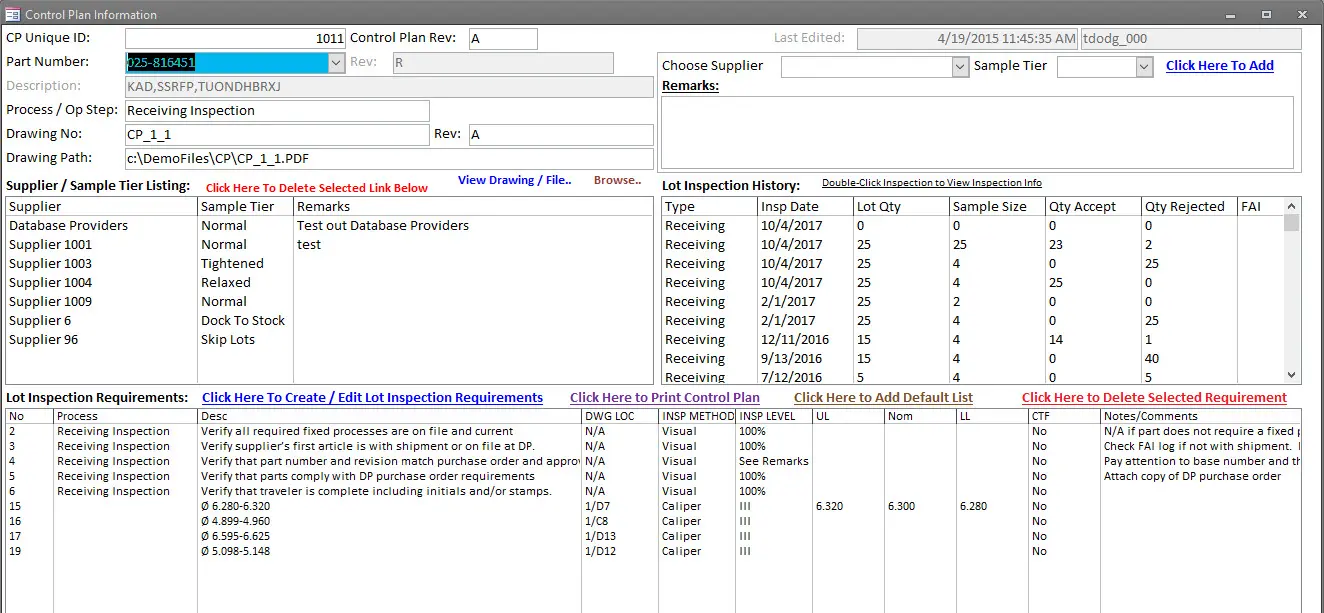
Inspection Requirement Details
Define inspection instructions, characteristics, specifications, nominal values, tolerances, sampling, equipment, and acceptance criteria.
How Control Plans Integrate with Manufacturing ERP
| ERP Process | Control Plan Relationship |
|---|---|
| Contract Review | Provides customer quality clauses, inspection, certification, and First Article requirements. |
| Item Master | Identifies product revisions, inspection requirements, serialization, lot control, and approved sources. |
| Approved Supplier Management | Provides supplier status, performance, inspection level, and corrective-action history. |
| Purchase Orders | Provides material, supplier, revision, quantity, certification, and quality requirements. |
| Receiving | Triggers the applicable supplier-specific receiving inspection plan. |
| Inventory | Controls whether received material is awaiting inspection, accepted, rejected, or on hold. |
| Work Orders | Provides product, revision, routing operation, lot, serial, and production quantity. |
| Manufacturing Routings | Triggers first-piece, in-process, outside-process, and final inspection requirements. |
| Calibration Management | Validates the status and suitability of measurement equipment. |
| Nonconformance Management | Controls failed inspection results and affected product. |
| Corrective Action | Addresses recurring supplier, process, product, and inspection failures. |
| Product Traceability | Connects inspections with receipts, material lots, Work Orders, finished products, and shipments. |
| Shipping | Verifies final inspection, documentation, and release requirements before delivery. |
| Management Review | Provides supplier, inspection, defect, yield, backlog, and escape metrics. |
Control Plans Software with SimpleManufacturing™
SimpleManufacturing™ connects quality planning and inspection execution with suppliers, Purchase Orders, receiving, inventory, Work Orders, routing operations, calibrated equipment, nonconformance, corrective action, product genealogy, shipping, and Management Review.
| SimpleManufacturing™ Capability | Business Benefit |
|---|---|
| Supplier-Specific Inspection Plans | Applies different inspection requirements to different suppliers of the same item. |
| Dock-to-Stock | Reduces routine inspection for qualified high-performing suppliers. |
| 100% Inspection | Applies complete inspection for critical, new, or underperforming sources. |
| AQL Sampling | Provides controlled sample sizes, acceptance numbers, rejection numbers, and inspection levels. |
| Skip Lot Programs | Reduces inspection frequency after sustained acceptable performance. |
| First Article Inspection | Records initial product and process verification before production release. |
| In-Process Inspection | Connects inspection requirements with Work Order routing operations. |
| Final Inspection | Verifies completed products and documentation before release. |
| Inspection Characteristics | Defines requirements, nominal values, tolerances, methods, equipment, and reaction plans. |
| Calibration Integration | Validates the measurement equipment used to generate results. |
| Nonconformance Integration | Creates controlled quality records from failed inspection results. |
| Supplier Quality Integration | Uses inspection results to support supplier ratings and corrective actions. |
| Lot and Serial Traceability | Connects inspection evidence with purchased materials, Work Orders, finished goods, and shipments. |
| Electronic Audit History | Records plan revisions, users, dates, actual results, approvals, and status history. |
| Quality Reporting | Provides supplier, inspection, sampling, defect, yield, and trend reports. |
One Integrated Inspection Process from Receiving Through Final Release
SimpleManufacturing™ gives Purchasing, Receiving, Production, Quality, Shipping, and management access to the same controlled inspection requirements and quality evidence.
Frequently Asked Questions About Control Plans Software
What is manufacturing Control Plans software?
Control Plans software defines and manages inspection characteristics, methods, tolerances, sample sizes, equipment, acceptance criteria, and reaction plans for purchased, in-process, and completed products.
Can inspection requirements vary by supplier?
Yes. Different suppliers providing the same item can have different requirements, including Dock-to-Stock, Skip Lot, AQL sampling, tightened sampling, or 100% inspection.
What is Dock-to-Stock?
Dock-to-Stock allows eligible material from approved, high-performing suppliers to enter available inventory without routine dimensional inspection, subject to the organization’s approved controls.
What is 100% inspection?
A 100% inspection requires every received or manufactured unit, or every applicable characteristic, to be evaluated.
What is AQL sampling?
AQL sampling uses lot size, inspection level, sample size, and acceptance or rejection numbers to make a controlled lot-acceptance decision.
What is Skip Lot inspection?
Skip Lot inspection reduces inspection frequency for suppliers and products demonstrating sustained acceptable performance.
Can inspection levels change automatically?
Inspection levels can be increased or reduced according to supplier performance, recent failures, consecutive accepted lots, quality policy, and product risk.
Does the software support First Article Inspection?
Yes. First Article inspections can record product characteristics, actual measurements, equipment, inspectors, lot or serial numbers, documents, and approval status.
Can inspections be linked with routing operations?
Yes. First-piece and in-process inspections can be assigned to specific Work Order routing operations and work centers.
What information is stored for an inspection characteristic?
A characteristic may include its description, drawing reference, nominal value, tolerance, method, equipment, sample size, frequency, acceptance criteria, and reaction plan.
Can calibrated equipment be validated?
Yes. The system can verify that selected measurement equipment is current, available, suitable, and authorized.
What happens when an inspection fails?
The reaction plan may stop production, hold product, increase inspection, create a nonconformance, require sorting, or initiate supplier corrective action.
How does Control Plans software support supplier quality?
It connects receiving results with supplier ratings, inspection levels, Dock-to-Stock qualification, Skip Lot status, nonconformances, and corrective actions.
Can inspection records be traced to product lots and serial numbers?
Yes. Inspection evidence can be linked with supplier lots, material receipts, Work Orders, finished-product lots, serial numbers, and customer shipments.
How are control-plan revisions managed?
Revisions can include effective dates, approvals, change reasons, product revisions, affected items, and historical inspection-plan retention.
Does Control Plans software support ISO 9001 and AS9100?
It supports defined inspection requirements, supplier monitoring, product acceptance, calibrated equipment, traceability, nonconformance control, and retained quality evidence.
Does software make a company ISO 9001 or AS9100 compliant?
No. Compliance depends on the organization’s quality-management system, implementation, procedures, employee competency, leadership, and objective evidence. Software supports those processes.
Which inspection KPIs should manufacturers track?
Useful KPIs include receiving acceptance, supplier defects, inspection backlog, First Article approval, first-pass yield, final failures, customer escapes, inspection cycle time, and inspection cost.
How does SimpleManufacturing™ manage control plans?
SimpleManufacturing™ connects supplier-specific receiving inspection, AQL sampling, Skip Lot, Dock-to-Stock, First Article, in-process and final inspection with calibrated equipment, nonconformance, traceability, and quality reporting.
Standardize Inspection from Supplier Receipt Through Final Shipment
Effective manufacturing control plans transform customer, engineering, supplier, and process requirements into controlled inspection instructions and objective quality records.
Supplier-specific inspection levels help manufacturers focus receiving resources according to actual risk, while First Article, in-process, and final inspections protect production and customer delivery.
Plan, Inspect, Record, React, Trace, and Improve
SimpleManufacturing™ connects Control Plans with suppliers, receiving, inventory, Work Orders, routing operations, calibrated equipment, nonconformance, corrective action, product genealogy, shipping, and quality reporting.
SimpleManufacturing™ Control Plans software is designed for small and mid-sized manufacturers requiring structured receiving inspection, supplier quality management, AQL sampling, Skip Lot, Dock-to-Stock, First Article, in-process inspection, final inspection, and audit-ready quality records.
Request a Control Plans Software Demonstration
Call SimpleManufacturing™ at 858-335-6421.