
Corrective Action Software for Manufacturing
SimpleManufacturing™ corrective action software helps manufacturers manage containment, root-cause analysis, corrective actions, preventive actions, assigned responsibilities, due dates, implementation evidence, effectiveness verification, and approved closure within one integrated manufacturing quality-management system.
Corrective actions may originate from internal nonconformances, customer complaints, supplier defects, audit findings, inspection failures, process problems, equipment failures, delivery issues, training gaps, or recurring manufacturing defects.
When corrective actions are managed through spreadsheets, emails, shared folders, paper forms, and separate quality databases, assignments may be overlooked, evidence may be difficult to retrieve, due dates may pass unnoticed, and recurring problems may remain unresolved.
Corrective action management should move every significant problem from containment and investigation through implementation, effectiveness verification, and approved closure.
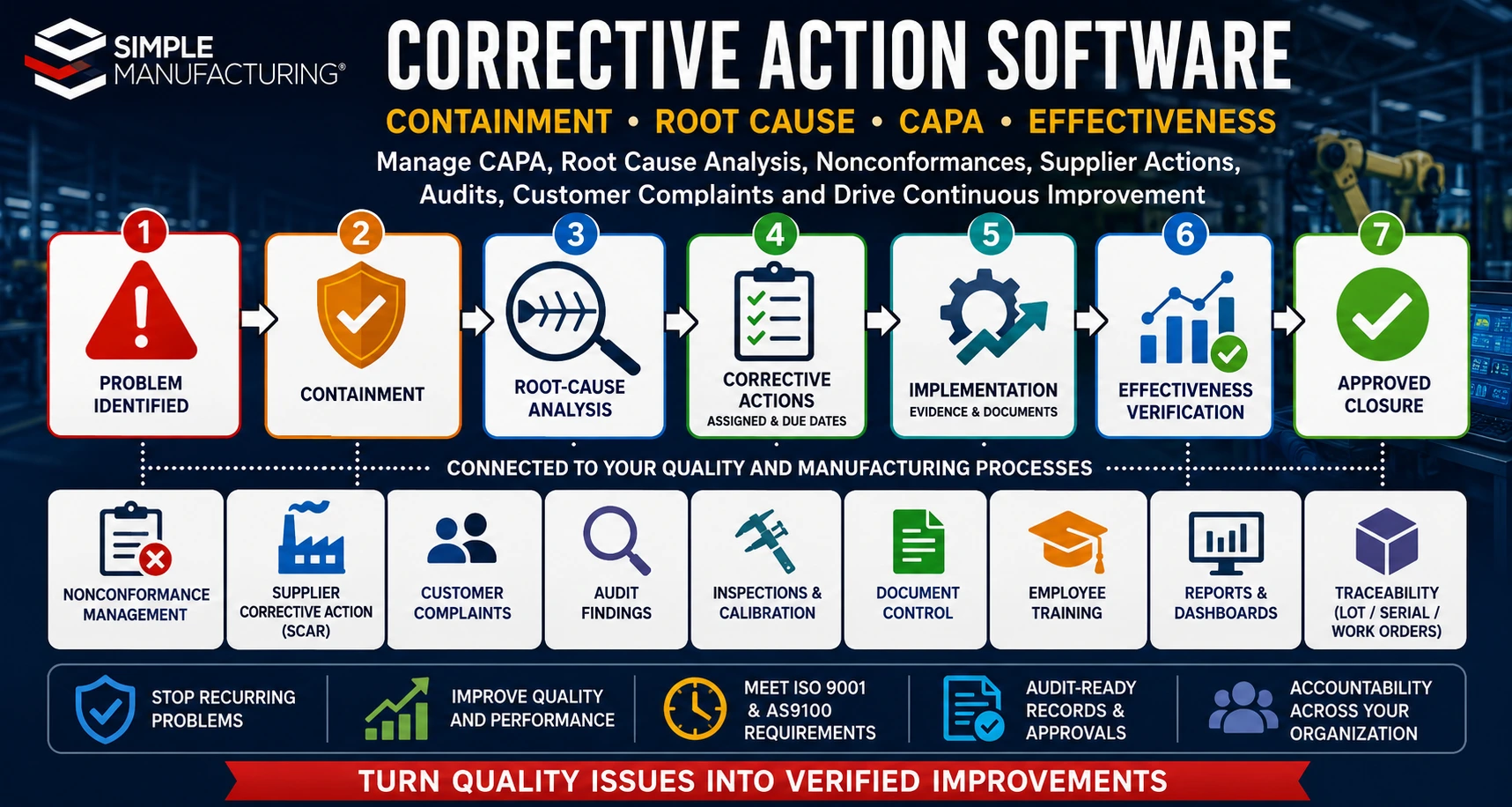
Manufacturing corrective action software connects nonconformances, containment, root-cause analysis, CAPA assignments, implementation evidence, effectiveness verification, and approved closure.
What Is Corrective Action Software?
Corrective action software provides a controlled workflow for investigating significant or recurring problems, determining their causes, implementing actions, and confirming that those actions prevented recurrence.
The software may manage:
- Problem statements
- Affected products and processes
- Immediate containment
- Correction of detected conditions
- Root-cause analysis
- Corrective-action plans
- Preventive and risk-reduction actions
- Assigned employees
- Target completion dates
- Automatic notifications
- Supporting documents
- Implementation evidence
- Effectiveness verification
- Management approval
- Electronic closure
- Complete audit history
Structured Investigation
Document the problem, affected records, containment, evidence, causes, and investigation results.
Assigned Actions
Assign responsibilities, due dates, priorities, resources, and required evidence.
Automatic Notifications
Notify owners about new assignments, approaching dates, overdue actions, and approval requests.
Effectiveness Verification
Confirm that implemented actions produced sustained improvement and prevented recurrence.
Integrated Quality Records
Connect corrective actions with nonconformances, complaints, suppliers, audits, inspections, Work Orders, and documents.
Audit-Ready History
Retain decisions, approvals, evidence, users, dates, changes, and closure records.
Correction, Containment, and Corrective Action
Correction, containment, and corrective action serve different purposes and should not be treated as interchangeable terms.
| Activity | Purpose | Example |
|---|---|---|
| Containment | Protects customers and operations from additional exposure while the problem is investigated. | Place affected inventory and Work Orders on quality hold. |
| Correction | Addresses the specific detected nonconforming condition. | Rework the rejected product so it meets requirements. |
| Corrective Action | Eliminates or reduces the cause so the problem does not recur. | Revise the process, tooling, training, or control that allowed the defect. |
| Preventive or Risk-Reduction Action | Addresses a potential problem before it occurs elsewhere. | Apply the improved control to similar products or processes. |
Fixing the Product Is Not Necessarily Corrective Action
Repairing, replacing, sorting, or reworking the affected product addresses the immediate condition. Corrective action evaluates why the problem occurred and why existing controls failed to prevent or detect it.
Why Corrective Action Management Matters
Recurring problems consume material, labor, production capacity, inspection resources, supplier-management time, and customer confidence.
Weak corrective-action processes may contribute to:
- Repeated defects
- Recurring customer complaints
- Repeated audit findings
- Growing quality-hold inventory
- Excess scrap and rework
- Supplier-quality problems
- Late customer deliveries
- Uncontrolled process changes
- Overdue assignments
- Ineffective actions
- Incomplete objective evidence
- Audit nonconformances
Corrective Action Converts Problems into Process Improvement
The goal is not to close forms quickly. The goal is to understand the problem, eliminate its cause, verify the result, and apply lessons to similar risks throughout the organization.
Corrective and Preventive Action Management
CAPA generally refers to a structured system for managing corrective actions and actions intended to prevent potential problems.
A CAPA record may include:
- CAPA number
- Source and category
- Problem description
- Risk or severity
- Affected product, supplier, customer, or process
- Containment activity
- Investigation team
- Root cause
- Assigned action items
- Responsible owners
- Due dates
- Implementation evidence
- Effectiveness criteria
- Effectiveness results
- Closure approval
A controlled CAPA record connects the original problem with the investigation, actions, evidence, effectiveness review, and final approval.
Common Sources of Corrective Actions
| Source | Example |
|---|---|
| Internal Nonconformance | Recurring machining defect or repeated assembly failure. |
| Customer Complaint | Product defect, incorrect documentation, late delivery, or packaging issue. |
| Supplier Nonconformance | Repeated material defects, missing certifications, or delivery failures. |
| Internal Audit | Process not implemented as defined or records incomplete. |
| Certification Audit | Quality-management-system nonconformance requiring formal response. |
| Customer Audit | Finding associated with contractual or customer-specific requirements. |
| Inspection Failure | Repeated failed receiving, in-process, or final-inspection characteristic. |
| Calibration Failure | Out-of-tolerance device affecting previous inspection decisions. |
| Management Review | Performance trend or objective requiring structured improvement. |
| Operational Risk | Potential supply, equipment, training, process, or product-safety problem. |
Corrective Action Workflow
Identified
Immediate Correction
Root-Cause Analysis
and Implemented
Verified
Closure
- Define the problem. Describe what occurred, where it occurred, when it occurred, and which requirements were not met.
- Contain the condition. Protect customers, production, inventory, and related products from further exposure.
- Correct affected product. Rework, repair, replace, return, scrap, or otherwise disposition the detected nonconforming condition.
- Investigate the cause. Collect evidence, analyze the process, and determine why the problem occurred and escaped detection.
- Define corrective actions. Assign changes designed to eliminate or control the verified causes.
- Implement the actions. Complete process, document, training, equipment, supplier, software, or control changes.
- Verify effectiveness. Evaluate whether the problem has remained controlled for an appropriate period or number of transactions.
- Approve closure. Confirm requirements are complete, evidence is adequate, and remaining risk is acceptable.
Writing an Effective Problem Statement
A useful problem statement describes the verified condition without assuming its cause.
The statement should identify:
- What happened
- Which requirement was not met
- Where the issue occurred
- When it occurred
- How it was detected
- How many units or transactions were affected
- Which customers, suppliers, products, or processes were involved
- Known evidence and supporting records
| Weak Statement | Improved Statement |
|---|---|
| Operator error caused bad parts. | Five of 40 parts from Work Order 10524 exceeded the drawing’s upper-diameter limit during final inspection. |
| Supplier quality is poor. | Three of the last five receipts from Supplier A contained missing material certifications required by Purchase Order clause Q-14. |
| The procedure was not followed. | The receiving-inspection record did not contain the required lot-number verification for receipts 4501 through 4504. |
Do Not Build the Cause into the Problem Statement
Terms such as operator error, lack of training, supplier negligence, or carelessness should be supported by investigation rather than assumed before evidence is reviewed.
Immediate Containment
Containment limits the immediate impact while the problem is investigated.
Containment actions may include:
- Stop production
- Place inventory on quality hold
- Identify affected Work in Process
- Segregate suspect material
- Notify customers
- Notify suppliers
- Perform additional inspection
- Inspect related lots or serial numbers
- Review recent shipments
- Implement temporary process controls
- Restrict equipment or tooling
- Assign temporary approval requirements
Containment Should Address the Potential Scope
The organization should consider related inventory, Work Orders, suppliers, products, processes, lots, serial numbers, and customer shipments—not only the single item where the problem was first detected.
Root-Cause Analysis
Root-cause analysis is a structured investigation intended to identify the underlying process, system, control, or decision that allowed the problem to occur or escape detection.
The investigation may evaluate:
- People and competency
- Procedures and instructions
- Materials and suppliers
- Machines, tooling, and fixtures
- Measurement equipment
- Manufacturing methods
- Environmental conditions
- Software and data
- Planning parameters
- Inspection and detection controls
- Management and resource decisions
- Similar products and processes
A root cause should explain why the problem occurred and why the organization’s existing controls did not prevent or detect it.
5 Whys Root-Cause Analysis
The 5 Whys method repeatedly asks why a condition occurred until the investigation reaches a controllable process or system cause.
| Question | Illustrative Answer |
|---|---|
| Why was the hole diameter oversized? | The cutting tool continued to be used after excessive wear developed. |
| Why was the worn tool still used? | The operator did not have a defined tool-replacement limit. |
| Why was no replacement limit defined? | The routing and work instruction did not include a tool-life requirement. |
| Why was the requirement missing? | Tool-life controls were not evaluated during process planning. |
| Why was process planning incomplete? | The planning checklist did not require evaluation of wear-dependent process controls. |
The Number Five Is Not a Requirement
Some investigations require fewer questions and others require more. The objective is to reach a supported, actionable cause rather than stop after a predetermined number of steps.
Fishbone and Cause-and-Effect Analysis
Fishbone analysis helps investigation teams evaluate multiple possible causes before selecting and verifying the most likely causes.
People
Competency, staffing, communication, workload, responsibilities, and authorization.
Methods
Procedures, routings, work instructions, setup methods, inspection methods, and process controls.
Machines
Equipment condition, tooling, maintenance, capacity, setup, programming, and capability.
Materials
Material condition, specification, supplier, lot variation, storage, and handling.
Measurement
Inspection plans, gauges, calibration, sampling, data collection, and acceptance criteria.
Environment
Temperature, humidity, contamination, lighting, layout, vibration, and workplace conditions.
Possible Causes Must Be Verified
A brainstorming diagram identifies possibilities. Evidence, testing, interviews, records, measurements, and process observation are still needed to verify the actual cause.
Occurrence Cause and Escape Cause
A complete investigation may distinguish between the cause that created the problem and the cause that allowed it to pass through the organization undetected.
| Cause Type | Question |
|---|---|
| Occurrence Cause | Why was the defect, failure, or nonconforming condition created? |
| Escape Cause | Why did the existing inspection, review, verification, or control fail to detect it? |
| Systemic Cause | Why did the management system allow the occurrence and escape controls to remain inadequate? |
Correcting only the occurrence cause may still allow other defects to escape. Correcting only the escape cause may improve detection without preventing the defect.
Corrective Action Planning
The corrective-action plan defines the changes required to eliminate or control the verified causes.
Actions may involve:
- Process changes
- Procedure revisions
- Work-instruction revisions
- Routing changes
- Control-plan changes
- Inspection changes
- Tooling or fixture changes
- Equipment repair or replacement
- Preventive-maintenance changes
- Supplier changes
- Employee training
- Software validation or changes
- Planning-parameter changes
- Management or resource decisions
| Action Field | Purpose |
|---|---|
| Action Description | Defines the specific change to be completed. |
| Responsible Owner | Assigns individual accountability. |
| Due Date | Defines when implementation must be completed. |
| Priority | Communicates urgency and risk. |
| Required Resources | Identifies funding, equipment, staffing, software, or support. |
| Implementation Evidence | Defines the documents or records required to prove completion. |
| Effectiveness Criteria | Defines how successful results will be evaluated. |
Corrective Action Assignments and Due Dates
Corrective actions frequently require participation from multiple departments and employees.
Assignments may be created for:
- Containment
- Product sorting or reinspection
- Root-cause investigation
- Procedure changes
- Engineering changes
- Supplier response
- Employee retraining
- Equipment repair
- Software changes
- Implementation verification
- Effectiveness review
- Final approval
Assign Actions to Individuals
A department may be responsible for a process, but each corrective-action assignment should identify a specific accountable owner.
Automatic Notifications and Escalation
Automated alerts help prevent corrective actions from becoming overdue or forgotten.
Notifications may identify:
- New action assignments
- Upcoming due dates
- Actions due today
- Overdue actions
- Investigation responses received
- Supplier responses received
- Documents awaiting approval
- Implementation awaiting verification
- Effectiveness reviews due
- Closure approvals required
Escalation Should Reflect Risk
High-severity customer, safety, regulatory, supplier, or production issues may require faster escalation than routine improvement actions.
Corrective Action Implementation Evidence
An action should not be marked complete solely because the assigned employee indicates it is finished.
Supporting evidence may include:
- Revised procedures
- Updated work instructions
- Engineering-change records
- Updated control plans
- Training completion records
- Equipment repair documentation
- Photographs
- Inspection results
- Supplier response documents
- Purchase Orders
- Software-change validation
- Management approvals
Implementation evidence should demonstrate that the planned action was actually completed and placed into operational use.
Corrective Action Effectiveness Verification
Effectiveness verification determines whether the implemented actions achieved the intended result and prevented recurrence.
Verification may use:
- Subsequent inspection results
- Consecutive accepted lots
- Work Order performance
- Customer complaint history
- Supplier performance
- Audit results
- Scrap and rework trends
- Process-capability results
- Production monitoring
- Employee observations
- Documented record review
- Defined review periods
| Effectiveness Result | Next Step |
|---|---|
| Effective | Proceed with approved closure when all other requirements are complete. |
| Partially Effective | Define additional action and continue monitoring. |
| Ineffective | Reopen the investigation, reevaluate the cause, and assign revised actions. |
| Insufficient Evidence | Extend the monitoring period or collect additional objective evidence. |
Completion Is Not the Same as Effectiveness
A revised procedure or completed training record proves implementation. It does not by itself prove that the problem has stopped recurring.
Corrective Action Closure and Approval
Final closure should occur only after required investigation, actions, evidence, and effectiveness activities are complete.
The closure review may confirm:
- Problem statement is complete
- Containment was completed
- Affected product was dispositioned
- Root causes are supported by evidence
- Required actions were implemented
- Documents were revised
- Required employees were trained
- Effectiveness criteria were satisfied
- Related risks were evaluated
- Similar products or processes were considered
- Required approvals were completed
Controlled Closure Protects the Integrity of the CAPA Process
Electronic closure records should identify the approving person, approval date, final conclusion, and any ongoing monitoring requirements.
Nonconformance and Corrective Action Integration
A nonconformance records the detected product, process, supplier, or documentation problem. A corrective action may be initiated when the issue is significant, recurring, systemic, high risk, or otherwise requires formal investigation.
The related records may share:
- Part number and revision
- Purchase Order or Work Order
- Supplier or customer
- Inspection requirement
- Actual condition
- Quantity affected
- Lot or serial number
- Containment
- Disposition
- Defect category
- Supporting evidence
Not Every Nonconformance Requires a Full Corrective Action
The organization should use defined risk, recurrence, severity, customer, supplier, audit, and systemic criteria to determine when formal corrective action is required.
Learn more in our Nonconforming Material Processing guide.
Customer Complaint Corrective Actions
Customer complaints may involve product quality, documentation, packaging, delivery, communication, or service.
The corrective-action record may connect:
- Customer
- Sales Order
- Shipment
- Invoice
- Part number and revision
- Lot or serial number
- Complaint description
- Returned product
- Containment response
- Customer communication
- Investigation results
- Corrective actions
- Customer approval or closure
Shipment and traceability integration helps identify related products, Work Orders, materials, and customers during complaint investigation.
Supplier Corrective Action Requests
Supplier Corrective Action Requests, commonly called SCARs, communicate significant supplier problems and require a structured response.
A SCAR may include:
- Supplier
- Purchase Order
- Receipt
- Part number and revision
- Lot or serial number
- Rejected quantity
- Inspection results
- Certification or documentation problem
- Immediate containment requirement
- Supplier response due date
- Root-cause response
- Corrective actions
- Verification activity
- Supplier-performance impact
| Supplier Response Element | Purpose |
|---|---|
| Containment | Protects the manufacturer from additional nonconforming supplier material. |
| Root Cause | Explains why the supplier’s process created or failed to detect the issue. |
| Corrective Action | Defines the supplier’s permanent process changes. |
| Implementation Evidence | Demonstrates completion of the planned supplier actions. |
| Effectiveness Evidence | Shows whether subsequent supplier performance improved. |
Learn more in our Approved Vendor List guide.
Audit Finding Corrective Actions
Corrective actions may originate from internal audits, customer audits, certification audits, regulatory reviews, or supplier audits.
Audit-related records may include:
- Audit type
- Audit date
- Auditor
- Standard or requirement
- Objective evidence
- Finding statement
- Correction
- Root cause
- Corrective actions
- Due dates
- Auditor response
- Effectiveness verification
- Closure acceptance
Correcting the Document May Not Correct the Process
When an audit identifies that a procedure is missing or inaccurate, the investigation should also evaluate implementation, training, records, oversight, and process effectiveness.
Inspection and Control Plan Integration
Failed receiving, First Article, in-process, final, or calibration-related inspections can create nonconformance and corrective-action records.
Integration may provide:
- Inspection characteristic
- Specification or tolerance
- Actual result
- Measurement equipment
- Inspector
- Inspection date
- Part and revision
- Supplier receipt or Work Order
- Lot or serial number
- Rejected quantity
- Defect category
Learn more in our Manufacturing Control Plans guide.
Calibration Corrective Actions
An out-of-tolerance calibration result may require investigation of both the measurement device and products previously inspected with that device.
The corrective action may evaluate:
- Device ID
- As-found condition
- Magnitude of failure
- Last acceptable calibration date
- Affected inspections
- Affected Work Orders
- Affected products and shipments
- Reinspection requirements
- Equipment repair or replacement
- Calibration interval changes
- Procedure or training changes
Learn more in our Calibration Management Software guide.
Document Control Integration
Corrective actions frequently require changes to controlled documents.
Related documents may include:
- Procedures
- Work instructions
- Engineering drawings
- Specifications
- Inspection plans
- Control plans
- Forms
- Manufacturing routings
- Training materials
- Supplier requirements
Requires Change
Created
Approval
Released
Implementation Verified
Learn more in our Document Control Software guide.
Employee Training and Competency Integration
Training may be one component of a corrective action when process changes, revised documents, new equipment, or competency gaps are involved.
Training integration may identify:
- Employees requiring training
- Applicable job titles or departments
- Revised document
- Training due date
- Completion status
- Trainer
- Competency evaluation
- Effectiveness evidence
Training Is Not Always the Root Cause
Before selecting retraining as the corrective action, determine whether the process, instructions, equipment, workload, supervision, or controls allowed the problem to occur.
Learn more in our Employee Training Management guide.
Work Order and Product Traceability
Corrective-action investigations may need to identify the Work Orders, materials, employees, machines, inspections, lots, serial numbers, and shipments related to a problem.
Traceability can help answer:
- Which Work Order created the affected product?
- Which materials and supplier lots were used?
- Which routing operations were completed?
- Which employees performed the work?
- Which machines and tools were used?
- Which inspections were completed?
- Which finished-product lots or serial numbers are affected?
- Which customers received the products?
Learn more in our Manufacturing Traceability guide.
Risk-Based Corrective Action
The depth, urgency, approval level, and effectiveness requirements of a corrective action should reflect the associated risk.
Risk considerations may include:
- Product safety
- Customer impact
- Regulatory impact
- Severity of the defect
- Frequency and recurrence
- Number of products affected
- Traceability limitations
- Potential escape population
- Financial impact
- Delivery impact
- Supplier risk
- Audit or certification impact
| Risk Level | Possible Control |
|---|---|
| Low | Local correction, documented review, and routine monitoring. |
| Moderate | Formal investigation, assigned corrective actions, and defined effectiveness review. |
| High | Immediate containment, management escalation, cross-functional investigation, and formal approval. |
| Critical | Customer or regulatory notification, shipment controls, executive oversight, and expanded traceability review. |
Review Similar Products and Processes
A verified cause may exist beyond the single product or department where the original problem was identified.
The investigation should consider:
- Similar products
- Similar Bills of Materials
- Similar routing operations
- Other suppliers providing the same item
- Other machines using the same setup
- Other employees using the same instruction
- Other customers with similar requirements
- Other forms, procedures, or software workflows
Applying lessons to similar risks can prevent the same underlying cause from creating a future problem elsewhere.
Corrective Action Reports
| Report | Purpose |
|---|---|
| Open Corrective Actions | Shows all active investigations and actions. |
| Overdue Actions | Identifies assignments and records exceeding their due dates. |
| Corrective Actions by Source | Groups actions by customer, supplier, audit, nonconformance, calibration, or other source. |
| Corrective Actions by Cause | Identifies recurring systemic, process, material, equipment, and competency causes. |
| Actions by Responsible Owner | Shows assignments, due dates, completion, and backlog by employee. |
| Ineffective Corrective Actions | Identifies actions that failed effectiveness verification. |
| Average Closure Time | Measures time from initiation through approved closure. |
| Supplier Corrective Action Report | Shows SCAR status, supplier responses, overdue items, and effectiveness. |
| Customer Complaint Actions | Shows corrective actions originating from customer issues. |
| Audit Finding Actions | Shows actions related to internal, customer, certification, or supplier audits. |
Corrective Action KPIs
| KPI | What It Measures |
|---|---|
| Open Corrective Actions | Total active corrective-action records. |
| Overdue Corrective Actions | Records or assignments exceeding their due dates. |
| Average Corrective Action Age | Average time active records have remained open. |
| Average Closure Time | Time from initiation through approved closure. |
| On-Time Action Completion | Percentage of assignments completed by their due dates. |
| Recurrence Rate | Frequency of the same or related problem after closure. |
| Ineffective Action Rate | Percentage of actions failing effectiveness verification. |
| Root-Cause Distribution | Frequency of cause categories across corrective actions. |
| Supplier Response Time | Time suppliers require to submit acceptable SCAR responses. |
| Customer Complaint Closure | Time required to investigate and close customer-originated issues. |
Corrective Action for ISO 9001 and AS9100
ISO 9001 and AS9100 quality-management systems require organizations to react to nonconformities, control and correct them, address their consequences, evaluate causes, implement needed actions, review effectiveness, and retain documented evidence.
Corrective action software can support:
- Nonconformance response
- Containment and correction
- Cause evaluation
- Action planning
- Assigned responsibilities
- Due-date tracking
- Implementation evidence
- Effectiveness review
- Risk and opportunity updates
- Quality-system changes
- Complete electronic records
- Management reporting
Software Supports the Approved Quality Process
Corrective action software provides workflow, assignments, notifications, evidence, approvals, traceability, and reporting. Compliance still depends on the organization’s procedures, leadership, competency, and implementation.
Common Corrective Action Problems
| Problem | Potential Result | Recommended Control |
|---|---|---|
| Problem Statement Assumes the Cause | The investigation begins with an unsupported conclusion. | Describe the verified condition separately from cause analysis. |
| Correction Is Treated as Corrective Action | The affected item is fixed, but the problem returns. | Investigate and address occurrence and escape causes. |
| Training Used for Every Problem | Process, equipment, documentation, or workload causes remain unresolved. | Verify the cause before selecting the action. |
| Actions Assigned to Departments | No individual is accountable for completion. | Assign each action to a named owner. |
| Evidence Is Not Required | Actions may be closed without proof of implementation. | Define required evidence for every assignment. |
| Closure Occurs Before Effectiveness Review | The organization cannot confirm recurrence was prevented. | Require effectiveness evidence before final approval. |
| Due Dates Tracked in Spreadsheets | Assignments become overdue without escalation. | Use automated notifications and management reporting. |
| Related Records Are Disconnected | Investigators cannot retrieve products, suppliers, inspections, or shipments. | Integrate CAPA with manufacturing and quality records. |
| Similar Risks Are Not Reviewed | The same cause creates problems in another product or department. | Evaluate horizontal deployment and systemic application. |
Corrective Action Best Practices
- Define the problem using objective evidence.
- Separate containment, correction, and corrective action.
- Determine the scope of affected product and processes.
- Contain all potentially affected inventory and Work in Process.
- Use a structured root-cause methodology.
- Evaluate both occurrence and escape causes.
- Verify causes with evidence.
- Assign actions to individual owners.
- Define realistic but controlled due dates.
- Require implementation evidence.
- Update applicable procedures and documents.
- Complete required employee training.
- Review similar products and processes.
- Define effectiveness criteria before closure.
- Allow adequate time for effectiveness verification.
- Reopen ineffective corrective actions.
- Use automatic notifications and escalation.
- Preserve complete electronic audit history.
- Analyze recurring cause categories.
- Review corrective-action KPIs during Management Review.
Corrective Action Software Selection Checklist
- Can corrective actions originate from multiple quality processes?
- Can nonconformances, complaints, suppliers, audits, and inspections be linked?
- Can immediate containment be assigned and tracked?
- Does the system support structured root-cause analysis?
- Can 5 Whys and cause-and-effect analysis be documented?
- Can occurrence and escape causes be recorded separately?
- Can multiple actions be assigned to individual employees?
- Can priorities, due dates, and responsible owners be controlled?
- Are automatic reminders and escalations available?
- Can supporting evidence be attached?
- Can document revisions be connected?
- Can employee-training requirements be generated?
- Can supplier corrective actions be managed?
- Can customer complaint actions be tracked?
- Can effectiveness criteria and review dates be defined?
- Can ineffective actions be reopened?
- Does final closure require approval?
- Is complete revision and audit history preserved?
- Are dashboards, trends, and KPIs available?
- Can users trace the action to affected products and shipments?
How Corrective Action Integrates with Manufacturing ERP
| ERP or Quality Process | Corrective Action Relationship |
|---|---|
| Customer Management | Connects complaints, communications, Sales Orders, shipments, and affected products. |
| Supplier Management | Connects SCARs, Purchase Orders, receipts, defects, certifications, and performance. |
| Receiving Inspection | Provides failed supplier-material results and containment requirements. |
| Inventory | Identifies and controls affected available, inspection, allocated, and quality-hold material. |
| Work Orders | Provides production history, operations, materials, employees, machines, and quantities. |
| Control Plans | Provides inspection characteristics, specifications, tolerances, and failed results. |
| Nonconformance Management | Provides the original quality issue, affected quantity, disposition, and evidence. |
| Calibration Management | Connects failed devices with affected inspections and product-impact reviews. |
| Document Control | Manages procedure, instruction, drawing, and form changes resulting from corrective action. |
| Employee Training | Assigns and verifies required training following process or document changes. |
| Internal Auditing | Creates corrective actions from findings and supports follow-up verification. |
| Traceability | Identifies affected materials, lots, serial numbers, Work Orders, shipments, and customers. |
| Management Review | Provides open, overdue, recurring, ineffective, and cause-category metrics. |
Corrective Action Software with SimpleManufacturing™
SimpleManufacturing™ connects corrective actions with nonconformance, suppliers, customers, audits, inspections, calibration, documents, employee training, Work Orders, product genealogy, risk management, and Management Review.
| SimpleManufacturing™ Capability | Business Benefit |
|---|---|
| Centralized CAPA Records | Maintains the problem, containment, investigation, actions, evidence, effectiveness, and closure in one record. |
| Multiple Source Types | Creates actions from customers, suppliers, audits, nonconformances, inspections, calibration, and risk reviews. |
| Root-Cause Analysis | Supports structured cause investigation and documented evidence. |
| Action Assignments | Assigns individual owners, due dates, priorities, and required evidence. |
| Automatic Notifications | Alerts employees about assignments, due dates, overdue items, and approval requests. |
| Supplier Corrective Actions | Connects supplier responses with Purchase Orders, receipts, defects, and supplier performance. |
| Customer Complaint Integration | Connects complaints with orders, shipments, products, lots, serial numbers, and responses. |
| Document Control Integration | Links corrective actions with revised procedures, instructions, drawings, and control plans. |
| Training Integration | Assigns retraining and competency verification resulting from approved changes. |
| Effectiveness Verification | Defines review criteria, dates, evidence, results, and additional actions. |
| Electronic Approval | Controls investigation approval, action approval, effectiveness, and final closure. |
| Product Traceability | Identifies affected suppliers, materials, Work Orders, lots, serials, shipments, and customers. |
| Quality Reporting | Provides open, overdue, cause, source, recurrence, closure, and effectiveness reports. |
| Electronic Audit History | Preserves changes, users, dates, comments, assignments, evidence, and decisions. |
One Connected Record from Problem Identification Through Verified Closure
SimpleManufacturing™ gives Quality, Engineering, Purchasing, Production, Customer Service, management, and other responsible departments access to the same corrective-action record and supporting evidence.
Frequently Asked Questions About Corrective Action Software
What is corrective action software?
Corrective action software manages problem statements, containment, root-cause analysis, assigned actions, implementation evidence, effectiveness verification, approvals, and closure.
What is CAPA?
CAPA stands for Corrective and Preventive Action. It describes structured processes for addressing detected problems and reducing the risk of potential problems.
What is the difference between correction and corrective action?
Correction addresses the detected condition, such as reworking a defective item. Corrective action addresses the underlying cause to prevent recurrence.
What is containment?
Containment is the immediate action used to protect customers and operations while the problem is investigated.
What is root-cause analysis?
Root-cause analysis is a structured investigation used to determine the underlying process, system, control, or decision that allowed a problem to occur or escape detection.
Does the software support 5 Whys analysis?
Yes. A corrective-action record can document sequential why questions, supporting evidence, occurrence causes, escape causes, and systemic causes.
Does it support Fishbone analysis?
Yes. Investigation teams can evaluate potential causes involving people, methods, machines, materials, measurement, environment, software, and management controls.
Can actions be assigned to multiple employees?
Yes. Separate actions can be assigned to individual owners with priorities, due dates, notifications, evidence requirements, and completion status.
Can corrective actions originate from nonconformances?
Yes. Significant, recurring, systemic, customer, supplier, audit, inspection, or high-risk nonconformances can initiate formal corrective action.
Can supplier corrective actions be managed?
Yes. Supplier Corrective Action Requests can include affected receipts, defects, containment, supplier responses, root causes, actions, evidence, and effectiveness.
Can customer complaints create corrective actions?
Yes. Complaints can be connected with customers, Sales Orders, shipments, products, lots, serial numbers, investigation results, actions, and responses.
How are audit findings managed?
Audit findings can generate corrective actions containing the applicable requirement, objective evidence, correction, cause, actions, due dates, verification, and closure.
What is effectiveness verification?
Effectiveness verification evaluates whether completed corrective actions produced sustained improvement and prevented recurrence.
Can an ineffective corrective action be reopened?
Yes. The investigation can be reopened when effectiveness evidence shows that the problem recurred or the action did not produce the intended result.
Can corrective actions require document revisions?
Yes. Corrective actions can link with revised procedures, work instructions, drawings, routings, inspection plans, and forms.
Can corrective actions require employee training?
Yes. Employees affected by revised documents or processes can be assigned training and competency requirements.
How does corrective action support traceability?
The system can identify affected suppliers, materials, Work Orders, operations, lots, serial numbers, inspections, shipments, and customers.
Does corrective action software support ISO 9001 and AS9100?
It supports nonconformance response, cause analysis, action planning, implementation, effectiveness verification, retained evidence, and management reporting.
Does software make a company ISO 9001 or AS9100 compliant?
No. Compliance depends on the organization’s quality-management system, procedures, implementation, leadership, competency, and objective evidence. Software supports those processes.
How does SimpleManufacturing™ manage corrective actions?
SimpleManufacturing™ connects CAPA with nonconformance, suppliers, customers, audits, inspection, calibration, documents, training, Work Orders, traceability, risk, and Management Review.
Turn Manufacturing Problems into Verified Improvements
Effective corrective action requires more than documenting a defect and assigning a due date. Manufacturers need a controlled process for containment, product correction, cause analysis, action planning, implementation evidence, effectiveness verification, and approved closure.
Integrating corrective actions with nonconformances, suppliers, customers, inspections, calibration, documents, training, Work Orders, product genealogy, audits, and management reporting provides the context needed for meaningful investigations and sustainable improvement.
Contain, Investigate, Correct, Verify, and Improve
SimpleManufacturing™ helps manufacturers reduce recurring problems, improve accountability, strengthen audit readiness, and convert quality issues into controlled operational improvements.
SimpleManufacturing™ corrective action software is designed for small and mid-sized manufacturers requiring integrated CAPA, root-cause analysis, supplier corrective action, customer complaint management, audit response, traceability, and quality reporting.
Request a Corrective Action Software Demonstration
Call SimpleManufacturing™ at 858-335-6421.