
What Is MRP? Material Requirements Planning for Manufacturers
Material Requirements Planning, commonly called MRP, is the manufacturing-planning process used to determine which materials and products are required, how many are needed, and when purchasing or production must begin.
MRP connects customer demand, forecasts, inventory, Bills of Materials, Purchase Orders, Work Orders, lead times, and production schedules. It helps manufacturers obtain the right material in the right quantity at the right time without carrying unnecessary inventory.
Instead of waiting for shortages to disrupt production, an integrated MRP system evaluates current and future demand, identifies available and expected supply, and recommends the purchasing and manufacturing actions needed to satisfy requirements.
MRP helps manufacturers answer three essential questions: What is needed, how much is needed, and when is it needed?
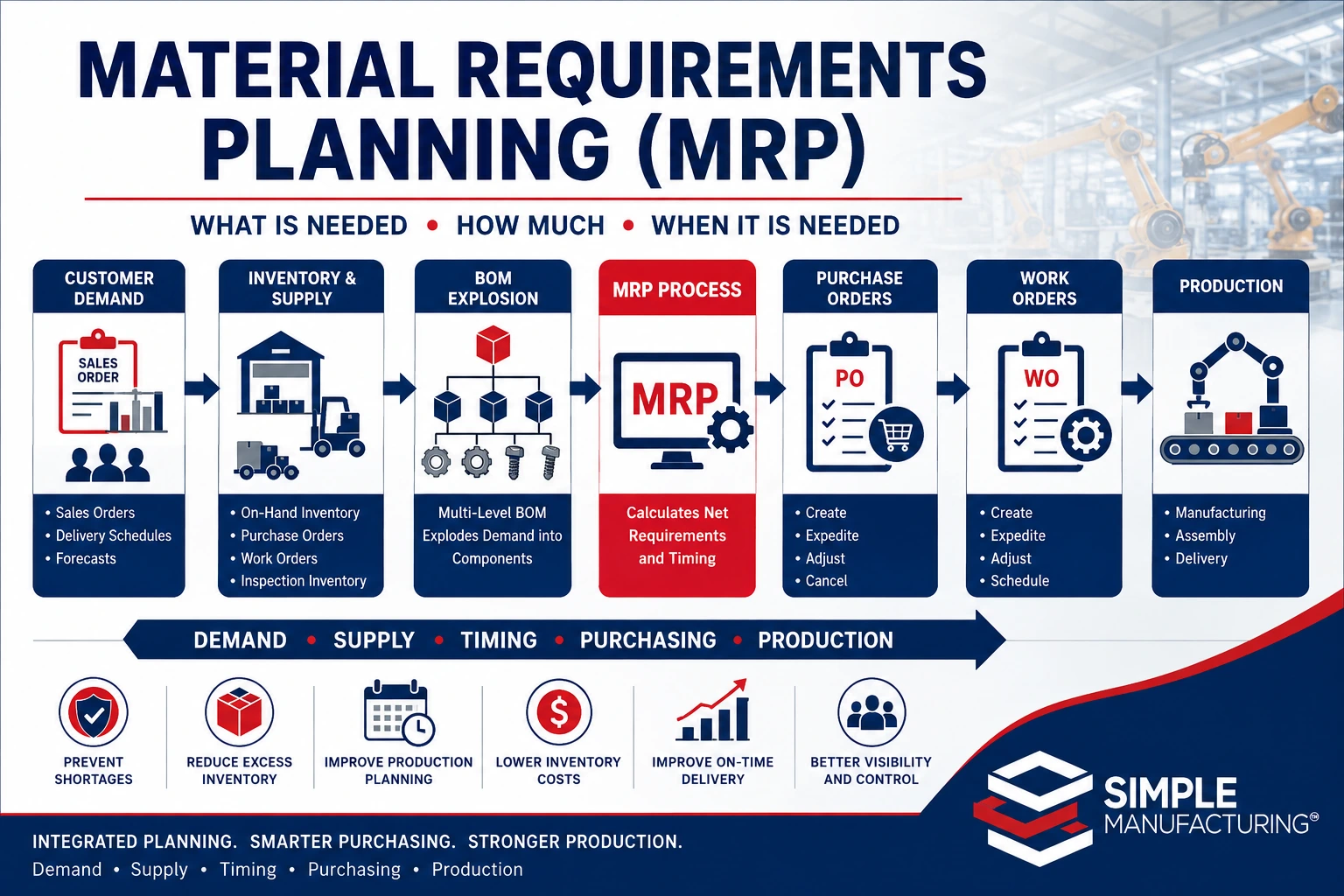
Material Requirements Planning converts customer demand and forecasts into time-phased purchasing, inventory, and manufacturing requirements.
What Is Material Requirements Planning?
Material Requirements Planning is a time-phased planning process that calculates the materials, subassemblies, and finished products required to satisfy expected demand.
MRP compares demand with:
- Available inventory
- Allocated inventory
- Inventory awaiting inspection
- Open Purchase Orders
- Open Work Orders
- Planned supply
- Safety stock
- Minimum order quantities
- Purchasing and manufacturing lead times
- Bill of Materials relationships
After evaluating demand and supply, MRP creates recommendations for purchasing materials, manufacturing products, expediting existing supply, postponing unneeded supply, or cancelling requirements that are no longer necessary.
MRP Is a Planning System
MRP does not physically purchase materials or manufacture products by itself. It provides the recommendations and dates that Purchasing, Production Planning, Inventory, and management use to coordinate supply.
Primary Objectives of MRP
Prevent Material Shortages
Identify missing material early enough for Purchasing or Production to respond before manufacturing is interrupted.
Reduce Excess Inventory
Purchase or manufacture supply according to time-phased demand instead of maintaining unnecessary quantities.
Improve Production Readiness
Coordinate materials, subassemblies, Work Orders, and outside processing with the production schedule.
Improve Purchasing Decisions
Provide buyers with required quantities, need dates, lead times, approved sources, and existing supply.
Improve Delivery Performance
Identify supply risks that may affect customer delivery commitments.
Provide Operational Visibility
Show how inventory and incoming supply will satisfy current and future demand.
The Three Questions MRP Answers
| MRP Question | Planning Meaning |
|---|---|
| What is required? | The finished products, subassemblies, raw materials, components, packaging, and outside services needed to satisfy demand. |
| How much is required? | The gross requirement reduced by eligible inventory and expected supply. |
| When is it required? | The date on which material or production must be available, considering lead time and operation timing. |
and Forecasts
Expected Supply
Lead-Time Analysis
Order Recommendations
Information Required by MRP
MRP results are only as reliable as the data used in the calculation.
| MRP Input | Purpose |
|---|---|
| Sales Orders | Create firm customer demand by product, quantity, and delivery date. |
| Delivery Schedules | Divide customer demand into required shipment quantities and dates. |
| Forecasts | Create expected future demand that may not yet be represented by firm orders. |
| Item Master | Provides make-or-buy status, lead time, units, planning rules, and sourcing information. |
| Bill of Materials | Defines the components and quantities required for each manufactured product. |
| Inventory | Provides current eligible quantities available to satisfy demand. |
| Inventory Allocations | Identifies inventory already reserved for another requirement. |
| Inspection Inventory | Identifies received material that may become available after acceptance. |
| Purchase Orders | Provide expected purchased quantities and delivery dates. |
| Work Orders | Provide expected manufactured quantities and completion dates. |
| Lead Times | Determine when purchasing or production actions must begin. |
| Safety Stock | Maintains a defined buffer quantity above projected demand. |
Sources of Manufacturing Demand
| Demand Source | Example |
|---|---|
| Customer Sales Order | A customer requires 100 assemblies by a specified delivery date. |
| Customer Delivery Schedule | A Sales Order requires 25 units monthly over four months. |
| Forecast | Expected future sales create planned demand before orders are received. |
| Work Order Component Demand | A released or planned Work Order requires BOM components. |
| Safety Stock | Inventory is planned to remain above a defined minimum level. |
| Internal Requirement | The business requires tooling, repair parts, demonstration units, or internal assemblies. |
| Service or Repair Demand | Maintenance or repair activity requires replacement components. |
Independent and Dependent Demand
MRP distinguishes between independent demand and dependent demand.
| Demand Type | Definition | Example |
|---|---|---|
| Independent Demand | Demand not calculated from another item within the BOM structure. | A customer order for a finished assembly. |
| Dependent Demand | Demand calculated from the requirements of a parent item. | Four fasteners required for each ordered assembly. |
A customer order for 100 finished assemblies creates independent demand for the finished product. If each assembly requires four fasteners, the BOM creates dependent demand for 400 fasteners before considering inventory, scrap, or other planning rules.
Bill of Materials Explosion
MRP uses the Bill of Materials to convert parent-item demand into component requirements.
Demand
Components
Subcomponents
Purchased Parts
| BOM Item | Quantity Per | Parent Demand | Gross Requirement |
|---|---|---|---|
| Finished Assembly | 1 | 100 | 100 |
| Subassembly A | 2 | 100 | 200 |
| Purchased Component B | 3 | 100 | 300 |
| Raw Material C | 4 | 200 Subassemblies | 800 |
Learn more in our Bill of Materials guide.
Gross Requirements and Net Requirements
Gross requirements represent total demand before available and expected supply are considered.
Net requirements represent the remaining demand after eligible supply is applied.
| Planning Element | Quantity |
|---|---|
| Gross Requirement | 500 |
| Available Inventory | 150 |
| Accepted Purchase Order Supply | 200 |
| Safety Stock Requirement | 50 |
| Net Additional Requirement | 200 |
Actual net-requirement logic may also consider allocations, inspection status, due dates, lot sizes, order multiples, minimum quantities, past-due supply, and planning policies.
Time-Phased Material Planning
MRP does more than calculate a total shortage. It determines when each requirement occurs and whether supply arrives in time to satisfy it.
| Date | Demand | Expected Supply | Projected Available |
|---|---|---|---|
| Beginning Balance | — | — | 300 |
| March 5 | 100 | — | 200 |
| March 12 | 150 | — | 50 |
| March 18 | 200 | 250 Purchase Order | 100 |
| March 25 | 175 | — | -75 |
The March 25 requirement creates a projected shortage even though the total inventory and Purchase Order supply appeared sufficient for earlier demand.
MRP must evaluate both quantity and timing. Supply that arrives after the requirement date does not prevent a production shortage.
Lead-Time Offsetting
After determining when an item is required, MRP works backward using lead time to recommend when the Purchase Order or Work Order should be released.
| Planning Event | Date |
|---|---|
| Component Required for Production | April 30 |
| Receiving and Inspection Allowance | 3 days |
| Supplier Lead Time | 20 days |
| Recommended Purchase Order Release | Approximately April 7 |
Lead-time calculations may include:
- Supplier lead time
- Manufacturing lead time
- Receiving time
- Inspection time
- Material-handling time
- Outside-processing time
- Queue time
- Setup and run time
- Transportation time
Make-or-Buy Planning
The Item Master identifies whether an item is normally purchased or manufactured.
| Supply Type | MRP Recommendation |
|---|---|
| Buy | Create, expedite, defer, increase, decrease, or cancel a Purchase Order. |
| Make | Create, expedite, defer, increase, decrease, or cancel a Work Order. |
| Phantom | Explode demand directly to the phantom item’s components. |
| Consigned or Customer-Owned | Plan quantity while observing ownership, availability, and valuation rules. |
| Service or Outside Processing | Create purchasing demand for the required operation or service. |
Learn more in our Item Master Data Management guide.
MRP Planning for Purchased Items
For purchased items, MRP evaluates available and expected supply before recommending a new Purchase Order.
A planning sequence may include:
- Apply eligible available inventory.
- Apply inventory awaiting inspection when its expected availability supports the need date.
- Apply open Purchase Order quantities in due-date order.
- Identify Purchase Orders that should be expedited.
- Identify Purchase Orders that may be postponed.
- Create a planned Purchase Order for uncovered demand.
| Purchase Recommendation | Meaning |
|---|---|
| Create | No existing supply covers the net requirement. |
| Expedite | An existing Purchase Order is scheduled after the material need date. |
| Defer | Supply is scheduled earlier than needed and may increase inventory unnecessarily. |
| Increase Quantity | An existing order can be adjusted to cover additional demand. |
| Decrease Quantity | Existing supply exceeds current projected requirements. |
| Cancel | The Purchase Order is no longer required, subject to supplier and contractual restrictions. |
MRP Planning for Manufactured Items
For Make items, MRP evaluates finished or subassembly inventory and existing Work Order supply.
A planning sequence may include:
- Apply eligible finished-goods or subassembly inventory.
- Apply inventory awaiting inspection when appropriate.
- Apply open Work Order quantities in completion-date order.
- Identify Work Orders that should be expedited.
- Identify Work Orders that can be deferred.
- Create a planned Work Order for uncovered demand.
- Explode planned Work Order demand into component requirements.
A planned Work Order may create additional dependent demand throughout multiple BOM levels.
Learn more in our Manufacturing Work Order Management guide.
How MRP Evaluates Inventory Availability
Recorded quantity on hand is not always equal to usable inventory.
| Inventory Status | Planning Treatment |
|---|---|
| Available | Can normally satisfy demand. |
| Allocated | Already reserved for another demand requirement. |
| Awaiting Inspection | May be considered expected supply rather than currently available inventory. |
| Quality Hold | Should not satisfy demand until released. |
| Rejected | Should not satisfy normal production demand. |
| Expired | Should not satisfy demand unless formally evaluated and released. |
| Customer-Owned | May be available only for the applicable customer or program. |
| Consigned | May be available subject to ownership and usage rules. |
| Location Restricted | May require transfer or may be unavailable to the requesting site. |
Incorrect Availability Creates Incorrect MRP Results
Treating held, allocated, expired, rejected, or customer-restricted inventory as generally available can hide real material shortages.
Inventory Allocations and MRP
Inventory allocation reserves available material for specific demand.
Allocations help MRP and production planning determine:
- Which inventory is already committed
- Which Work Orders are materially ready
- Which customer orders have priority
- Which shortages remain uncovered
- Whether available inventory can be reassigned
- Whether purchasing or production should be expedited
MRP should avoid applying the same inventory quantity to multiple requirements.
Safety Stock and Reorder Policies
Safety stock is inventory maintained above expected demand to reduce the risk of shortages caused by variability.
Variability may result from:
- Supplier delivery delays
- Unexpected customer demand
- Production scrap
- Inventory inaccuracies
- Long or unstable lead times
- Quality rejections
- Demand fluctuations
| Planning Rule | Purpose |
|---|---|
| Safety Stock | Maintains a defined inventory buffer. |
| Reorder Point | Initiates replenishment when inventory reaches a specified level. |
| Minimum Order Quantity | Prevents recommendations below a supplier or production minimum. |
| Order Multiple | Rounds recommendations to package, batch, reel, lot, or production multiples. |
| Maximum Inventory | Limits replenishment that would create excessive stock. |
Lot Sizing and Order Quantities
The net requirement does not always become the exact recommended order quantity.
MRP may adjust quantities according to:
- Minimum purchase quantity
- Supplier package quantity
- Order multiple
- Economic order quantity
- Production batch size
- Maximum order quantity
- Fixed lot size
- Lot-for-lot planning
- Yield or scrap allowance
| Net Requirement | Planning Rule | Recommended Quantity |
|---|---|---|
| 73 | Lot-for-lot | 73 |
| 73 | Order multiple of 25 | 75 |
| 73 | Minimum buy of 100 | 100 |
| 230 | Fixed production batch of 100 | 300 |
Past-Due Purchase Orders and Work Orders
Open supply with a due date in the past should be evaluated carefully.
A past-due order may:
- Still be expected and available shortly
- Require supplier confirmation
- Require production-status confirmation
- Need a revised due date
- Need to be expedited
- Need to be cancelled or replaced
- Be complete operationally but not closed in the ERP system
Past-Due Supply Can Hide Future Shortages
MRP should not assume that an old open order will automatically arrive in time. Buyers and planners should confirm realistic supply dates.
MRP Pegging and Demand Traceability
Pegging connects a material or production requirement with the demand that created it.
Order
Requirement
Requirement
Requirement
Pegging allows users to determine:
- Which customer order created a requirement
- Which parent item requires the component
- Which Work Order will consume the material
- Which Purchase Order or Work Order will provide supply
- Which delivery date is at risk
- Whether demand is firm, forecasted, or safety stock
Without pegging, a buyer may see a shortage but not understand which customer, product, Work Order, or delivery will be affected.
Demand Priorities and Allocation Decisions
When supply is insufficient, manufacturers must determine which demand receives available inventory first.
Priority may be based on:
- Customer commitment date
- Order priority
- Customer importance
- Contract requirement
- Work Order release status
- Production sequence
- Material expiration
- Revenue impact
- Critical product or service requirement
The ERP system should make allocation decisions visible and preserve an audit history when inventory is reassigned.
How MRP Improves Purchasing
MRP gives buyers a consolidated view of future material requirements and existing supply.
Purchasing recommendations may provide:
- Internal part number
- Manufacturer part number
- Approved suppliers
- Supplier part numbers
- Quantity required
- Recommended order quantity
- Required receipt date
- Recommended order date
- Current inventory
- Open Purchase Order supply
- Demand source
- Supplier lead time
- Minimum buy and order multiple
- Historical pricing
Fewer Emergency Purchases
Buyers receive earlier visibility into material requirements and expected shortages.
Lower Excess Inventory
Purchase quantities can be aligned with time-phased requirements.
Improved Supplier Communication
Required quantities and dates provide clearer information for supplier scheduling.
Better Expediting Decisions
Buyers can focus on supply that directly affects production and customer commitments.
Learn more in our Purchase Order Management guide.
How MRP Improves Production Planning
MRP identifies manufactured items that must be created and the dates by which they are required.
Production planners can use MRP to:
- Create planned Work Orders
- Release Work Orders when materials are available
- Prioritize production based on demand dates
- Coordinate parent and component Work Orders
- Identify capacity risks
- Plan outside processing
- Evaluate make-or-buy decisions
- Reschedule existing Work Orders
- Reduce unneeded production
MRP and Scheduling Are Related but Different
MRP determines what supply is required and when it is needed. Production scheduling determines how operations are assigned to work centers, machines, employees, and specific time periods.
Learn more in our Manufacturing Production Scheduling guide.
How MRP Improves Inventory Management
MRP provides future visibility that cannot be obtained from a simple quantity-on-hand report.
Inventory teams can review:
- Current on-hand quantity
- Available quantity
- Allocated quantity
- Inspection quantity
- Expected Purchase Order supply
- Expected Work Order supply
- Future demand
- Projected available balance
- Shortage date
- Excess or stagnant inventory
This helps reduce unnecessary purchases while protecting production from shortages.
Learn more in our Manufacturing Inventory Management guide.
MRP and Demand Forecasting
Forecasts allow manufacturers to plan expected demand before firm customer orders are received.
Forecast planning should define:
- Forecast item
- Forecast quantity
- Forecast period
- Customer or market relationship
- Consumption by actual Sales Orders
- Confidence or planning category
- Review and expiration rules
Avoid Double-Counting Forecast and Firm Orders
When actual customer orders represent demand already included in the forecast, the forecast should be consumed or reduced according to the organization’s planning policy.
MRP and Production Capacity
Traditional MRP focuses primarily on material availability. A complete production plan must also consider capacity.
Capacity constraints may involve:
- Work-center hours
- Machine availability
- Qualified employees
- Tooling and fixtures
- Inspection equipment
- Outside-processing capacity
- Maintenance downtime
- Setup requirements
| Planning Question | System Function |
|---|---|
| Do we have the required materials? | MRP |
| Do we have enough labor and machine capacity? | Capacity planning |
| Which operation should run on which resource and when? | Production scheduling |
| What actually happened on the shop floor? | Manufacturing execution and labor reporting |
Typical MRP Run Process
Data
and Supply
Requirements
Balances
Recommendations
Validate Planning Data
Review Item Master records, BOMs, lead times, units of measure, inventory statuses, and open-order dates.
Collect Demand
Gather Sales Orders, delivery schedules, forecasts, safety stock, Work Order requirements, and other demand.
Collect Supply
Gather available inventory, inspection inventory, Purchase Orders, Work Orders, and planned supply.
Explode Bills of Materials
Convert manufactured-item requirements into dependent demand for components and subassemblies.
Calculate Projected Balances
Apply supply to demand in date order and identify projected shortages or excess quantities.
Create Recommendations
Recommend new Purchase Orders and Work Orders, plus changes to existing supply.
Planner Review
A planner evaluates exceptions, priorities, feasibility, supplier constraints, and capacity before releasing actions.
MRP Exception Messages
Exception messages focus attention on supply requiring action.
| Exception | Meaning |
|---|---|
| Create Purchase Order | Purchased supply is required and no existing order covers the requirement. |
| Create Work Order | Manufactured supply is required and no existing order covers the requirement. |
| Expedite | Existing supply arrives after the need date. |
| Defer | Existing supply arrives earlier than necessary. |
| Increase Quantity | Existing supply does not cover total projected demand. |
| Decrease Quantity | Existing supply exceeds expected demand. |
| Cancel | Existing supply is no longer required. |
| Past Due | Supply or demand date has passed without completion. |
| Invalid BOM or Lead Time | Required planning data is missing or inconsistent. |
Why MRP Recommendations Require Planner Review
MRP recommendations are calculated from system data and planning rules. A knowledgeable buyer or planner should review them before creating or changing orders.
Planner review may consider:
- Supplier capacity
- Contractual purchase commitments
- Customer priority
- Alternate components
- Engineering changes
- Quality holds
- Minimum supplier charges
- Economic purchasing opportunities
- Work-center capacity
- Outside-processing availability
- Inventory accuracy
- Unrecorded operational changes
MRP provides structured recommendations; planners apply business judgment, current supplier information, and operational knowledge.
MRP Data Accuracy Requirements
Poor data creates unreliable recommendations.
| Data Problem | Possible MRP Result |
|---|---|
| Incorrect Inventory Quantity | False shortage or hidden shortage. |
| Incorrect BOM Quantity | Components are overplanned or underplanned. |
| Missing BOM Component | Required material is never recommended. |
| Incorrect Make-or-Buy Status | MRP recommends the wrong supply type. |
| Incorrect Lead Time | Orders are recommended too early or too late. |
| Old Open Purchase Order | MRP assumes nonexistent supply is available. |
| Old Open Work Order | MRP assumes unfinished production will cover demand. |
| Incorrect Unit Conversion | Order and inventory quantities become inaccurate. |
| Obsolete Item Remains Active | MRP recommends unsupported material. |
Material Requirements Planning Best Practices
- Maintain accurate Item Master data.
- Use current approved Bills of Materials.
- Maintain realistic purchasing and manufacturing lead times.
- Record every inventory transaction promptly.
- Separate available, allocated, inspection, held, rejected, and customer-owned inventory.
- Close completed Purchase Orders and Work Orders.
- Update expected supply dates when schedules change.
- Review past-due supply before each planning run.
- Maintain correct make-or-buy classifications.
- Validate units of measure and conversion factors.
- Use appropriate safety stock rather than excessive informal buffers.
- Maintain minimum quantities and order multiples.
- Prevent forecast and Sales Order demand from being double counted.
- Use pegging to identify the source of requirements.
- Review MRP recommendations before release.
- Coordinate MRP with production capacity and scheduling.
- Measure supplier delivery performance.
- Use cycle counting to improve inventory accuracy.
- Monitor shortage and expediting trends.
- Re-run MRP after significant demand or supply changes.
Common MRP Problems
| Problem | Possible Result | Better Control |
|---|---|---|
| Planning from Spreadsheets | Demand, inventory, and supply become outdated and disconnected. | Use live ERP demand and inventory data. |
| MRP Run Too Infrequently | New shortages and schedule changes are missed. | Run planning at an interval appropriate to business activity. |
| Every Recommendation Automatically Released | Unnecessary or unrealistic orders are created. | Use planner review and approval. |
| Inventory Accuracy Is Poor | Recommendations cannot be trusted. | Use controlled transactions and cycle counting. |
| Lead Times Are Static | Order dates do not reflect actual supplier or production performance. | Review historical and current lead times. |
| Capacity Is Ignored | Material may be available even though production cannot meet the schedule. | Integrate MRP with capacity planning and scheduling. |
| No Demand Pegging | Buyers and planners cannot identify which customer or order is affected. | Maintain demand-to-supply relationships. |
| Obsolete Supply Remains Open | MRP underestimates new supply requirements. | Reconcile and close invalid orders. |
MRP and Planning KPIs
| KPI | What It Measures |
|---|---|
| Material Availability | Percentage of released Work Orders with required material available. |
| Shortage Rate | Frequency of material shortages affecting production. |
| Expedite Rate | Frequency of emergency purchasing or production action. |
| Supplier On-Time Delivery | Supplier performance against confirmed due dates. |
| Purchase Recommendation Accuracy | How closely recommendations align with actual requirements. |
| Work Order Recommendation Accuracy | How closely planned production aligns with actual demand. |
| Inventory Turnover | How efficiently inventory investment supports sales and production. |
| Excess Inventory | Inventory exceeding current and projected demand. |
| Schedule Adherence | Production completion compared with planned dates. |
| Planning Lead-Time Accuracy | Planned lead times compared with actual performance. |
| Past-Due Supply | Open Purchase Orders and Work Orders with expired due dates. |
| Inventory Accuracy | Recorded quantity compared with verified physical quantity. |
Why Accounting Software Is Not a Complete MRP System
Accounting software is designed primarily to manage financial transactions. It may record inventory purchases and sales without providing the production-planning logic required by manufacturers.
| Manufacturing Requirement | Typical Accounting Software Limitation |
|---|---|
| Multi-Level BOM Explosion | Component demand may not be calculated through product structures. |
| Work Order Planning | Manufactured supply may not be time-phased. |
| Inventory Allocations | Available inventory may not reflect production commitments. |
| Projected Availability | Future demand and supply may not be compared by date. |
| Material Pegging | Shortages may not be connected to customers and parent orders. |
| Production Scheduling | Work-center, machine, and operation capacity may not be managed. |
| Lot and Serial Genealogy | Material-to-finished-product relationships may be incomplete. |
Manufacturers often compensate with spreadsheets, but disconnected spreadsheets become difficult to maintain as products, customers, BOM levels, suppliers, orders, and inventory transactions increase.
MRP vs. Manufacturing ERP
| System | Primary Scope |
|---|---|
| MRP | Plans materials and manufactured supply based on time-phased demand. |
| MRP II | Extends planning to capacity, labor, machines, schedules, and manufacturing resources. |
| Manufacturing ERP | Integrates MRP with customer orders, purchasing, inventory, Work Orders, quality, shipping, costing, and accounting. |
MRP is a critical manufacturing ERP function, but ERP provides the transactions and business processes that create and execute the MRP plan.
How MRP Integrates with Manufacturing ERP
| ERP Process | MRP Relationship |
|---|---|
| Customer Orders | Create firm demand and delivery requirements. |
| Forecasting | Creates expected future demand. |
| Item Master | Provides make-or-buy, lead-time, UOM, lot-size, and sourcing rules. |
| Bill of Materials | Creates dependent component demand. |
| Inventory | Provides available, allocated, inspection, held, and expected quantities. |
| Purchasing | Executes Purchase Order recommendations. |
| Work Orders | Execute manufactured-supply recommendations. |
| Production Scheduling | Assigns planned operations to resources and dates. |
| Shop Floor Reporting | Updates actual operation progress and Work Order completion. |
| Quality Management | Controls inspection availability, holds, rejections, and accepted supply. |
| Shipping | Consumes finished-product supply and fulfills customer demand. |
| Costing | Provides purchase, inventory, labor, and production cost information. |
Material Requirements Planning with SimpleManufacturing™
SimpleManufacturing™ connects MRP with customer orders, delivery schedules, Item Master data, Bills of Materials, inventory, receiving inspection, Purchase Orders, Work Orders, production scheduling, quality management, and purchasing.
| SimpleManufacturing™ MRP Capability | Business Benefit |
|---|---|
| Customer Demand Planning | Uses Sales Orders and delivery schedules to establish required quantities and dates. |
| Multi-Level BOM Explosion | Calculates dependent demand for assemblies, subassemblies, and purchased components. |
| Inventory Availability | Evaluates eligible inventory while distinguishing allocations and restricted statuses. |
| Inspection Supply | Identifies received material awaiting acceptance as expected supply. |
| Purchase Order Supply | Applies incoming purchased quantities by scheduled receipt date. |
| Work Order Supply | Applies manufactured quantities by planned completion date. |
| BUY Item Recommendations | Creates and adjusts planned purchasing requirements. |
| MAKE Item Recommendations | Creates and adjusts planned manufacturing requirements. |
| Expedite and Defer Recommendations | Identifies supply scheduled too late or earlier than necessary. |
| Demand Pegging | Connects each requirement with its customer, parent item, Work Order, or planning source. |
| Planning Dates | Calculates required supply and release dates using lead times. |
| Integrated Purchasing | Allows approved recommendations to become Purchase Orders. |
| Integrated Work Orders | Allows approved MAKE recommendations to become controlled production orders. |
| Production Visibility | Connects planned supply with scheduling, shop-floor status, shortages, and completion. |
One Planning Process from Customer Demand Through Supply
SimpleManufacturing™ uses live ERP information to show how existing inventory, inspection quantities, Purchase Orders, and Work Orders will satisfy demand—and which purchasing or manufacturing actions remain necessary.
Frequently Asked Questions About Material Requirements Planning
What does MRP stand for?
MRP stands for Material Requirements Planning.
What is MRP in manufacturing?
MRP is the process used to calculate which purchased and manufactured items are required, how many are needed, and when supply must become available.
What are the three main questions answered by MRP?
MRP determines what materials are required, how many are required, and when they are required.
What information does MRP use?
MRP commonly uses Sales Orders, forecasts, Bills of Materials, inventory, allocations, Purchase Orders, Work Orders, lead times, safety stock, and planning rules.
What is BOM explosion?
BOM explosion converts demand for a parent manufactured item into requirements for its subassemblies, materials, and purchased components.
What is a gross material requirement?
A gross requirement is the total demand before inventory and expected supply are applied.
What is a net material requirement?
A net requirement is the remaining demand after eligible inventory and expected supply are considered.
What is independent demand?
Independent demand originates outside the BOM relationship, such as a customer order or forecast for a finished product.
What is dependent demand?
Dependent demand is calculated from the quantity required by a parent item’s Bill of Materials.
How does MRP use inventory?
MRP applies eligible inventory to time-phased demand while considering allocations, inspection status, quality holds, ownership, expiration, and other restrictions.
How does MRP use Purchase Orders?
Open Purchase Order quantities are treated as expected supply according to their confirmed receipt dates.
How does MRP use Work Orders?
Open Work Order quantities are treated as expected manufactured supply according to their planned completion dates.
What is MRP pegging?
Pegging connects a material or supply requirement with the customer order, forecast, parent item, Work Order, or other demand source that created it.
What is an expedite recommendation?
It indicates that existing supply is expected after the requirement date and may need an earlier delivery or completion date.
What is a defer recommendation?
It indicates that existing supply is scheduled earlier than necessary and may be postponed to reduce excess inventory.
What is lead-time offsetting?
Lead-time offsetting works backward from the required date to determine when purchasing or manufacturing should begin.
Does MRP create Purchase Orders automatically?
MRP can generate planned purchasing recommendations. Many organizations require buyer review and approval before converting recommendations into Purchase Orders.
Does MRP create Work Orders automatically?
MRP can generate planned Work Order recommendations. Production planners normally review material, capacity, priority, and scheduling before release.
What is the difference between MRP and production scheduling?
MRP determines which supply is needed and when. Production scheduling assigns Work Order operations to resources and specific times.
What is the difference between MRP and ERP?
MRP plans materials and manufactured supply. Manufacturing ERP integrates MRP with customer orders, purchasing, inventory, production, quality, shipping, costing, and accounting.
Why does MRP produce incorrect results?
Incorrect inventory, BOMs, lead times, units of measure, order dates, make-or-buy settings, or open-order statuses can create unreliable recommendations.
How often should MRP be run?
The appropriate frequency depends on order volume, production activity, lead times, schedule changes, and operational requirements. Many manufacturers run MRP daily or after significant demand or supply changes.
How does SimpleManufacturing™ perform MRP?
SimpleManufacturing™ evaluates Sales Order demand, Bills of Materials, available and inspection inventory, Purchase Orders, Work Orders, lead times, and planning rules to create BUY and MAKE recommendations with demand pegging.
Plan Materials and Production Before Shortages Occur
Material Requirements Planning provides manufacturers with a structured method for balancing customer demand, inventory, incoming supply, Bills of Materials, purchasing lead times, and production requirements.
Instead of reacting to shortages after production stops, MRP identifies potential supply problems early and recommends the actions needed to protect manufacturing schedules and customer delivery commitments.
Demand, Supply, Timing, and Traceability in One Plan
An integrated MRP system helps manufacturers reduce shortages, control inventory investment, improve purchasing, coordinate Work Orders, and understand which customers and products are affected by every material requirement.
SimpleManufacturing™ provides integrated MRP designed for small and mid-sized manufacturers that require live Sales Order demand, multi-level BOM explosion, inventory visibility, Purchase Order and Work Order supply, lead-time planning, demand pegging, and actionable BUY and MAKE recommendations.