
Manufacturing Work Orders in ERP Software: Purpose, Process, and Benefits
A manufacturing Work Order is the controlled production record used to define what must be manufactured, how many units are required, which materials and operations are needed, when production is due, and how labor, inventory, quality, traceability, and cost will be recorded.
Work Orders are an integral part of manufacturing ERP software because they connect planning with shop-floor execution. They convert customer demand, forecasts, inventory requirements, or internal production needs into structured manufacturing activity.
An integrated Work Order provides one operational record connecting the Item Master, Bill of Materials, manufacturing routing, material availability, production scheduling, employees, equipment, quality requirements, inventory transactions, actual cost, and completed finished goods.
The Work Order is the central production record that coordinates what will be built, which resources will be used, how production will be completed, and how the resulting inventory, traceability, and manufacturing cost will be recorded.
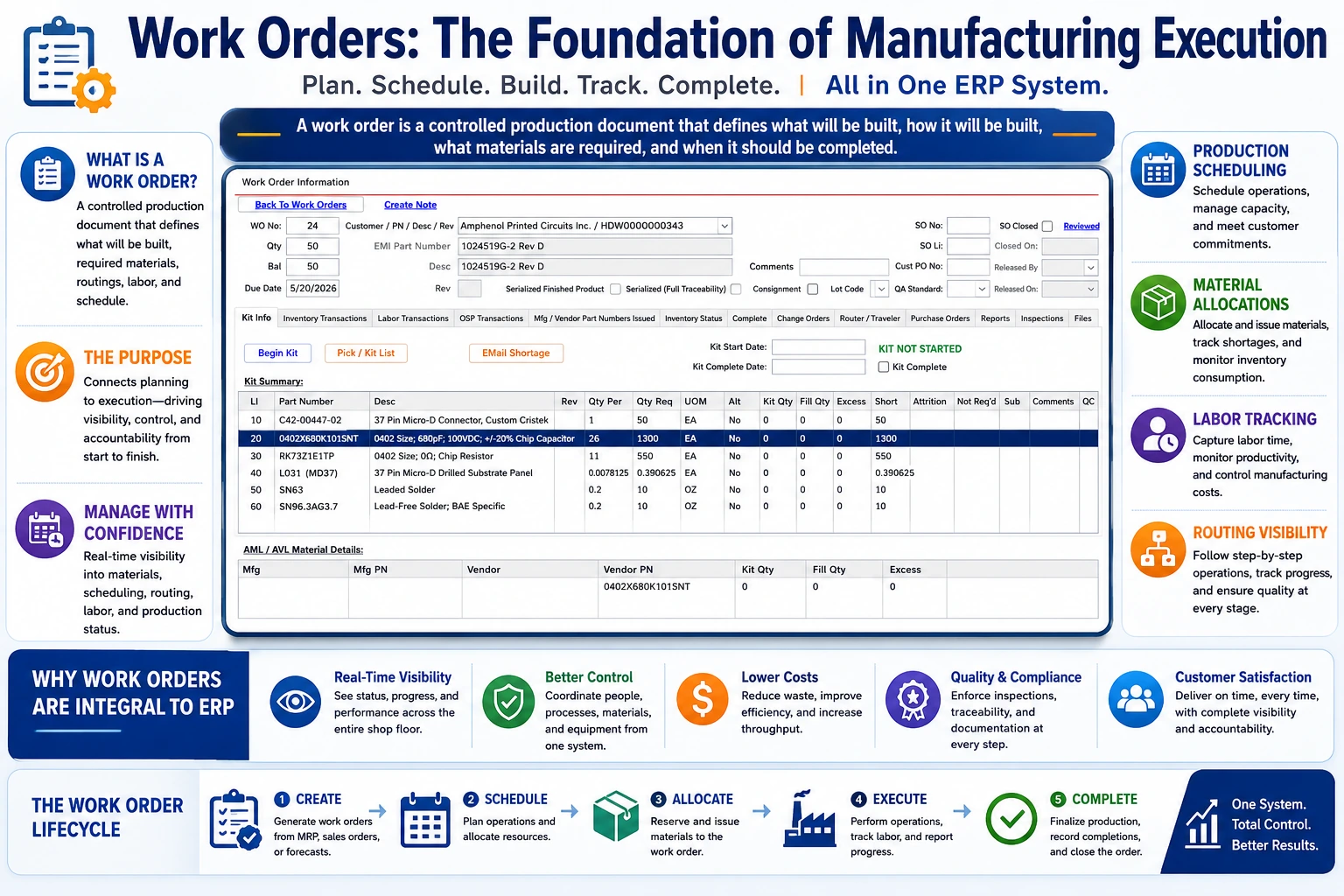
Manufacturing Work Orders connect production demand with materials, routing operations, labor, quality, finished-goods inventory, traceability, and actual manufacturing cost.
What Is a Manufacturing Work Order?
A manufacturing Work Order is an authorization and instruction to perform a defined production activity. It identifies the product being manufactured and establishes the operational structure required to complete it.
Depending on the organization, a Work Order may also be called a:
- Production Order
- Manufacturing Order
- Shop Order
- Job Order
- Production Job
- Service Order
- Repair Order
- Rework Order
Work Orders may be used to:
- Manufacture a finished product
- Build a subassembly
- Replenish finished-goods inventory
- Manufacture against a customer Sales Order
- Perform repair or rework
- Complete an engineering prototype
- Perform customer-owned material processing
- Complete an internal maintenance or service activity
Work Orders Control More Than Quantity
A Work Order does not simply tell production how many units to make. It also defines the applicable product revision, material requirements, routing operations, quality controls, required documents, traceability, timing, and cost-collection structure.
Why Work Orders Are Essential in Manufacturing ERP
Manufacturing depends on coordinated decisions involving customer demand, materials, labor, machines, suppliers, quality, inventory, shipping, and accounting. The Work Order brings those decisions together in one controlled production record.
Production Authorization
The Work Order formally identifies what production is approved and prevents unauthorized or undocumented manufacturing.
Material Control
It identifies required materials, allocations, shortages, issues, substitutions, returns, scrap, and actual consumption.
Routing Control
It establishes the required sequence of manufacturing, inspection, outside-processing, and completion operations.
Labor Collection
Employees can record setup, production, inspection, rework, and other labor against the applicable operation.
Production Visibility
Supervisors can monitor status, completed quantities, remaining work, bottlenecks, shortages, and due dates.
Product Traceability
The Work Order connects purchased materials, inventory lots, employees, operations, inspections, finished products, and shipments.
Actual Costing
Material, labor, outside processing, machine burden, overhead, and scrap can be accumulated against the production record.
Finished-Goods Creation
Completion converts accepted production into finished-goods inventory with quantity, cost, lot, serial, and genealogy information.
The Manufacturing Work Order Lifecycle
or Inventory Demand
Planning
Created
Routing Released
Inspection
Completed
| Lifecycle Stage | Primary Activity |
|---|---|
| Demand Identified | A customer order, forecast, shortage, replenishment rule, or internal requirement creates production demand. |
| Work Order Planned | Quantity, due date, product revision, BOM, routing, and supply requirements are evaluated. |
| Work Order Created | The production record and required relationships are established. |
| Work Order Released | Production is authorized and required materials, instructions, and operations become available. |
| Materials Allocated | Inventory is reserved, picked, staged, or issued. |
| Operations Performed | Employees report labor, machine activity, quantities, scrap, and progress. |
| Inspections Completed | Required receiving, first-piece, in-process, and final inspections are recorded. |
| Work Order Completed | Accepted quantity becomes finished-goods inventory. |
| Work Order Closed | Remaining materials, transactions, costs, documentation, and exceptions are reconciled. |
What Creates a Work Order?
A Work Order may be created from several types of manufacturing demand.
| Demand Source | Example |
|---|---|
| Customer Sales Order | A customer orders a specific product, quantity, revision, and delivery date. |
| Material Requirements Planning | MRP determines that manufactured supply is needed to satisfy current or projected demand. |
| Inventory Replenishment | Finished-goods or subassembly inventory falls below a defined planning level. |
| Forecast | Expected future demand justifies production before firm customer orders arrive. |
| Repair or Rework | A product requires correction, repair, modification, or return processing. |
| Engineering Prototype | Engineering authorizes a controlled build for evaluation or qualification. |
| Internal Requirement | The company needs tooling, fixtures, maintenance parts, or internal-use products. |
Information Managed by a Work Order
| Work Order Information | Purpose |
|---|---|
| Work Order Number | Provides a unique production reference. |
| Product Part Number | Identifies what is being manufactured. |
| Product Revision | Controls the applicable configuration. |
| Description | Provides a recognizable product description. |
| Quantity Required | Defines planned production quantity. |
| Quantity Completed | Records accepted finished quantity. |
| Quantity Scrapped | Records production loss. |
| Start and Due Dates | Supports production scheduling and customer commitments. |
| Customer Order | Connects production with customer demand. |
| Bill of Materials | Defines required components and quantities. |
| Routing | Defines required production and inspection operations. |
| Priority | Supports scheduling and dispatch decisions. |
| Lot or Serial Requirement | Defines product-level traceability. |
| Quality Requirements | Defines inspections, documentation, certifications, and acceptance criteria. |
| Status | Identifies whether the order is planned, released, in process, completed, on hold, or closed. |
Item Master Integration
The Item Master provides the product definition used to create the Work Order.
The Work Order may inherit:
- Internal part number
- Description
- Revision
- Make-or-buy classification
- Inventory stage
- Unit of measure
- Bill of Materials
- Manufacturing routing
- Lot-control requirements
- Serialization requirements
- Quality and inspection requirements
- Required documents
- Finished-goods inventory account
- Work-in-Process account
- Cost-of-Goods-Sold account
Learn more in our Item Master Data Management guide.
Bill of Materials Integration
The Bill of Materials defines the raw materials, purchased components, subassemblies, packaging, and other items required to manufacture the product.
Item
Materials
Requirements
and Consumption
The Work Order material list may identify:
- Component part number and revision
- Quantity per assembly
- Total planned quantity
- Unit of measure
- Required operation
- Approved manufacturer or alternate
- Inventory available
- Quantity allocated
- Quantity issued
- Quantity returned
- Quantity scrapped
- Lot or serial number consumed
- Actual material cost
Learn more in our Bill of Materials guide.
Material Requirements Planning and Work Orders
MRP compares manufacturing demand with available inventory, inspection inventory, open Purchase Orders, open Work Orders, Bills of Materials, and lead times.
For manufactured items, MRP can recommend:
- Creating a new Work Order
- Increasing or decreasing production quantity
- Expediting a Work Order
- Deferring a Work Order
- Changing the planned completion date
- Releasing planned production
- Cancelling unneeded production
MRP determines what manufactured supply is needed; the Work Order controls how that supply is produced.
Learn more in our Material Requirements Planning guide.
Material Allocation and Reservation
Material allocation reserves available inventory for the Work Order without necessarily removing it from its current inventory location.
Allocation helps manufacturers:
- Protect inventory for priority production
- Identify uncovered shortages
- Prevent the same quantity from being promised to multiple jobs
- Prepare material-picking lists
- Schedule production based on material readiness
- Track customer-owned or consigned material
| Material Quantity | Meaning |
|---|---|
| Required | Total material calculated from the BOM and Work Order quantity. |
| Available | Eligible inventory that may be used. |
| Allocated | Inventory reserved for the Work Order. |
| Issued | Inventory physically and financially transferred into production. |
| Consumed | Material used during manufacturing. |
| Returned | Unused material transferred back into available inventory. |
| Short | Required quantity not covered by available or expected supply. |
Work Order Kitting
Kitting collects and prepares the materials required for production.
A controlled kitting process may include:
- Reviewing the Work Order material list
- Confirming current product revision
- Verifying available quantities
- Selecting eligible FIFO inventory layers
- Verifying lots, serial numbers, expiration dates, and customer ownership
- Picking material from approved locations
- Recording actual quantities
- Identifying shortages
- Staging material for production
- Issuing material to the Work Order
Automated Kitting Improves Control
ERP software can compare BOM requirements with eligible inventory and create controlled material transactions instead of relying on handwritten pick lists and unrecorded shop-floor movement.
FIFO Material Issues
When material is issued to production, SimpleManufacturing™ can consume eligible inventory from the oldest FIFO cost layers first.
| FIFO Layer | Available Quantity | Quantity Issued | Unit Cost |
|---|---|---|---|
| Layer 1001 | 100 | 100 | $4.82 |
| Layer 1002 | 150 | 80 | $4.95 |
| Total | 250 | 180 | Actual layer costs |
Each material issue can preserve:
- FIFO inventory layer
- Original Purchase Order
- Supplier
- Receipt date
- Lot or serial number
- Quantity issued
- Actual unit cost
- Extended material cost
- Work Order
Learn more in our FIFO Inventory Costing guide.
Material Shortage Visibility
A Work Order should identify shortages before production is released or reaches the affected operation.
| Shortage Information | Business Use |
|---|---|
| Required Quantity | Defines total production demand. |
| Available Quantity | Shows current eligible inventory. |
| Allocated Quantity | Shows inventory already reserved. |
| Purchase Order Supply | Shows expected purchased material. |
| Work Order Supply | Shows expected manufactured components. |
| Expected Date | Indicates when missing supply may become available. |
| Short Quantity | Identifies uncovered demand. |
| Affected Operation | Indicates when the material is required during production. |
On-Hand Inventory Does Not Always Mean Available Inventory
Material may be allocated to another order, awaiting inspection, expired, on quality hold, customer-owned, or otherwise unavailable for the selected Work Order.
Manufacturing Routing Integration
The manufacturing routing defines the sequence of operations required to complete the product.
Routing operations may include:
- Material preparation
- Setup
- Machining
- Fabrication
- Assembly
- Welding
- Programming
- Testing
- Inspection
- Outside processing
- Packaging
- Final acceptance
| Routing Field | Purpose |
|---|---|
| Operation Number | Defines sequence. |
| Operation Description | Explains the required activity. |
| Work Center | Identifies the department, machine group, or resource. |
| Setup Time | Defines expected preparation time. |
| Run Time | Defines expected production time. |
| Labor Requirement | Identifies the employee skill or labor category. |
| Machine Requirement | Identifies required equipment. |
| Inspection Requirement | Defines required quality verification. |
| Outside Processing | Identifies work performed by a supplier. |
| Document Requirement | Provides drawings, instructions, programs, and specifications. |
Operation Sequencing and Production Control
Routing sequences ensure that operations occur in the intended order.
Preparation
Inspection
Processing
Final Inspection
Sequence control can prevent production from moving forward when:
- A prior operation is incomplete
- Required inspection has not been accepted
- Material has not been issued
- Required documentation is unavailable
- Outside processing has not been received
- The Work Order is on hold
- An employee lacks required qualification
- Required equipment is unavailable or out of calibration
Production Scheduling Integration
Work Orders provide the demand that production scheduling assigns to work centers, employees, machines, and dates.
Scheduling may consider:
- Work Order priority
- Customer due date
- Operation sequence
- Setup and run time
- Work-center capacity
- Employee availability
- Machine availability
- Material readiness
- Outside-processing lead time
- Inspection requirements
- Existing schedule commitments
- Planned maintenance
| Scheduling View | Business Purpose |
|---|---|
| Work Order Schedule | Shows planned start, completion, and due dates. |
| Work Center Schedule | Shows operations assigned to each department or resource. |
| Machine Schedule | Shows planned usage and available capacity by equipment. |
| Employee Schedule | Shows labor assignments and qualification requirements. |
| Shortage Schedule | Shows jobs blocked by unavailable material. |
| Outside Processing Schedule | Shows supplier operations, shipment dates, and expected returns. |
Learn more in our Manufacturing Production Scheduling guide.
Work Center and Machine Control
Each routing operation can be assigned to a work center, machine, department, or external supplier.
Work-center information may include:
- Available production hours
- Number of machines
- Employee skills
- Setup capacity
- Machine rate
- Labor rate
- Burden or overhead rate
- Planned maintenance
- Current queue
- Open operations
- Historical performance
This information helps management evaluate capacity, bottlenecks, utilization, and schedule feasibility.
Labor Tracking by Work Order Operation
Employees can record time against the exact Work Order and routing operation being performed.
Labor transactions may include:
- Employee
- Work Order
- Operation
- Setup time
- Production time
- Inspection time
- Rework time
- Indirect time
- Quantity completed
- Quantity rejected
- Start and stop time
- Labor rate
- Extended labor cost
| Operation | Hours | Hourly Rate | Labor Cost |
|---|---|---|---|
| Setup | 1.50 | $32.00 | $48.00 |
| CNC Machining | 3.25 | $30.50 | $99.13 |
| Assembly | 2.00 | $24.00 | $48.00 |
| Final Inspection | 0.75 | $35.00 | $26.25 |
Learn more in our Employee Time Tracking guide.
Shop-Floor Reporting
Shop-floor employees need a simple method to review assigned work and report production activity.
A shop-floor interface may allow employees to:
- View assigned operations
- Review product and revision
- Access drawings and instructions
- Review required materials
- Start and stop labor
- Report setup completion
- Report completed quantity
- Report scrap or defects
- Record lot and serial information
- Request material
- Record machine use
- Complete inspection tasks
- Transfer production to the next operation
Real-time shop-floor reporting keeps Work Order status current without requiring supervisors to reconstruct production activity from handwritten travelers at the end of the shift.
Learn more in our Shop Floor Tracking guide.
Production Quantity Reporting
| Quantity | Meaning |
|---|---|
| Planned Quantity | Total quantity authorized for production. |
| Started Quantity | Quantity introduced into the manufacturing process. |
| Completed Quantity | Quantity completing the current operation. |
| Accepted Quantity | Quantity meeting applicable requirements. |
| Rejected Quantity | Quantity failing inspection or testing. |
| Scrapped Quantity | Quantity permanently removed from usable production. |
| Rework Quantity | Quantity requiring additional controlled processing. |
| Remaining Quantity | Quantity still required to complete the Work Order. |
Quality Management Integration
Quality requirements should be integrated into the Work Order rather than maintained as unrelated notes or separate spreadsheets.
A Work Order may include:
- Receiving-inspection requirements
- First-piece inspection
- First Article Inspection
- In-process inspection
- Final inspection
- Functional testing
- Material-certification requirements
- Special-process certifications
- Customer quality clauses
- Lot and serial requirements
- Key characteristics
- Required measuring equipment
- Certificate of Conformance requirements
Quality Gates Control Production Movement
The ERP system can prevent transfer, completion, or shipment until required inspections, certifications, approvals, and documentation are complete.
Nonconforming Material and Rework
When production fails to meet requirements, the nonconformance should remain linked to the Work Order and affected operation.
The record may identify:
- Work Order
- Operation
- Part number and revision
- Quantity affected
- Lot or serial number
- Requirement
- Actual condition
- Employee or machine
- Material consumed
- Disposition
- Rework instructions
- Reinspection results
- Scrap cost
Rework may be performed through controlled routing operations or a separate rework Work Order, depending on the organization’s procedures.
Outside Processing Operations
Some routing operations are performed by qualified suppliers rather than internal employees.
Examples include:
- Heat treatment
- Plating
- Anodizing
- Painting
- Powder coating
- Welding
- Nondestructive testing
- Calibration
- Specialized machining
- Laboratory testing
Operation
Purchase Order
Approved Supplier
Certificate Verified
Operation
The supplier’s actual service cost can be accumulated as part of the Work Order’s manufacturing cost.
Work Order Traceability and Product Genealogy
The Work Order provides the central link between source materials and finished products.
Purchase Receipts
and Serial Numbers
Labor, and Operations
Lot or Serial
Shipment
Work Order genealogy may identify:
- Original supplier
- Purchase Order
- Inventory receipt
- Material lot, heat, batch, or serial number
- FIFO inventory layer
- Employees performing each operation
- Machines and equipment used
- Inspection and test results
- Outside-processing suppliers
- Material and process certifications
- Finished-product lot or serial number
- Customer shipment
Learn more in our Lot and Serial Number Traceability guide.
Documents and Manufacturing Instructions
Employees should have access to current approved documents while completing Work Order operations.
Documents may include:
- Engineering drawings
- Bill of Materials
- Work instructions
- Setup instructions
- CNC programs
- Assembly procedures
- Inspection plans
- Customer specifications
- Material specifications
- Test procedures
- Photographs and visual aids
- Packaging instructions
Control Document Revisions
The Work Order should provide the document revision applicable to the product and prevent unintended use of obsolete instructions.
Employee Qualification and Training
Work Order operations may require specific employee qualifications.
Examples include:
- Machine-operation qualification
- Welding certification
- Inspection qualification
- Special-process training
- Safety training
- Customer-program training
- Document-revision training
- Equipment-specific authorization
ERP integration can identify whether an employee is currently qualified before the employee begins a controlled operation.
Actual Work Order Costing
Every material issue, labor transaction, outside-processing charge, machine cost, and overhead allocation can contribute to the Work Order’s accumulated manufacturing cost.
| Cost Component | Source |
|---|---|
| Material Cost | Actual FIFO inventory layers consumed by the Work Order |
| Direct Labor | Employee time recorded by operation |
| Outside Processing | Supplier Purchase Orders and receiving transactions |
| Machine Cost | Machine hours multiplied by applicable rates |
| Manufacturing Overhead | Burden or overhead allocated according to company policy |
| Scrap and Rework | Additional material, labor, processing, or write-off associated with production loss |
When the Work Order is completed, the accumulated cost can be divided by the accepted completed quantity to determine the actual unit cost.
Learn more in our Actual Work Order Costing guide.
Work in Process
Work in Process represents manufacturing cost accumulated on products that have entered production but are not yet complete.
Inventory
to Work Order
and Overhead Added
Process
Inventory
WIP reporting can provide visibility into:
- Open Work Orders
- Material cost issued
- Labor cost accumulated
- Outside-processing cost
- Completed and remaining quantities
- Current operation
- Age of open production
- Estimated completion date
- Total WIP value
Completing a Manufacturing Work Order
Work Order completion converts accepted production into finished-goods inventory.
Before completion, the system should confirm:
- Required operations are complete
- Required inspections are accepted
- Completed quantity is valid
- Rejected and scrap quantities are recorded
- Required lot or serial numbers are assigned
- Material issues are complete
- Unused material has been returned
- Outside-processing receipts are complete
- Labor transactions are complete
- Required documents are available
- Customer approvals are complete
Completing a Work Order should update inventory, cost, traceability, production status, and accounting through one controlled transaction.
Creating Finished-Goods Inventory
A completed Work Order can create a new finished-goods FIFO inventory layer.
| Finished-Goods Attribute | Example |
|---|---|
| Part Number | FG-10025 |
| Revision | Rev C |
| Work Order | WO-24158 |
| Quantity Completed | 100 |
| Actual Unit Cost | $18.00 |
| Finished Lot | LOT-24158 |
| Completion Date | Production completion date |
| Inventory Location | Finished-goods warehouse or inspection location |
Work Order Status Control
| Status | Meaning |
|---|---|
| Planned | The Work Order has been created for planning but is not yet authorized for production. |
| Pending Review | Engineering, material, quality, or production review is incomplete. |
| Released | The Work Order is authorized for production. |
| Kitting | Materials are being allocated, picked, or staged. |
| In Process | One or more manufacturing operations have started. |
| On Hold | Production is temporarily blocked. |
| Awaiting Material | Production is delayed by shortages. |
| Outside Processing | Material is at or awaiting an external supplier. |
| Awaiting Inspection | Production requires quality acceptance. |
| Completed | The accepted quantity has been received into finished goods. |
| Closed | All related transactions and reconciliation activities are complete. |
| Cancelled | Production authorization has been withdrawn. |
Partial Work Order Completion
A manufacturer may complete part of a Work Order before the full planned quantity is finished.
Partial completion may be appropriate when:
- A customer requires an early partial shipment
- Production is divided into lots or batches
- Accepted quantity is available while other units require rework
- Material shortages delay the remaining quantity
- Outside-processing capacity limits batch size
- The Work Order supports recurring production releases
Each partial completion should preserve the applicable quantity, actual cost, lot or serial identity, completion date, and remaining Work Order balance.
Work Order Holds
A Work Order may be placed on hold to prevent additional production activity.
Common hold reasons include:
- Material shortage
- Engineering review
- Customer clarification
- Quality nonconformance
- Equipment failure
- Expired training
- Expired calibration
- Missing documentation
- Supplier delay
- Customer payment or commercial issue
- Schedule change
The hold record should identify the reason, person initiating the hold, date, affected operations, required action, and authorization for release.
Work Order Changes and Revision Control
Changes after release should be controlled because they can affect materials, production, inspection, cost, scheduling, and customer commitments.
Controlled changes may include:
- Product revision
- Production quantity
- Due date
- Bill of Materials
- Material substitution
- Routing sequence
- Work center
- Outside processor
- Inspection requirement
- Customer quality clause
- Lot or serial requirement
- Document revision
Review Existing Production Before Changing the Work Order
The organization should determine what material has already been issued, which operations are complete, what product is affected, and whether customer or engineering approval is required.
Work Order Audit History
An electronic audit history can record:
- Work Order creation
- Creator and creation date
- Original quantity and due date
- Release approval
- Status changes
- Material allocations and issues
- Labor reporting
- Operation transfers
- Inspections and results
- Lot and serial assignments
- Document revisions
- Holds and releases
- Quantity changes
- Completion transactions
- Closure
This history provides evidence of how the production order changed and who authorized each significant action.
Work Order Dashboards and Production Visibility
A Work Order dashboard can help supervisors identify:
- Orders due today or this week
- Past-due Work Orders
- Orders awaiting material
- Orders awaiting inspection
- Orders at outside processing
- Orders on hold
- Current operation
- Completed and remaining quantities
- Work-center queues
- Labor performance
- Potential schedule bottlenecks
- Actual cost compared with estimate
Production Status
See planned, released, active, held, completed, and overdue Work Orders.
Material Readiness
Identify fully allocated jobs and shortages requiring action.
Operation Progress
Review the current routing operation and remaining production steps.
Schedule Performance
Compare planned dates with actual production progress.
Cost Performance
Compare estimated cost with current accumulated material, labor, and processing cost.
Quality Status
Identify inspections, holds, nonconformances, rework, and documentation requirements.
Manufacturing Work Order KPIs
| KPI | What It Measures |
|---|---|
| On-Time Work Order Completion | Percentage completed by the planned date. |
| Schedule Adherence | Production performance compared with the released schedule. |
| Work Order Cycle Time | Time from release through completion. |
| First-Pass Yield | Percentage accepted without rework. |
| Scrap Rate | Quantity or value lost during production. |
| Rework Rate | Quantity requiring additional processing. |
| Material Usage Variance | Planned material compared with actual consumption. |
| Labor Efficiency | Estimated labor hours compared with actual hours. |
| Machine Utilization | Available equipment time compared with productive time. |
| Material Shortage Rate | Frequency of production delay caused by unavailable materials. |
| Outside Processing Lead Time | Time required for subcontract operations. |
| WIP Age | Length of time production remains open and incomplete. |
| Actual Cost Variance | Estimated or quoted cost compared with actual manufacturing cost. |
Common Manufacturing Work Order Problems
| Problem | Possible Result | Better Control |
|---|---|---|
| Wrong Product Revision | Production builds an obsolete configuration. | Copy and verify the approved Item Master, BOM, routing, and document revision. |
| Material Not Issued | Inventory remains overstated and Work Order cost understated. | Require controlled material-issue transactions. |
| Labor Not Reported | Production status and actual cost are incomplete. | Record time by Work Order and routing operation. |
| Operations Completed Out of Sequence | Required manufacturing or inspection steps may be skipped. | Control operation transfers and quality gates. |
| Shortages Identified Too Late | Production stops after labor and equipment have already been scheduled. | Review allocation and expected supply before release. |
| Unused Material Not Returned | Inventory remains understated and WIP value overstated. | Reconcile Work Order material before closure. |
| Documents Not Revision Controlled | Employees use obsolete drawings or instructions. | Link current controlled documents to the Work Order. |
| Inspection Not Connected | Production may move or ship before required acceptance. | Use routing-based inspection operations and shipment holds. |
| Work Order Completed Without Full Cost | Finished-goods inventory is undervalued. | Validate materials, labor, processing, and overhead before completion. |
| Work Order Never Closed | Old WIP, allocations, shortages, and open commitments remain inaccurate. | Use a defined reconciliation and closure checklist. |
Manufacturing Work Order Best Practices
- Use one unique Work Order number.
- Connect the Work Order with its demand source.
- Verify part number and revision before release.
- Use approved Bills of Materials and routings.
- Review material availability before scheduling production.
- Allocate inventory to priority Work Orders.
- Issue material through controlled transactions.
- Use FIFO inventory layers where applicable.
- Record material substitutions and approvals.
- Provide current drawings and instructions.
- Control operation sequence.
- Verify employee qualifications.
- Verify machine and measuring-equipment status.
- Record setup and production labor by operation.
- Record accepted, rejected, rework, and scrap quantities.
- Integrate outside processing with Purchase Orders.
- Capture required inspections and tests.
- Maintain lot and serial traceability.
- Record holds and release authorization.
- Control changes after production release.
- Review estimated and actual cost.
- Reconcile unused and excess material.
- Complete all required documents before finished-goods receipt.
- Close Work Orders promptly after reconciliation.
- Analyze production KPIs and recurring problems.
Work Order Process Automation
MRP Work Order Recommendations
Create planned production requirements from customer demand, forecasts, inventory, BOMs, and supply.
Automatic BOM Copy
Create Work Order material requirements from the approved product BOM.
Automatic Routing Copy
Create production operations, work centers, instructions, and planned times.
Automated Material Allocation
Reserve eligible inventory and identify uncovered shortages.
FIFO Kitting
Select eligible FIFO layers and create controlled material-issue transactions.
Shop-Floor Labor Collection
Record employees, operations, time, quantities, and production progress.
Quality Gates
Block operation transfer, completion, or shipment until required inspections are accepted.
Finished-Goods Completion
Create inventory, traceability, actual cost, and accounting transactions through one completion process.
How Work Orders Integrate with Manufacturing ERP
| ERP Process | Work Order Relationship |
|---|---|
| Customer Orders | Create demand, due dates, product revisions, quantities, and customer requirements. |
| Item Master | Provides product identity, classifications, controls, and financial settings. |
| Bill of Materials | Provides component requirements. |
| MRP | Determines when manufactured supply is needed. |
| Inventory | Provides allocations, material issues, returns, FIFO cost, and finished-goods receipts. |
| Purchasing | Provides missing materials and outside-processing services. |
| Production Scheduling | Assigns Work Order operations to resources and dates. |
| Employee Time | Records labor by operation. |
| Quality Management | Controls inspections, nonconformances, rework, certifications, and approvals. |
| Document Control | Provides current drawings, specifications, procedures, and instructions. |
| Shipping | Consumes completed finished-goods inventory and fulfills customer demand. |
| Costing | Accumulates actual material, labor, outside-processing, machine, and overhead costs. |
| Accounting | Transfers value from Raw Material to WIP, Finished Goods, and eventually COGS. |
Manufacturing Work Orders with SimpleManufacturing™
SimpleManufacturing™ connects Work Orders with customer demand, Item Master records, Bills of Materials, MRP, inventory, production scheduling, manufacturing routings, employee labor, quality management, traceability, costing, and accounting.
| SimpleManufacturing™ Capability | Business Benefit |
|---|---|
| Integrated Demand | Connects Work Orders with customer Sales Orders, forecasts, and MRP requirements. |
| BOM Material Requirements | Copies required components and quantities into the Work Order. |
| Manufacturing Routings | Provides sequenced operations, work centers, instructions, and planned time. |
| Material Allocation | Reserves eligible inventory and displays shortages. |
| FIFO Material Issues | Consumes actual inventory cost layers and preserves traceability. |
| Production Scheduling | Coordinates Work Orders, operations, work centers, machines, employees, and dates. |
| Labor Collection | Records setup, run, inspection, and rework time by operation. |
| Outside Processing | Connects subcontract operations with Purchase Orders, receipts, certifications, and cost. |
| Quality Management | Connects inspections, nonconformances, corrective actions, documents, and approvals. |
| Lot and Serial Traceability | Connects purchased material, Work Orders, finished products, and customer shipments. |
| Actual Costing | Accumulates actual materials, labor, processing, machine, and overhead cost. |
| Finished-Goods Completion | Creates accepted inventory with quantity, cost, lot, serial, and completion history. |
| Accounting Integration | Transfers manufacturing value through Raw Material, WIP, Finished Goods, and COGS. |
| Audit History | Records production transactions, changes, status, employees, and dates. |
One Production Record from Demand Through Finished Goods
SimpleManufacturing™ keeps materials, routing operations, employees, inspections, outside processing, costs, traceability, and completed inventory connected with the Work Order that authorized production.
Frequently Asked Questions About Manufacturing Work Orders
What is a manufacturing Work Order?
A manufacturing Work Order is a controlled production record defining the product, quantity, revision, materials, routing operations, schedule, labor, quality requirements, traceability, and cost associated with manufacturing activity.
Why are Work Orders important in ERP software?
They connect planning with production by integrating demand, materials, scheduling, routing, labor, quality, inventory, traceability, costing, and finished-goods completion.
What creates a Work Order?
A Work Order may be created from a customer Sales Order, MRP recommendation, forecast, inventory-replenishment requirement, repair, rework, prototype, or internal production need.
What information is contained in a Work Order?
Typical information includes the product, revision, quantity, due date, BOM, routing, materials, operations, instructions, quality requirements, lot or serial controls, status, labor, and cost.
What is the relationship between a BOM and a Work Order?
The BOM defines the components required to manufacture the product. The Work Order converts those component relationships into production-specific material requirements.
What is the relationship between MRP and Work Orders?
MRP calculates when manufactured supply is required. The Work Order authorizes and controls production of that supply.
What is material allocation?
Material allocation reserves eligible inventory for a Work Order without necessarily issuing it into production.
What is Work Order kitting?
Kitting is the process of selecting, picking, verifying, staging, and issuing the materials required for production.
How are materials issued to a Work Order?
Inventory transactions transfer material from available inventory into Work in Process while recording quantity, lot, serial, cost, and Work Order relationships.
Can Work Orders use FIFO inventory?
Yes. Eligible material can be issued from the oldest FIFO layers first while retaining the actual cost and receipt traceability of each layer.
What is a manufacturing routing?
A routing defines the sequence of production, inspection, outside-processing, and completion operations required to manufacture the item.
How is labor recorded?
Employees record setup, production, inspection, rework, or other time against the applicable Work Order operation.
How does a Work Order support quality control?
It can include inspection operations, acceptance criteria, customer clauses, certifications, lot and serial requirements, nonconformances, and shipment-release conditions.
What is a partial Work Order completion?
Partial completion receives an accepted portion of production into finished-goods inventory while the remaining quantity stays open.
What is Work in Process?
WIP is the value of materials, labor, outside processing, and overhead accumulated on products that have entered manufacturing but are not yet complete.
How is actual Work Order cost calculated?
Actual cost combines the inventory cost layers consumed, employee labor, outside processing, machine cost, overhead, scrap, and rework recorded during production.
What happens when a Work Order is completed?
The accepted quantity is received into finished-goods inventory, actual unit cost is established, genealogy is preserved, and manufacturing value is transferred from WIP.
How does a Work Order support traceability?
It connects suppliers, receipts, material lots, serial numbers, employees, machines, routing operations, inspections, finished products, and customer shipments.
Can a Work Order be placed on hold?
Yes. A hold may block production because of shortages, quality issues, equipment problems, customer clarification, engineering review, or another defined reason.
Should completed Work Orders be closed?
Yes. Closure confirms materials, labor, costs, quantities, documents, inspections, and remaining commitments have been reconciled.
How does SimpleManufacturing™ manage Work Orders?
SimpleManufacturing™ connects Work Orders with customer demand, Item Master data, BOMs, MRP, inventory, routing, scheduling, labor, quality, traceability, costing, accounting, and finished-goods completion.
Connect Production Planning with Shop-Floor Execution
Manufacturing Work Orders provide the structure required to convert demand into controlled production activity.
They connect the product definition, required materials, routing operations, employees, machines, quality requirements, production quantities, traceability records, actual costs, and finished-goods inventory within one ERP process.
Plan, Release, Build, Inspect, Cost, and Complete
Integrated Work Order management improves production visibility, material control, schedule coordination, employee accountability, product traceability, inventory accuracy, and manufacturing cost reporting.
SimpleManufacturing™ provides Work Order software designed for small and mid-sized manufacturers requiring integrated MRP, inventory, FIFO costing, routings, production scheduling, labor tracking, quality management, genealogy, and accounting.