
Bill of Materials Software for Small Manufacturing Businesses
SimpleManufacturing™ Bill of Materials software helps small and mid-sized manufacturers create, revise, approve, and use accurate multi-level product structures within one integrated manufacturing ERP system.
A Bill of Materials, commonly called a BOM, defines the raw materials, purchased components, subassemblies, quantities, revisions, approved sources, documents, and manufacturing requirements needed to produce an item.
Small manufacturers often begin managing BOMs with spreadsheets, shared folders, or separate engineering databases. These tools may work when the company has only a few products, but they become increasingly difficult to control as the number of assemblies, revisions, suppliers, Work Orders, and customer requirements grows.
SimpleManufacturing™ connects Bills of Materials with Item Master data, inventory, purchasing, approved suppliers, Material Requirements Planning, Work Orders, manufacturing routings, quality requirements, shop floor production, traceability, costing, and engineering documents.
A controlled Bill of Materials creates one source of truth for Engineering, Purchasing, Inventory, Production, Quality, and Accounting.
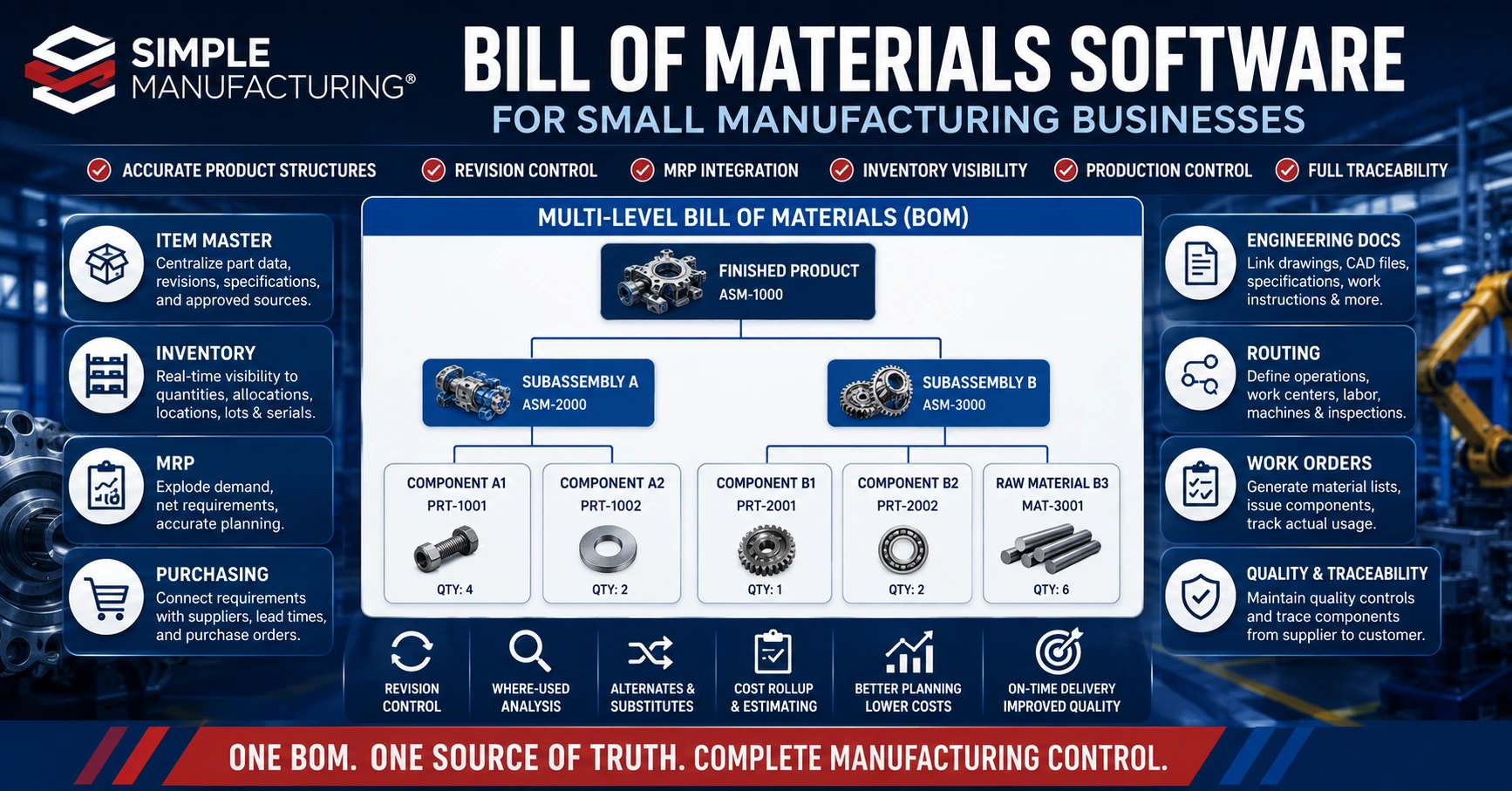
SimpleManufacturing™ connects multi-level Bills of Materials with engineering, inventory, MRP, purchasing, Work Orders, routings, quality, and production.
What Is a Bill of Materials?
A Bill of Materials is the controlled product structure identifying the materials, components, subassemblies, quantities, and related information required to manufacture a finished product.
A BOM may contain:
- Parent assembly
- Component part numbers
- Component revisions
- Descriptions
- Quantity per assembly
- Unit of measure
- BOM level
- Make-or-buy classification
- Approved manufacturers
- Approved suppliers
- Alternate and substitute parts
- Reference designators
- Material specifications
- Effective dates
- Engineering documents
- Manufacturing instructions
- Inspection requirements
The BOM Is More Than a Parts List
A complete manufacturing BOM provides the information required to plan materials, purchase components, allocate inventory, release Work Orders, control revisions, calculate cost, and preserve the product’s manufacturing history.
Why Small Manufacturers Need BOM Software
Small manufacturers must coordinate engineering, purchasing, inventory, production, quality, and customer delivery with limited administrative resources.
An inaccurate or outdated BOM can create:
- Material shortages
- Unnecessary purchases
- Incorrect assemblies
- Production delays
- Excess inventory
- Scrap and rework
- Uncontrolled substitutions
- Incorrect product costs
- Customer-quality problems
- Traceability gaps
Improved Accuracy
Maintain one controlled product structure instead of multiple spreadsheets and copied files.
Better Material Planning
Use BOM quantities and lead times to calculate time-phased material requirements.
Controlled Revisions
Preserve approved versions, effective dates, change history, and prior production configurations.
Improved Production
Provide Work Orders with the approved materials, routing, documents, and requirements.
Better Cost Visibility
Roll component, labor, outside-processing, and overhead costs into manufactured-product cost.
Stronger Traceability
Connect purchased materials and component lots with Work Orders and finished products.
Common Problems with Spreadsheet-Based BOMs
| Spreadsheet Problem | Potential Manufacturing Impact |
|---|---|
| Multiple Copies | Employees may use different BOM versions for purchasing, planning, and production. |
| Uncontrolled Changes | Quantities, components, and revisions may be modified without review or approval. |
| No Effective-Date Control | Employees cannot determine when a revised BOM should begin or stop being used. |
| Disconnected Inventory | Material availability and shortages cannot be evaluated from the BOM. |
| Disconnected Purchasing | Approved suppliers, manufacturer parts, lead times, and pricing remain in separate records. |
| Weak Where-Used Analysis | Engineering cannot quickly determine which products use an affected component. |
| Manual Costing | Product cost becomes outdated when component or process costs change. |
| Limited Audit History | The organization cannot reliably identify who changed the BOM and why. |
| Separate Document Storage | Drawings, specifications, and instructions may not match the BOM revision. |
A Shared Spreadsheet Is Not a Controlled Manufacturing System
File permissions and naming conventions may reduce some risk, but they do not provide the integration, approvals, traceability, validation, and historical configuration control available within manufacturing ERP.
Multi-Level Bill of Materials Software
A multi-level BOM represents the complete hierarchy of finished products, assemblies, subassemblies, and components.
Product
Assemblies
and Raw Materials
Multi-level BOM software allows manufacturers to:
- View the complete product structure
- Expand or collapse assembly levels
- Calculate total component demand
- Identify manufactured and purchased items
- Review subassembly availability
- Determine where components are used
- Calculate rolled-up product cost
- Plan Work Orders for manufactured subassemblies
- Plan Purchase Orders for purchased components
Multi-level BOM explosion converts finished-product demand into requirements for every lower-level assembly and component.
Indented BOM Reporting
An indented BOM report displays each component according to its level within the product structure.
| Level | Example Item | Quantity |
|---|---|---|
| 0 | Finished Product | 1 |
| 1 | Main Assembly | 1 |
| 2 | Subassembly A | 2 |
| 3 | Purchased Component | 4 per subassembly |
| 2 | Subassembly B | 1 |
| 3 | Raw Material | 6 units |
Indented reports help Engineering, Planning, Purchasing, Production, and Cost Accounting understand the complete structure and cumulative material requirements of a manufactured item.
Engineering BOM vs. Manufacturing BOM
Engineering and manufacturing may view the same product from different operational perspectives.
| Engineering BOM | Manufacturing BOM |
|---|---|
| Represents the engineering product design | Represents how the product will be manufactured |
| Organized around design relationships | Organized around production sequence and assembly methods |
| May include design components and specifications | May include packaging, consumables, tooling, and production-specific items |
| Controlled through engineering changes | Connected with routing operations, Work Orders, and production instructions |
| Supports product definition | Supports material planning and shop floor execution |
Not Every Manufacturer Needs Separate EBOM and MBOM Records
Small manufacturers may manage a single controlled BOM when the engineering and production structures are substantially the same. The software should still provide the flexibility to support manufacturing-specific components, instructions, and routing relationships.
Bill of Materials Revision Control
Revision control ensures that purchasing, planning, production, inspection, and shipping use the approved product configuration.
A revision-controlled BOM may include:
- BOM revision
- Product revision
- Revision description
- Effective date
- Obsolete date
- Approval status
- Approved by
- Approval date
- Engineering Change Order
- Reason for change
- Affected components
- Affected Work Orders
- Affected inventory
- Customer approval requirements
Requested
Reviewed
Created
Completed
Released
Historical BOMs Should Not Be Overwritten
The system should preserve the BOM revision used by previous Work Orders and customer shipments even after a new revision becomes effective.
Engineering Change Control
Engineering changes may affect product design, inventory, purchasing, production, inspection, documentation, cost, and customer commitments.
A change-impact review may evaluate:
- Products using the affected component
- Open Sales Orders
- Open Work Orders
- Open Purchase Orders
- Existing inventory
- Customer-owned inventory
- Work in Process
- Approved suppliers
- Drawings and specifications
- Manufacturing routings
- Inspection requirements
- Employee training
- Standard and actual cost
Where-used analysis helps Engineering determine the complete impact of changing or discontinuing a component.
Where-Used Analysis
Where-used analysis identifies every assembly and product containing a selected component or subassembly.
This analysis supports:
- Engineering changes
- Component obsolescence
- Supplier quality investigations
- Material recalls
- Cost-change analysis
- Alternate-part evaluation
- Excess-inventory review
- Customer-impact analysis
| Selected Item | Where-Used Result |
|---|---|
| Purchased Component | Identifies all subassemblies and finished products using the component. |
| Manufactured Subassembly | Identifies every parent assembly containing the subassembly. |
| Raw Material | Identifies manufactured items and Work Orders requiring the material. |
| Obsolete Part | Identifies products, open supply, inventory, and affected customer demand. |
Alternate and Substitute Component Management
Alternate components may help manufacturers respond to shortages, long lead times, obsolescence, or supplier availability problems.
Alternate-component records may include:
- Original component
- Alternate part number
- Approved manufacturer
- Manufacturer part number
- Approved supplier
- Technical equivalency
- Applicable BOM
- Effective date
- Engineering approval
- Quality approval
- Customer approval requirement
- Restrictions and notes
Availability Does Not Automatically Authorize Substitution
Before an alternate is used, the organization should verify engineering, quality, customer, contractual, and regulatory requirements.
Approved Manufacturers and Suppliers
The BOM can connect each internal component with approved manufacturers, manufacturer part numbers, approved suppliers, and supplier ordering numbers.
| Relationship | Purpose |
|---|---|
| Internal Part Number | Provides the organization’s controlled item identity. |
| Manufacturer | Identifies the organization producing the component. |
| Manufacturer Part Number | Identifies the manufacturer’s exact component. |
| Approved Supplier | Identifies an authorized source for purchasing. |
| Vendor Part Number | Identifies the supplier’s ordering or catalog number. |
| Approval Status | Controls whether the source may be used. |
Learn more in our Approved Vendor List guide.
BOM and Item Master Integration
Every BOM component should reference a controlled Item Master record rather than repeating independent part information inside each BOM.
The Item Master may define:
- Part number
- Revision
- Description
- Make-or-buy classification
- Inventory stage
- Units of measure
- Lead times
- Approved manufacturers
- Approved suppliers
- Cost classifications
- Lot and serial requirements
- Inspection requirements
- Compliance classifications
- Linked drawings and documents
Update Item Data Once
When component information is maintained in the Item Master, purchasing, inventory, MRP, BOMs, Work Orders, quality, and costing can reference the same controlled definition.
Learn more in our Item Master Data Management guide.
BOM and Inventory Integration
Inventory integration allows users to compare BOM requirements with available material.
The system may evaluate:
- Quantity on hand
- Available quantity
- Allocated quantity
- Inventory awaiting inspection
- Quality-hold inventory
- Customer-owned inventory
- Inventory locations
- Lot and serial requirements
- FIFO cost layers
- Expiration and shelf-life dates
| Inventory Condition | BOM and Production Impact |
|---|---|
| Available Inventory | Can be allocated or issued to eligible Work Orders. |
| Allocated Inventory | Reserved for another demand and may not cover the new requirement. |
| Awaiting Inspection | May become available after acceptance but should not be assumed usable immediately. |
| Quality Hold | Should not be included as usable supply. |
| Customer-Owned Material | Should be restricted to the applicable customer or program. |
Learn more in our Manufacturing Inventory Management guide.
BOM Integration with Material Requirements Planning
MRP uses the BOM to convert customer demand and forecasted demand into requirements for lower-level materials and assemblies.
and Forecasts
Demand
Explosion
Netting
Order Recommendations
MRP may consider:
- Customer Sales Orders
- Delivery schedules
- Forecasts
- BOM quantities
- Scrap or yield factors
- Available inventory
- Allocated inventory
- Open Purchase Orders
- Open Work Orders
- Safety stock
- Purchasing lead time
- Manufacturing lead time
- Minimum order quantities
- Order multiples
The accuracy of MRP recommendations depends on accurate BOM quantities, revisions, lead times, inventory, and open supply records.
Learn more in our MRP Software for Manufacturers guide.
BOM Integration with Purchasing
Purchased-component requirements generated from BOMs can be connected with approved suppliers, pricing, lead times, minimum quantities, and open Purchase Orders.
Purchasing visibility may include:
- Component demand
- Required date
- Available inventory
- Short quantity
- Approved manufacturers
- Approved suppliers
- Supplier part numbers
- Last purchase price
- Current quotation
- Supplier lead time
- Minimum buy quantity
- Open Purchase Orders
- Expected receipt dates
Purchase the Approved Component from the Approved Source
BOM, Item Master, manufacturer, and supplier relationships help buyers select the correct item rather than relying only on descriptions or historical memory.
Learn more in our Purchase Order Management guide.
BOM Integration with Work Orders
When a Work Order is created, the approved BOM can generate the planned material requirements for the production quantity.
The Work Order material list may identify:
- Required component
- Component revision
- Quantity per assembly
- Total required quantity
- Quantity allocated
- Quantity issued
- Quantity returned
- Quantity scrapped
- Short quantity
- Lot or serial number
- Actual FIFO cost
| Work Order Material Activity | Purpose |
|---|---|
| Allocation | Reserves available material for the Work Order. |
| Picking | Identifies the inventory to be physically prepared. |
| Issue | Transfers material quantity and cost into Work in Process. |
| Additional Issue | Records material needed beyond the original planned quantity. |
| Return | Returns unused eligible material to inventory. |
| Scrap | Records unusable material and its cost. |
| Substitution | Records an approved alternate used in place of the planned component. |
Learn more in our Manufacturing Work Order Management guide.
BOM and Manufacturing Routing Integration
The BOM defines what materials are required. The manufacturing routing defines how the product will be produced.
| Bill of Materials | Manufacturing Routing |
|---|---|
| Defines components and quantities | Defines operation sequence |
| Supports material planning | Supports capacity and labor planning |
| Connects approved materials and sources | Connects work centers, employees, and equipment |
| Supports material costing | Supports labor, machine, and processing costing |
| Creates the planned Work Order material list | Creates the planned Work Order operation list |
Routing operations may include:
- Operation number
- Operation description
- Work center
- Setup time
- Run time
- Labor classification
- Employee qualification
- Equipment requirement
- Outside-processing supplier
- Inspection requirement
- Work instruction
- Completion criteria
Learn more in our Manufacturing Routing Software guide.
Outside Processing within the Product Structure
Some manufacturing steps are performed by outside suppliers rather than internal work centers.
Examples include:
- Heat treatment
- Plating
- Anodizing
- Painting
- Welding
- Specialized machining
- Nondestructive testing
- Laboratory testing
Outside-processing records may connect:
- Work Order
- Routing operation
- Approved processor
- Purchase Order
- Specification and revision
- Quantity sent
- Lot or serial numbers
- Expected return date
- Certification requirements
- Actual processing cost
BOM Costing and Cost Rollup
BOM software can calculate estimated or standard product cost by rolling lower-level material and process costs into the parent assembly.
| Cost Element | Possible Source |
|---|---|
| Purchased Material | Standard cost, last cost, average cost, quoted cost, or actual FIFO cost |
| Manufactured Subassembly | Rolled component, labor, machine, processing, and overhead cost |
| Direct Labor | Routing labor standards and labor rates |
| Machine Cost | Routing machine time and equipment rates |
| Outside Processing | Supplier quotation, Purchase Order, or historical processing cost |
| Manufacturing Overhead | Applied according to company costing policy |
Estimated BOM Cost and Actual Work Order Cost Serve Different Purposes
The BOM can support quotations and planning through estimated or standard costs. Actual Work Order costing records the materials, labor, processing, scrap, and overhead actually consumed during production.
Learn more in our Actual Work Order Costing guide.
Engineering Document Management
Documents can be linked directly with the product, BOM, component, and manufacturing routing.
Linked documents may include:
- Engineering drawings
- CAD files
- Specifications
- Datasheets
- Work instructions
- Assembly instructions
- Inspection plans
- Quality requirements
- Customer documents
- Supplier documents
- Photographs
- Programs and electronic files
Employees should be able to open the current approved document directly from the item, BOM, Work Order, or routing operation where it is used.
Document and BOM Revision Alignment
The BOM, drawing, routing, and work instructions should represent a consistent approved configuration.
The system should help identify:
- Current document revision
- Current BOM revision
- Current product revision
- Applicable routing revision
- Effective date
- Approval status
- Employees requiring retraining
- Open Work Orders using prior revisions
A Current Drawing Does Not Automatically Update Existing Work Orders
The organization should define whether open Work Orders continue using the previously released configuration or must be updated through an approved change process.
Learn more in our Document Control Software guide.
BOM and Manufacturing Traceability
The planned BOM identifies which components should be used. Manufacturing genealogy records which specific materials, lots, serial numbers, and revisions were actually used.
Requirement
Serial Selected
Work Order
Lot or Serial
Shipment
Traceability can identify:
- Planned BOM component
- Actual component issued
- Component revision
- Supplier
- Purchase Order
- Receipt
- Lot or serial number
- Work Order
- Finished-product lot or serial number
- Customer shipment
Learn more in our Lot and Serial Number Traceability guide.
BOM and Quality Management Integration
Product and component requirements can create inspection, documentation, traceability, and quality-control requirements.
Quality information may include:
- Receiving-inspection requirements
- Material certifications
- Approved-source restrictions
- In-process inspection requirements
- Final-inspection requirements
- First Article requirements
- Lot and serial controls
- Shelf-life requirements
- Customer quality clauses
- Special-process certifications
- Nonconformance history
Flow Product Requirements into Production
Quality requirements connected with the BOM and Item Master should remain visible during purchasing, receiving, Work Order planning, routing operations, inspection, and shipment.
Learn more in our Quality Management Software guide.
BOM Search and Filtering
Users should be able to find product structures quickly using multiple search criteria.
Search fields may include:
- Parent assembly
- Component part number
- Description
- Revision
- Customer part number
- Manufacturer
- Manufacturer part number
- Supplier
- Vendor part number
- BOM status
- Effective date
- Product family
Bill of Materials Module Screens
The following SimpleManufacturing™ screens support BOM search, component management, document control, routing, and production planning.

BOM Search and Revision Control
Search BOM records by assembly, revision, customer, component, manufacturer, supplier, or other product criteria.
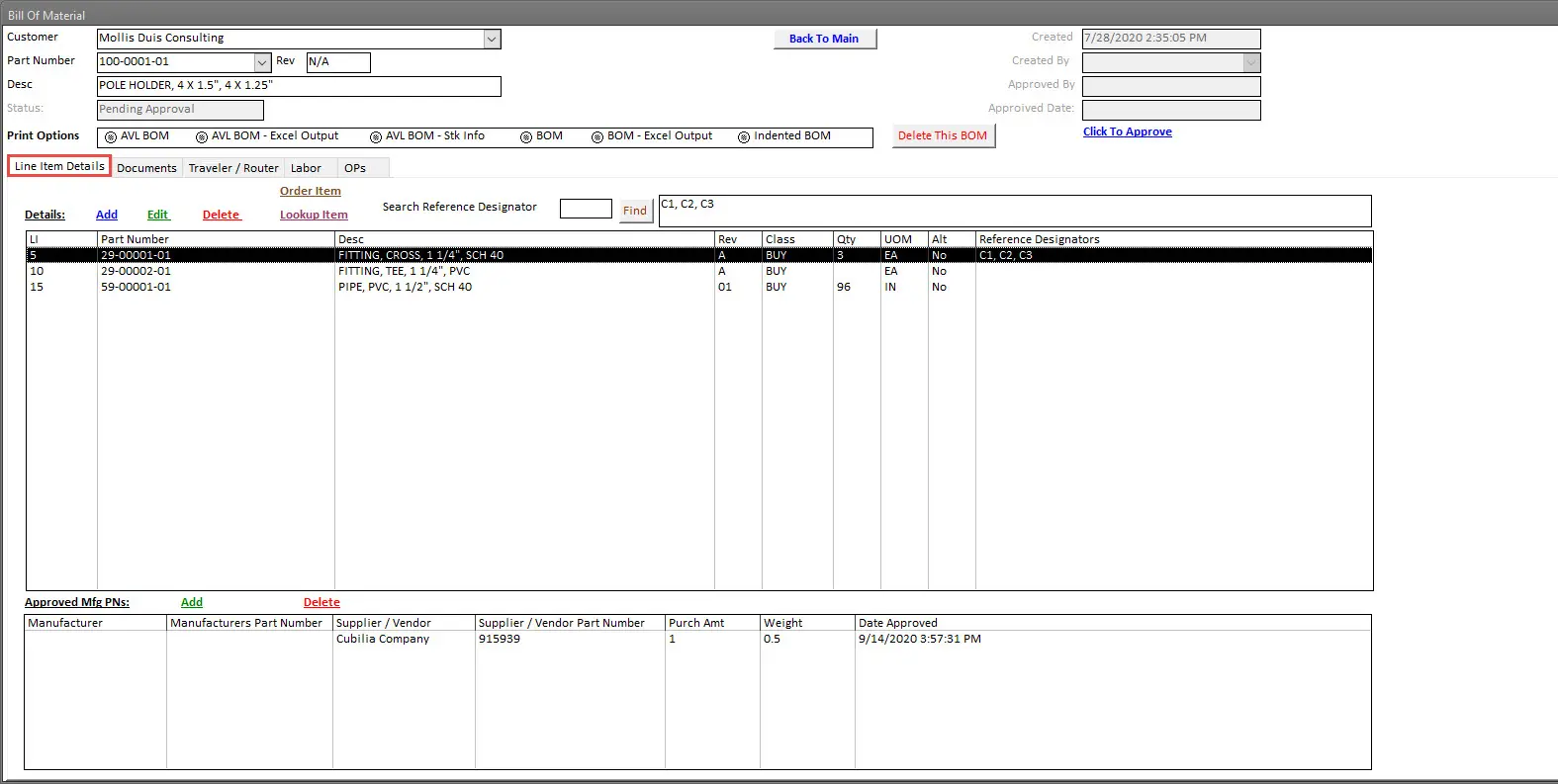
BOM Component Management
Manage components, subassemblies, quantities, units, revisions, approved manufacturers, suppliers, and alternates.
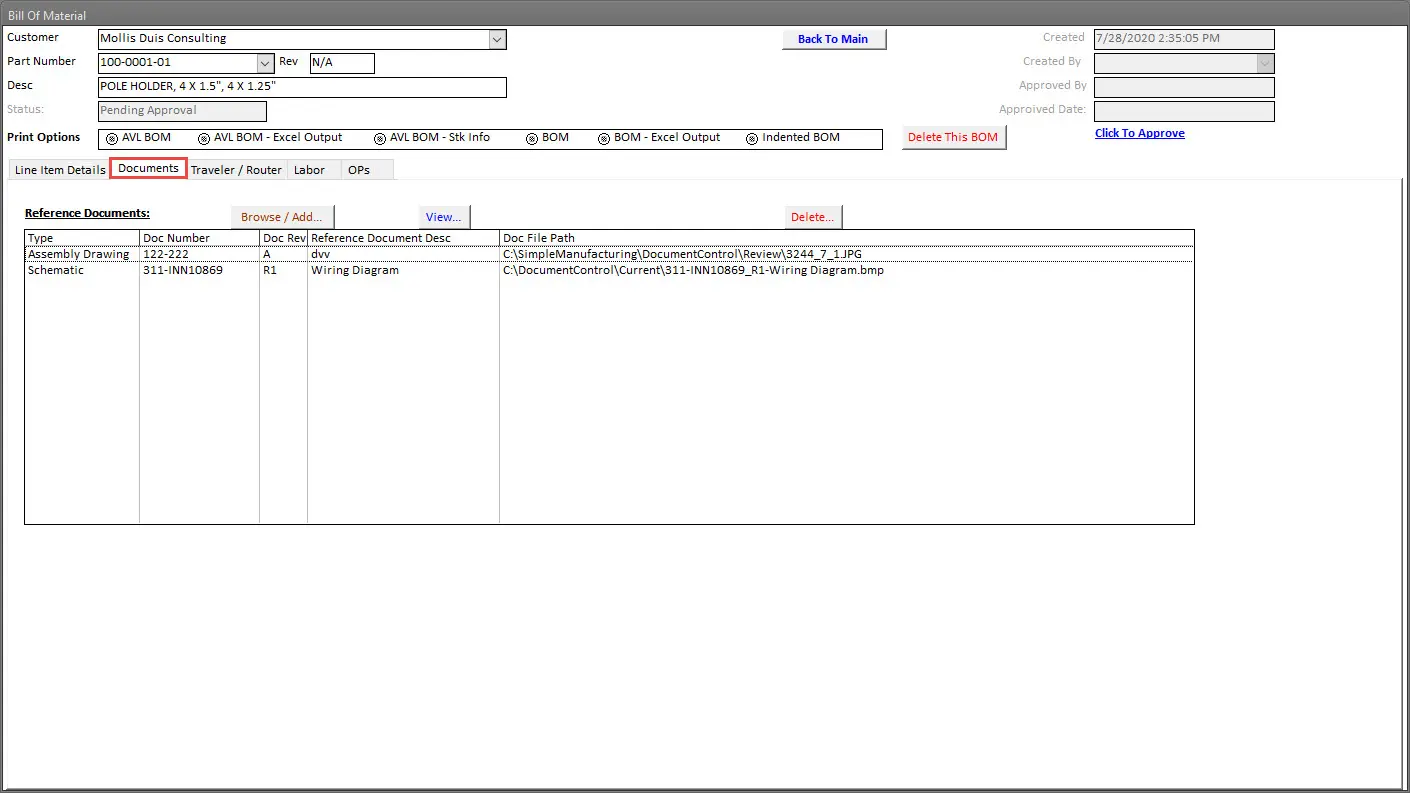
Engineering Documents
Link drawings, CAD files, specifications, quality documents, forms, work instructions, and customer requirements.
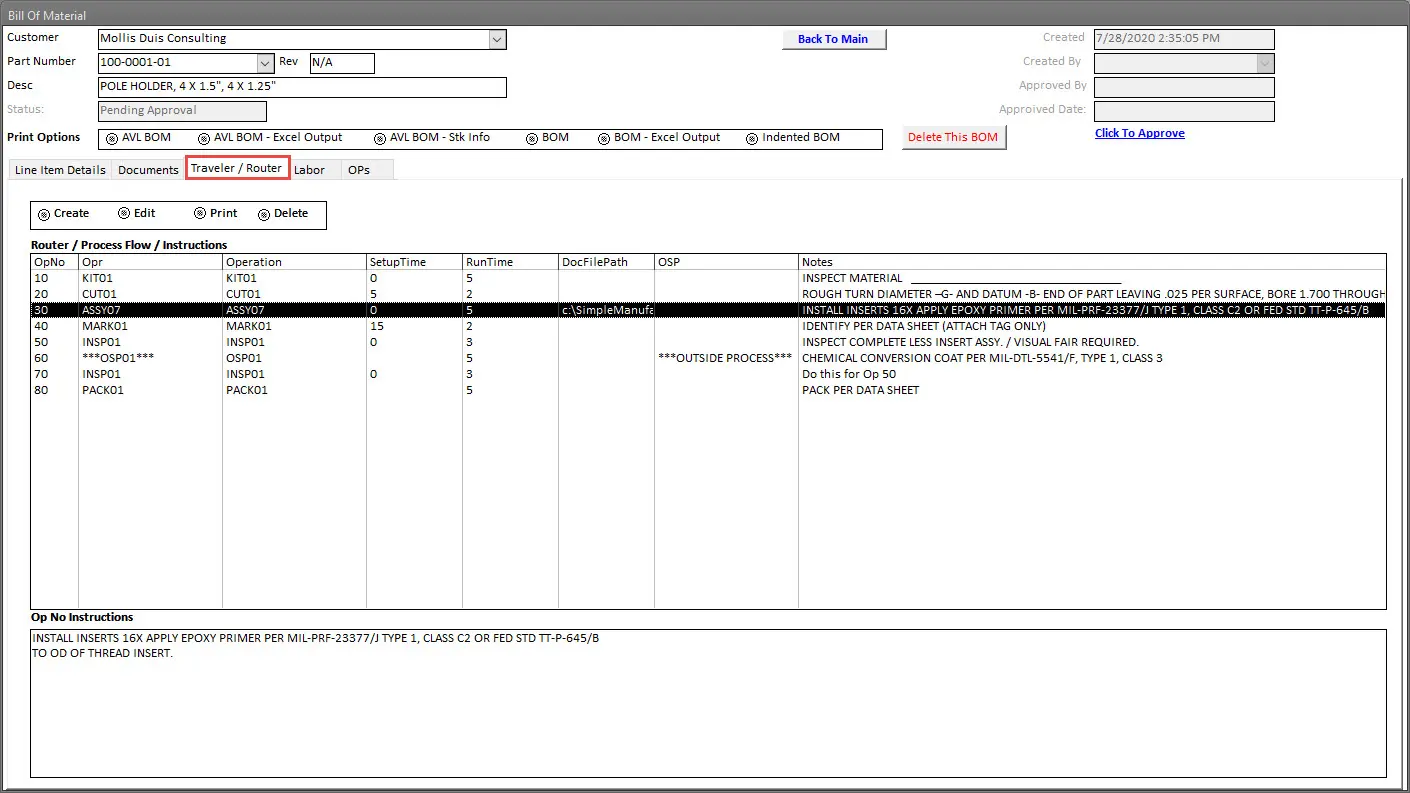
Manufacturing Routing
Define the sequence of work centers, production operations, inspections, and outside-processing activities.
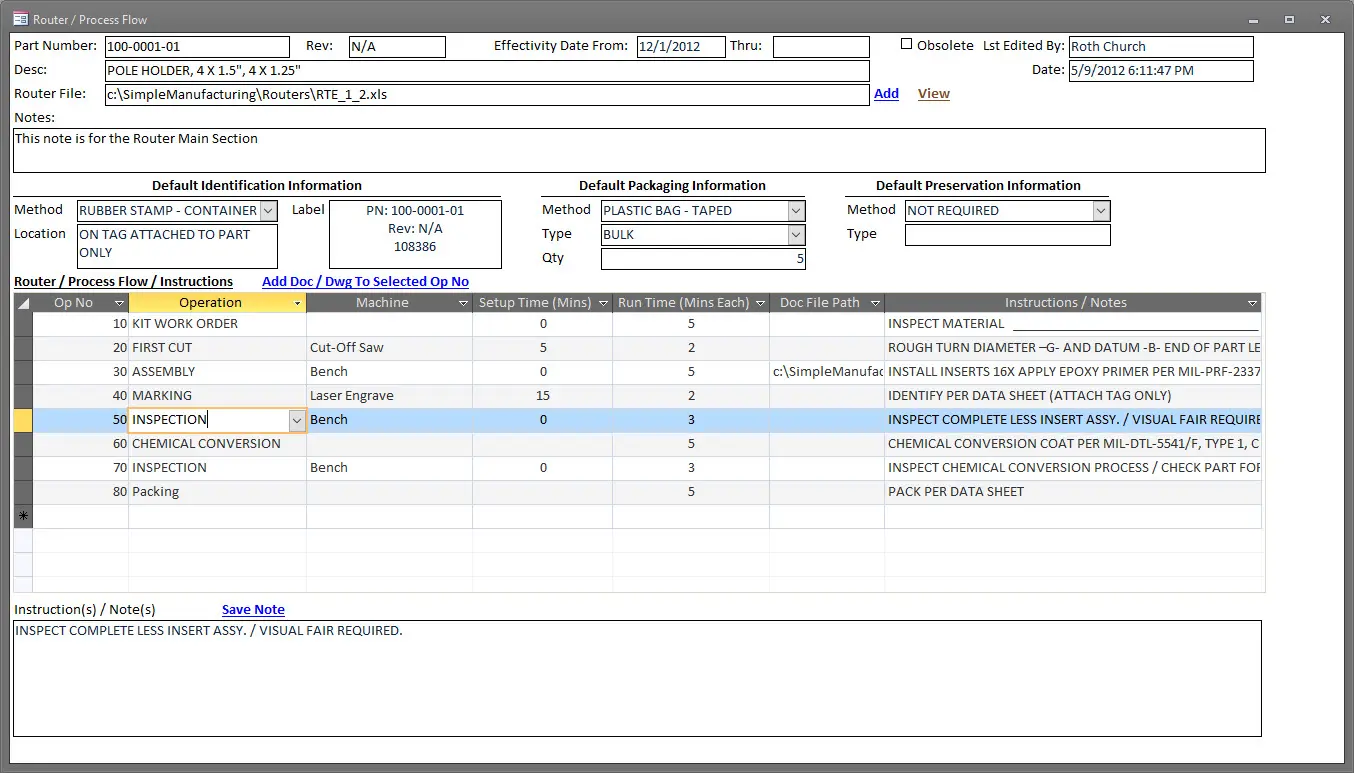
Routing Operation Details
Record operation sequencing, setup standards, labor standards, instructions, equipment, and inspection requirements.
Advanced Bill of Materials Software Features
Multi-Level Product Structures
Manage finished products, assemblies, subassemblies, components, and raw materials.
Revision Control
Maintain approvals, effective dates, obsolete dates, and complete change history.
Where-Used Reporting
Identify every assembly and product affected by a component change.
Alternate Parts
Maintain approved alternates, source restrictions, and customer-approval requirements.
MRP Integration
Calculate purchased and manufactured requirements using live demand and supply.
Inventory Visibility
Review quantities, locations, allocations, inspection inventory, status, and FIFO cost.
Purchasing Integration
Connect component requirements with approved suppliers, lead times, pricing, and Purchase Orders.
Work Order Integration
Generate planned material requirements and preserve actual component usage.
Routing Integration
Connect product materials with manufacturing operations, labor, equipment, and inspection.
Cost Rollup
Calculate material, labor, machine, processing, and overhead cost for assemblies.
Document Management
Link drawings, specifications, instructions, CAD files, and quality documents.
Manufacturing Traceability
Connect planned components with actual lots, serial numbers, Work Orders, and finished products.
Industries Using Bill of Materials Software
Aerospace Manufacturing
Control revisions, approved suppliers, material certifications, production routings, and product genealogy.
Electronics Manufacturing
Manage multi-level assemblies, approved manufacturer parts, alternates, date codes, and component traceability.
Medical Device Manufacturing
Maintain controlled product structures, revisions, documents, quality requirements, and manufacturing records.
Defense Manufacturing
Control customer configurations, approved sources, traceability, documents, and serialized assemblies.
Industrial Equipment
Manage complex assemblies, purchased components, fabricated parts, routing, and service documentation.
Contract Manufacturing
Maintain customer-specific product structures, materials, documents, and production requirements.
Machine and Fabrication Shops
Connect raw material, purchased components, outside processing, routing, and Work Order cost.
Assembly Manufacturers
Control kits, subassemblies, purchased parts, instructions, labor, and product completion.
Integrated Manufacturing ERP Modules
Item Master Management
Centralize part numbers, revisions, descriptions, classifications, approved sources, costs, and documents.
Inventory Management
Track available, allocated, inspection, quality-hold, customer-owned, lot-controlled, and serialized inventory.
Material Requirements Planning
Convert customer demand and BOM structures into time-phased BUY and MAKE recommendations.
Purchase Order Management
Connect material requirements with approved suppliers, pricing, lead times, delivery schedules, and quality clauses.
Work Order Management
Control planned materials, routing operations, quantities, labor, quality, genealogy, and completion.
Shop Floor Tracking
Record actual labor, production quantities, operation progress, downtime, holds, and completion.
Manufacturing Traceability
Connect supplier materials, lots, serial numbers, Work Orders, finished products, and customer shipments.
Quality Management
Connect inspections, nonconformance, corrective action, documents, training, calibration, and audit records.
Bill of Materials Software Selection Checklist
| Evaluation Area | Questions to Ask |
|---|---|
| Multi-Level Structures | Can the system manage finished products, assemblies, subassemblies, and components? |
| Revision Control | Can it preserve approvals, effective dates, prior revisions, and change history? |
| Item Master Integration | Does every component reference a controlled item record? |
| Where-Used Analysis | Can Engineering identify every product affected by a component change? |
| Alternates | Can approved alternate and substitute parts be controlled? |
| Approved Sources | Can components be linked with approved manufacturers and suppliers? |
| MRP Integration | Can customer demand be exploded through all BOM levels? |
| Inventory Integration | Can users review availability, allocations, status, locations, lots, and serials? |
| Purchasing Integration | Can requirements be converted into supplier Purchase Orders? |
| Work Order Integration | Can the approved BOM generate production material requirements? |
| Routing Integration | Can materials, operations, labor, machines, inspection, and outside processing be connected? |
| Document Control | Can drawings, specifications, and instructions be linked with controlled revisions? |
| Costing | Can component and process costs be rolled into assembly cost? |
| Traceability | Can planned materials be compared with actual materials consumed? |
| Audit History | Can changes, approvals, users, and dates be retrieved? |
Bill of Materials Management with SimpleManufacturing™
SimpleManufacturing™ provides an integrated BOM module for small and mid-sized manufacturers requiring multi-level product structures, revision control, approved sources, inventory planning, MRP, Work Orders, routings, engineering documents, quality controls, traceability, and costing.
| SimpleManufacturing™ Capability | Business Benefit |
|---|---|
| Multi-Level BOMs | Controls assemblies, subassemblies, components, raw materials, and quantities. |
| Revision Control | Preserves approved revisions, effective dates, obsolete dates, and change history. |
| Item Master Integration | Uses one controlled item definition throughout engineering and manufacturing. |
| Where-Used Analysis | Identifies every parent assembly affected by a component change. |
| Alternate Components | Controls approved substitutes, restrictions, and source relationships. |
| MRP Integration | Explodes demand through all BOM levels and calculates net requirements. |
| Inventory Integration | Displays material availability, allocations, locations, status, lots, serials, and costs. |
| Purchasing Integration | Connects shortages with approved suppliers, Purchase Orders, lead times, and pricing. |
| Work Order Integration | Generates planned material requirements and records actual consumption. |
| Routing Integration | Connects product materials with manufacturing and inspection operations. |
| Cost Rollup | Calculates material, labor, machine, processing, and overhead product cost. |
| Document Management | Links CAD files, drawings, specifications, instructions, and quality documents. |
| Manufacturing Traceability | Connects component requirements with actual lots, serial numbers, Work Orders, and shipments. |
| Electronic Audit History | Records significant changes, approvals, users, dates, and revision history. |
One BOM Connected with the Complete Manufacturing Process
SimpleManufacturing™ gives Engineering, Purchasing, Inventory, Production, Quality, and Accounting access to the same controlled product structure and supporting information.
Frequently Asked Questions About Bill of Materials Software
What is Bill of Materials software?
Bill of Materials software manages the product structure identifying the materials, components, subassemblies, quantities, revisions, approved sources, and documents required to manufacture a product.
What is a multi-level BOM?
A multi-level BOM shows the hierarchy of finished products, assemblies, subassemblies, components, and raw materials required for manufacturing.
What is an indented BOM?
An indented BOM displays each component according to its hierarchical level within the product structure.
What is the difference between an EBOM and an MBOM?
An Engineering BOM represents the product design, while a Manufacturing BOM represents how the product will be built and may include production-specific materials, packaging, consumables, and operation relationships.
Why is BOM revision control important?
Revision control ensures purchasing, planning, production, inspection, and shipping use the approved product configuration and preserves historical configurations.
What is where-used analysis?
Where-used analysis identifies every assembly and product containing a selected component or subassembly.
Can BOM software manage alternate parts?
Yes. Approved alternate and substitute components can be linked with applicable products, manufacturers, suppliers, restrictions, and approval requirements.
How does BOM software integrate with inventory?
It compares component requirements with available, allocated, inspection, quality-hold, and customer-owned inventory.
How does a BOM integrate with MRP?
MRP explodes customer and forecast demand through the BOM and calculates net requirements after considering inventory, Purchase Orders, Work Orders, lead times, and safety stock.
How does a BOM integrate with purchasing?
Purchased-component shortages can be connected with approved suppliers, manufacturer parts, supplier part numbers, pricing, lead times, and Purchase Orders.
How does a BOM integrate with Work Orders?
The approved BOM creates the planned Work Order material list and supports allocation, picking, issuing, substitution, returns, scrap, and actual material costing.
What is the difference between a BOM and a routing?
The BOM defines what materials are required. The routing defines how and where the product will be manufactured.
Can engineering documents be attached to a BOM?
Yes. Drawings, CAD files, specifications, instructions, forms, photographs, and quality documents can be linked with products, components, BOMs, and routing operations.
How is BOM cost calculated?
BOM cost may combine purchased-material cost, manufactured-subassembly cost, labor standards, machine cost, outside processing, and manufacturing overhead.
What is BOM traceability?
BOM traceability compares the planned component requirements with the actual materials, revisions, lots, serial numbers, and quantities consumed during production.
Why are spreadsheets risky for BOM management?
Spreadsheets can create duplicate versions, uncontrolled changes, outdated revisions, weak approvals, limited integration, and unreliable historical configuration records.
Does BOM software support approved manufacturers and suppliers?
Yes. Internal components can be connected with approved manufacturers, manufacturer part numbers, approved suppliers, vendor part numbers, and approval status.
Which manufacturers benefit from BOM software?
BOM software supports aerospace, electronics, medical device, defense, industrial equipment, contract manufacturing, assembly, machine-shop, and fabrication businesses.
How does SimpleManufacturing™ manage Bills of Materials?
SimpleManufacturing™ connects multi-level BOMs, Item Master data, revisions, approved sources, inventory, MRP, purchasing, Work Orders, routings, documents, quality, traceability, costing, and accounting.
Replace Spreadsheet BOMs with Integrated Manufacturing Control
Accurate Bills of Materials are essential for purchasing, inventory planning, MRP, Work Orders, production, quality, traceability, costing, and customer delivery.
A controlled BOM system helps manufacturers reduce revision confusion, material shortages, duplicate records, incorrect assemblies, excess inventory, scrap, and production delays.
One BOM. One Source of Truth. Complete Manufacturing Control.
SimpleManufacturing™ connects product structures with Item Master data, inventory, approved suppliers, MRP, purchasing, Work Orders, routing, documents, quality, genealogy, costing, and accounting.
SimpleManufacturing™ Bill of Materials software is designed for small and mid-sized manufacturers that need powerful product-management capabilities without the cost and complexity of large enterprise ERP systems.
Request a Bill of Materials Software Demonstration
Call SimpleManufacturing™ at 858-335-6421.