
Manufacturing Routing Software
SimpleManufacturing™ Manufacturing Routing Software defines the ordered production, quality, outside-processing, and machine steps required to manufacture a product—and transfers that controlled process directly from the Bill of Materials into every new Work Order.
A manufacturing routing, sometimes called a router, traveler, process flow, or operation sequence, explains how a manufactured item moves from one production step to the next. The routing gives employees the operation number, step, description, instructions, pictures, machine assignment, inspection requirements, and outside-processing activity needed to complete the work correctly.
In SimpleManufacturing™, the router is linked to the applicable Bill of Materials. When a Work Order is created to manufacture that BOM, the Work Order inherits the router so production begins with the defined operation sequence and instructions.
One Product Definition for Materials and Process
The BOM defines what materials are required. The router defines how the product is manufactured. Together they give the Work Order a controlled starting point for materials, operations, instructions, machines, inspections, and outside processing.
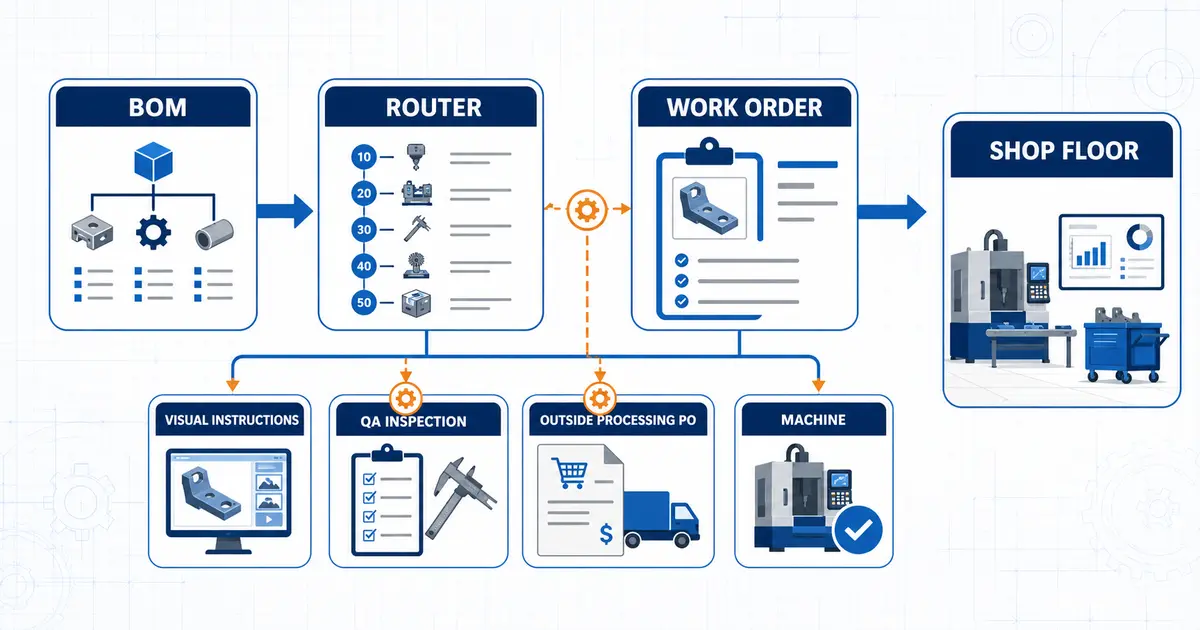
SimpleManufacturing™ connects BOM routers with Work Orders, step instructions, in-process inspections, outside-processing Purchase Orders, and machine assignments.
What Is Manufacturing Routing?
Manufacturing routing is the controlled sequence of operations required to produce, inspect, process, and complete a manufactured item. It organizes the work into individual steps so employees know what must happen, in what order, and with which instructions, pictures, machines, quality activities, or outside suppliers.
A SimpleManufacturing™ router can define standard information for each operation, including:
- Operation number
- Step
- Step description
- Detailed work instructions
- Pictures embedded in the instructions
- Quality-assurance step designation
- Outside-processing step designation
- Machine assigned to the step
- Required operation sequence
A controlled routing converts manufacturing knowledge into a repeatable operation sequence that can be inherited by every applicable Work Order.
Manufacturing Routers Linked to the Bill of Materials
SimpleManufacturing™ links the router directly with the Bill of Materials for the manufactured item. This relationship keeps the product’s required materials and manufacturing process connected instead of maintaining the BOM in one system and the routing in a separate spreadsheet, traveler, or database.
| Bill of Materials | Manufacturing Router |
|---|---|
| Defines the components and quantities required. | Defines the operation sequence required to manufacture the item. |
| Controls the material structure of the product. | Controls the production, inspection, and outside-processing flow. |
| Provides planned Work Order material requirements. | Provides planned Work Order routing steps and instructions. |
| Connects manufactured demand with required material. | Connects manufactured demand with the work needed to complete it. |
Materials and Operations Stay Connected
Engineering and production can define both the product structure and its manufacturing process at the BOM level, giving Work Orders a consistent source for planned materials and routing operations.
Work Orders Inherit the BOM Router
When a Work Order is created to manufacture an item, SimpleManufacturing™ inherits the router linked to that item’s BOM. The Work Order receives the operation sequence and step information required to control the production process.
and BOM
Linked to BOM
Created
Inherited
Execution
The inherited Work Order router gives production access to:
- The required operation sequence
- Operation numbers and steps
- Step descriptions
- Detailed manufacturing instructions
- Instructional pictures
- Quality-assurance steps
- Outside-processing steps
- Machine assignments
This inheritance reduces duplicate setup and helps ensure that each new production job starts with the defined process for the manufactured BOM.
Standard Routing Operation Data
Every routing operation provides a controlled place to describe the work. Rather than relying on employee memory or a general note attached to the entire job, instructions can be associated with the exact step where they are needed.
Operation Number
Identifies the operation and supports an organized production sequence.
Step
Defines the individual production, inspection, or outside-processing activity.
Step Description
Provides a concise explanation of the purpose or activity performed at the step.
Instructions
Communicates the detailed methods, requirements, cautions, and information needed to perform the work.
Instruction Pictures
Adds visual guidance directly to the instructions for the applicable routing step.
Machine Assignment
Identifies the machine associated with the operation so the required resource is visible within the process.
Pictures within Routing Instructions
Text alone may not communicate every setup, orientation, tooling, assembly, inspection, or handling requirement clearly. SimpleManufacturing™ allows pictures to be added to the instructions for each routing step, placing visual information beside the operation where employees need it.
Step-level pictures may help communicate:
- Correct part orientation
- Machine or fixture setup
- Tooling placement
- Assembly sequence
- Connection or wiring position
- Inspection location
- Acceptable or unacceptable conditions
- Packaging and handling requirements
Visual Instructions at the Point of Work
Associating pictures with the applicable step makes the router more useful as a production traveler and reduces the need to search separate folders for basic visual guidance.
Quality-Assurance Routing Steps
A routing step can be designated as a Quality Assurance step. When production is transferred into that step, SimpleManufacturing™ automatically creates an in-process inspection record.
Completed
to QA Step
Automatically Created
Recorded
This automation connects the defined manufacturing process with the required quality activity. The inspection is created because production reached the designated QA operation—not because someone remembered to create a separate record manually.
| Manual Quality Process | Integrated QA Routing Step |
|---|---|
| An employee must recognize that inspection is required. | The routing explicitly identifies the operation as a QA step. |
| The inspection record must be created separately. | Transfer into the QA step automatically creates the in-process inspection. |
| Production and inspection records may become disconnected. | The quality activity originates from the Work Order routing flow. |
Learn more about integrated inspections and quality records in SimpleManufacturing™ Quality Assurance Management.
Outside-Processing Routing Steps
Manufacturing processes may require a supplier to perform specialized work such as plating, heat treatment, coating, testing, grinding, or another subcontracted operation. A routing step can be designated as outside processing so the purchasing activity is tied to the exact point in the production sequence where it is required.
When production is transferred into an outside-processing step, SimpleManufacturing™ automatically creates a Purchase Order for that outside-processing operation.
Completed
Outside-Processing Step
Purchase Order Created
Managed
to Next Step
Purchasing Triggered by Production Flow
The Purchase Order is generated when the Work Order reaches the defined outside-processing step, helping connect the subcontracted service with the job and operation that require it.
Learn more about supplier purchasing workflows in Purchase Order Management Software.
Machine Assignments by Routing Step
SimpleManufacturing™ allows a machine to be assigned to each routing step. The assignment identifies the equipment associated with the operation and makes the required production resource part of the Work Order process.
Machine assignments can help manufacturers:
- Identify the machine expected to perform the operation
- Connect the manufacturing step with the applicable production resource
- Give employees clearer routing and traveler information
- Improve visibility into machine-dependent production steps
- Support production planning and shop floor coordination
- Preserve the relationship between the operation and its assigned machine
Routing and machine visibility also support the production-planning process described in our Shop Floor Tracking Software page.
Routing Transfers Drive Manufacturing Workflow
The Work Order progresses through the router by transferring production from one operation to the next. These transfers do more than change a status: they can trigger the business activity associated with the destination step.
| Destination Step Type | Result When Production Is Transferred into the Step |
|---|---|
| Standard Production Step | The Work Order advances to the next defined manufacturing operation and its instructions. |
| Quality Assurance Step | An in-process inspection record is automatically created. |
| Outside-Processing Step | A Purchase Order is automatically created for the outside-processing operation. |
| Machine-Assigned Step | The operation identifies the machine associated with the work. |
The routing becomes an active manufacturing workflow: operation transfers can initiate production, quality, purchasing, and machine-related activity.
Benefits of Integrated Manufacturing Routing Software
Consistent Process Flow
Give each applicable Work Order the routing sequence linked to the manufactured BOM.
Clear Work Instructions
Place descriptions, detailed instructions, and pictures at the exact operation where they are needed.
Integrated Quality
Automatically create an in-process inspection when production transfers into a designated QA step.
Integrated Purchasing
Automatically create a Purchase Order when production enters a defined outside-processing step.
Machine Visibility
Associate the required machine with each applicable routing operation.
Reduced Duplicate Entry
Define the router with the BOM and allow new Work Orders to inherit the operation structure.
Connected Records
Keep materials, operations, instructions, inspections, outside processing, and machines within one manufacturing flow.
Better Shop Floor Visibility
Give production a clear view of the current step, next operation, and applicable manufacturing requirements.
Router, BOM, and Work Order: How They Work Together
| Manufacturing Record | Primary Purpose | SimpleManufacturing™ Relationship |
|---|---|---|
| Bill of Materials | Defines the components and quantities required to manufacture the item. | The manufacturing router is linked to the BOM. |
| Manufacturing Router | Defines the ordered operations, instructions, pictures, QA steps, outside processing, and machines. | The linked router becomes the standard process for manufacturing the BOM. |
| Work Order | Authorizes and records a specific production job. | The new Work Order inherits the router of the BOM being manufactured. |
| Routing Transfer | Moves production from one operation to the next. | Entering QA or outside-processing steps automatically creates the related record. |
Manufacturing Routing Integrated with SimpleManufacturing™ ERP
Bill of Materials
Link the product’s material structure with its standard manufacturing router.
Work Order Management
Inherit the BOM router when a Work Order is created and manage the production flow.
Quality Assurance
Create in-process inspection records automatically when production enters QA routing steps.
Purchase Order Management
Create a Purchase Order automatically when production enters an outside-processing step.
Shop Floor Tracking
Follow Work Order progress through the defined production and routing sequence.
Labor Management
Connect employee activity with Work Orders, routing operations, production quantities, and actual job cost.
Engineering Change Control
Evaluate and control changes affecting BOMs, routings, instructions, machines, quality, and production.
Manufacturing Routing Software Selection Checklist
| Evaluation Area | Question to Ask |
|---|---|
| BOM Integration | Can the router be linked directly with the manufactured Bill of Materials? |
| Work Order Inheritance | Does a new Work Order inherit the router of the BOM being manufactured? |
| Operation Control | Can each operation include a number, step, description, and instructions? |
| Visual Instructions | Can pictures be added directly to the instructions for each step? |
| Quality Automation | Can transfer into a QA step automatically create an in-process inspection? |
| Outside Processing | Can transfer into an outside-processing step automatically create a Purchase Order? |
| Machine Assignment | Can a machine be assigned to each applicable routing step? |
| Shop Floor Flow | Can production be transferred through the defined operation sequence? |
| Integrated Records | Are materials, operations, quality, purchasing, machines, and Work Orders connected? |
Frequently Asked Questions About Manufacturing Routing Software
What is manufacturing routing software?
Manufacturing routing software defines the ordered production, inspection, outside-processing, and machine operations required to manufacture an item. Each step can contain an operation number, description, instructions, pictures, and other process information.
What is the difference between a BOM and a manufacturing router?
The Bill of Materials defines what components and quantities are required. The manufacturing router defines how the item moves through production, inspection, outside processing, and completion.
How are routers linked with BOMs in SimpleManufacturing™?
The manufacturing router is linked directly to the applicable Bill of Materials, connecting the item’s material structure with its standard manufacturing process.
What happens to the router when a Work Order is created?
When a Work Order is created to manufacture a BOM, the Work Order inherits the router linked to that BOM, including its operation sequence and step information.
Can pictures be included in routing instructions?
Yes. Pictures can be added to the instructions for each routing step to provide visual production, setup, assembly, inspection, or handling guidance.
How do QA routing steps work?
A routing step can be designated as Quality Assurance. When production is transferred into that step, SimpleManufacturing™ automatically creates an in-process inspection record.
How do outside-processing routing steps work?
When production is transferred into a designated outside-processing step, SimpleManufacturing™ automatically creates a Purchase Order for the outside-processing operation.
Can machines be assigned to routing operations?
Yes. A machine can be assigned to each applicable routing step so the required equipment is identified within the manufacturing process.
How does SimpleManufacturing™ integrate routing with ERP?
SimpleManufacturing™ connects BOM routers with Work Orders, operation transfers, visual instructions, in-process inspections, outside-processing Purchase Orders, machines, labor, and shop floor tracking.
Connect Product Definition with Shop Floor Execution
Manufacturing routing software turns the approved production process into an organized sequence of operations that employees can follow. Linking that routing with the BOM and inheriting it into each Work Order helps reduce duplicate setup and keeps manufacturing instructions connected with the product being built.
One Routing Flow for Production, Quality, Outside Processing, and Machines
SimpleManufacturing™ connects operation numbers, steps, descriptions, instructions, pictures, QA inspections, outside-processing Purchase Orders, machine assignments, BOMs, and Work Orders within one integrated manufacturing ERP system.
SimpleManufacturing™ Manufacturing Routing Software is designed for small and mid-sized manufacturers that need consistent process control without disconnected travelers, spreadsheets, and manually created quality or purchasing records.
Request a Manufacturing Routing Software Demonstration
Call SimpleManufacturing™ at 858-335-6421.