
Customer Management Software for Manufacturing Businesses
SimpleManufacturing™ customer management software helps manufacturers centralize customer contacts, addresses, part-number cross-references, pricing agreements, quality clauses, shipping accounts, payment terms, order history, receivables, documents, and communications within one integrated manufacturing ERP system.
Manufacturing customer relationships involve more than storing names, phone numbers, and email addresses. Each customer may have unique purchasing contacts, Quality representatives, billing locations, shipping destinations, product identifiers, pricing agreements, delivery expectations, quality clauses, documentation requirements, freight accounts, payment terms, and regulatory requirements.
When this information is divided among spreadsheets, accounting software, emails, shared folders, and individual employee records, quoting, Contract Review, order entry, production, shipping, and invoicing become more difficult to control.
Customer Management creates one controlled source for the commercial, operational, quality, shipping, and financial information required to serve each manufacturing customer.

SimpleManufacturing™ connects customer information, pricing, quality requirements, orders, production, shipping, invoicing, receivables, and customer history.
What Is Customer Management Software for Manufacturing?
Manufacturing customer management software centralizes the information and transactions associated with customers from the first inquiry through quotation, order acceptance, production, shipment, invoicing, payment, and ongoing support.
The customer record may contain:
- Customer name and account number
- Corporate parent and division
- Sales, purchasing, engineering, Quality, shipping, and accounting contacts
- Bill-To addresses
- Ship-To addresses
- Customer shipping accounts
- Payment terms
- Credit limits and account status
- Tax information
- Customer-specific part numbers
- Pricing agreements
- Customer quality clauses
- Packaging and labeling requirements
- Shipping instructions
- Documents and contracts
- Quotation and Sales Order history
- Shipment and invoice history
- Accounts Receivable status
- Customer communications
Centralized Customer Records
Provide Sales, Quality, Production, Shipping, and Accounting with access to the same controlled customer information.
Customer-Specific Requirements
Maintain quality clauses, packaging instructions, documentation requirements, and special shipping conditions.
Pricing and Part Cross-References
Connect internal products with customer part numbers, revisions, descriptions, and negotiated prices.
Order and Shipment History
Review quotations, Sales Orders, deliveries, invoices, returns, and customer purchasing patterns.
Receivables Visibility
Monitor invoices, open balances, payment history, credit limits, terms, and Accounts Receivable aging.
Complete Customer Context
See operational, commercial, quality, shipping, and financial activity from one customer record.
Why Customer Management Matters in Manufacturing
Manufacturers frequently support customers with different product configurations, documentation, delivery schedules, contract terms, pricing, quality clauses, inspection requirements, and shipping processes.
A controlled customer-management process helps manufacturers:
- Respond to customer requests more quickly
- Reduce quotation and order-entry errors
- Improve Contract Review
- Maintain customer-specific product information
- Control customer pricing agreements
- Improve requirement flowdown
- Track customer quality requirements
- Coordinate multiple billing and shipping locations
- Improve on-time delivery
- Increase Accounts Receivable visibility
- Strengthen customer retention
- Support audit and traceability requirements
Customer Data Affects the Complete Manufacturing Process
Incorrect customer information can affect quotations, pricing, Sales Orders, Contract Review, Work Orders, inspections, packaging, shipping, invoicing, and payment collection.
Customer Master Record
The customer master record provides the primary controlled identity for each customer account.
| Customer Field | Purpose |
|---|---|
| Customer ID | Provides a unique internal account identifier. |
| Customer Name | Identifies the legal or operating business name. |
| Account Status | Shows whether the customer is active, inactive, on hold, or restricted. |
| Account Type | Classifies customers by market, industry, program, division, or business relationship. |
| Assigned Salesperson | Identifies the employee responsible for the commercial relationship. |
| Payment Terms | Defines the standard timing and conditions for customer payment. |
| Credit Limit | Supports financial review before additional orders are accepted. |
| Tax Status | Controls taxable status and applicable exemption documentation. |
| Default Shipping Method | Identifies the preferred carrier or shipping process. |
| Quality Requirements | Connects customer-specific clauses, certifications, inspections, and documentation. |
| Customer Notes | Records controlled operational or relationship information. |
Maintain customer information once and reference it throughout Quotations, Sales Orders, Contract Reviews, Work Orders, shipments, invoices, and quality records.
Customer Contact Management
Manufacturing customers often have multiple contacts with different responsibilities and communication requirements.
Contact types may include:
- Purchasing contact
- Engineering contact
- Quality contact
- Accounts Payable contact
- Shipping and receiving contact
- Program manager
- Contract administrator
- Executive or management contact
- Technical support contact
- Emergency contact
Each contact record may include:
- Name and job title
- Department
- Email address
- Telephone and extension
- Mobile number
- Preferred communication method
- Associated location
- Active or inactive status
- Notes and responsibilities
Direct Communications to the Correct Customer Contact
Purchase Order questions may go to Purchasing, drawing questions to Engineering, corrective actions to Quality, shipment notices to Receiving, and invoices to Accounts Payable.
Customer Bill-To Address Management
A customer may use different legal entities, business units, Accounts Payable departments, or billing locations.
Bill-To records may contain:
- Billing company name
- Street address
- City, state, postal code, and country
- Accounts Payable contact
- Invoice email address
- Customer billing code
- Tax jurisdiction
- Payment terms
- Invoice-submission instructions
- Customer portal requirements
- Electronic invoicing requirements
- Special invoice documentation
Bill-To and Ship-To Addresses Serve Different Purposes
The organization invoiced for the product may not be the physical location receiving the shipment. Both address types should be selected and validated independently.
Customer Ship-To Address Management
Manufacturing customers may receive products at multiple plants, warehouses, distributors, contract manufacturers, or customer-designated locations.
Ship-To records may contain:
- Location name
- Street address
- Receiving contact
- Receiving hours
- Dock instructions
- Carrier restrictions
- Freight terms
- Delivery appointment requirements
- Packaging instructions
- Labeling requirements
- Customer location code
- Export or international requirements
Select the Correct Shipping Destination During Order Entry
The selected Ship-To address should flow into shipment planning, packing lists, labels, carrier documents, Advanced Shipping Notices, and customer communications.
Customer Shipping Account Management
Customers may require shipments to be billed to their carrier accounts rather than the manufacturer’s account.
Customer shipping-account information may include:
- Carrier name
- Account number
- Authorized services
- Billing method
- Default shipping method
- Associated Ship-To address
- International account information
- Freight terms
- Special instructions
- Expiration or review date
Common carrier records may include:
- UPS
- FedEx
- DHL
- USPS
- Freight carriers
- Customer-designated logistics providers
Customer shipping accounts should be available directly during shipment processing to reduce freight-billing errors and manual lookup.
Customer Part Number Cross-References
Customers may identify products using part numbers and revisions that differ from the manufacturer’s internal Item Master records.
| Cross-Reference Field | Purpose |
|---|---|
| Internal Part Number | Provides the manufacturer’s controlled item identity. |
| Internal Revision | Identifies the manufacturer’s controlled product revision. |
| Customer Part Number | Identifies the product according to the customer’s system. |
| Customer Revision | Records the customer’s applicable revision. |
| Customer Description | Preserves terminology used on customer Purchase Orders and documents. |
| Customer-Specific Pricing | Connects the cross-reference with applicable prices and quantity breaks. |
| Effective Dates | Controls when the relationship or price applies. |
| Supporting Documents | Links drawings, specifications, agreements, and customer approvals. |
Do Not Rely Only on Descriptions
Customer and internal part-number cross-references help prevent order-entry, production, packaging, labeling, and shipping errors when terminology differs between systems.
Customer Pricing Agreements
Manufacturers may negotiate different prices for the same product according to customer, quantity, contract, effective date, delivery schedule, configuration, or service level.
Pricing records may include:
- Customer
- Internal part number
- Customer part number
- Product revision
- Quantity range
- Unit price
- Currency
- Effective date
- Expiration date
- Contract or quotation reference
- Setup and tooling charges
- Non-recurring engineering charges
- Expedite charges
- Price-revision history
- Approval status
| Pricing Method | Example Use |
|---|---|
| Standard Customer Price | Default negotiated price for a product. |
| Quantity Break | Different prices for different order quantities. |
| Contract Price | Price controlled by a customer agreement or contract. |
| Effective-Date Price | Price valid only during a defined period. |
| Quotation Price | Price accepted from a specific quotation. |
| Customer and Revision Price | Price associated with a specific customer product configuration. |
Preserve Pricing History
New pricing should not erase the price used on previous quotations, Sales Orders, shipments, and invoices.
Customer Quality Clauses and Compliance Requirements
Customer quality clauses communicate requirements affecting purchasing, manufacturing, inspection, documentation, traceability, packaging, shipment, and record retention.
Customer-level requirements may include:
- Quality-system certification
- Approved-source restrictions
- Material certifications
- Special-process certifications
- First Article Inspection
- Source inspection
- Lot and serial-number traceability
- Counterfeit-parts prevention
- Customer approval of nonconformance
- Certificate of Conformance
- Record-retention periods
- Right-of-access requirements
- Packaging and labeling controls
- Product-safety requirements
Requirement
Evaluation
Order Flowdown
Inspection Controls
Certification Evidence
Learn more in our Customer Purchase Order Quality Clauses guide.
Customer Document Management
Customer-related documents can be attached to the customer account, product, Contract Review, Sales Order, Work Order, shipment, or other applicable record.
Customer documents may include:
- Contracts
- Blanket Purchase Orders
- Drawings
- Specifications
- Statements of work
- Quality clauses
- Pricing agreements
- Tax certificates
- Packaging instructions
- Shipping guides
- Label formats
- Customer forms
- Portal instructions
- Correspondence and approvals
Link Documents with the Process Where They Are Used
A customer drawing may support the Item Master and BOM, while shipping instructions should be available during shipment processing and quality clauses during Contract Review and Work Order release.
Learn more in our Document Control Software guide.
Customer Communication History
Communication records help preserve customer decisions, commitments, questions, changes, approvals, and follow-up requirements.
Communication history may contain:
- Telephone conversations
- Email correspondence
- Meeting notes
- Quotation discussions
- Purchase Order clarifications
- Delivery updates
- Engineering questions
- Quality discussions
- Complaint responses
- Payment discussions
- Customer approvals
- Assigned follow-up actions
Important customer commitments should be stored with the relevant account, quotation, order, Contract Review, shipment, invoice, or quality record rather than remaining only in an employee’s inbox.
Customer and Quotation Management
Customer information provides the foundation for preparing accurate quotations.
Quotation integration may use:
- Customer contacts
- Customer part numbers
- Pricing agreements
- Payment terms
- Tax status
- Bill-To and Ship-To addresses
- Quality requirements
- Delivery expectations
- Historical quotation data
- Customer documents
Convert Accepted Quotations Without Re-entering Customer Data
Approved quotations can become Sales Orders while preserving the customer, products, quantities, pricing, delivery, requirements, and supporting documents.
Learn more in our Manufacturing Quote Management guide.
Customer Management and Contract Review
Contract Review evaluates whether the customer’s Purchase Order and requirements are complete, understood, achievable, and consistent with the approved quotation.
The customer record can provide:
- Standard customer requirements
- Approved contacts
- Quality clauses
- Payment terms
- Pricing agreements
- Shipping requirements
- Historical discrepancies
- Customer documents
- Account status
- Previous Contract Review decisions
Customer Defaults Should Still Be Verified
The Contract Review should confirm whether standard customer requirements apply to the current Purchase Order and whether the customer submitted any new or revised requirements.
Learn more in our Contract Review Software guide.
Customer and Sales Order Management
Sales Orders use approved customer information to control what will be produced, delivered, invoiced, and documented.
Customer information flowing to a Sales Order may include:
- Customer Purchase Order
- Bill-To address
- Ship-To address
- Customer contacts
- Customer and internal part numbers
- Product revision
- Pricing
- Payment terms
- Delivery schedule
- Quality clauses
- Packaging instructions
- Shipping account
- Certification requirements
The Sales Order should preserve the customer information and requirements approved for that transaction, even when customer defaults change later.
Learn more in our Manufacturing Order Management guide.
Customer Demand and Production Planning
Customer order history, open Sales Orders, delivery schedules, forecasts, and product demand help manufacturers plan inventory, purchasing, capacity, and Work Orders.
Planning may evaluate:
- Open customer demand
- Past-due demand
- Future delivery schedules
- Customer forecasts
- Historical order frequency
- Average order quantity
- Seasonal demand
- Product revisions
- Customer priority
- Blanket-order releases
Customer History Supports Better Planning
Historical purchasing patterns can supplement current orders and forecasts when evaluating materials, safety stock, production capacity, and supplier requirements.
Customer and Work Order Integration
Customer Sales Orders may create or connect with manufacturing Work Orders.
Customer information visible to production may include:
- Customer name
- Customer Purchase Order
- Sales Order and line item
- Customer part number
- Internal part number
- Product revision
- Required quantity
- Delivery date
- Customer quality clauses
- Inspection requirements
- Lot or serial-number requirements
- Special packaging instructions
- Required documents
Learn more in our Manufacturing Work Order Management guide.
Customer Shipping and Delivery Management
Shipment processing uses customer addresses, carrier accounts, freight terms, packaging instructions, documentation requirements, and order information.
Customer shipping requirements may control:
- Ship-To location
- Receiving contact
- Carrier and service
- Customer freight account
- Freight terms
- Packaging requirements
- Labeling format
- Packing list format
- Certificate of Conformance
- Material and process certificates
- Advanced Shipping Notice
- Delivery appointment
- International documentation
Verify Customer Shipment Requirements Before Release
A conforming product can still be rejected or delayed when it is shipped to the wrong location, billed to the wrong carrier account, packaged incorrectly, or delivered without required documentation.
Customer Invoicing and Accounts Receivable
Integrated accounting provides visibility from customer shipment through invoicing, payment, and Accounts Receivable aging.
Customer financial information may include:
- Open invoices
- Invoice history
- Current balance
- Accounts Receivable aging
- Payment terms
- Credit limit
- Credit-hold status
- Payment history
- Deposits and credits
- Sales tax status
- Disputed invoices
- Customer statements
| Receivable Status | Business Use |
|---|---|
| Current | Invoices remain within approved payment terms. |
| Past Due | Invoices have exceeded their contractual due dates. |
| Over Credit Limit | Additional orders may require financial approval. |
| Credit Hold | New orders or shipments may require management authorization. |
| Disputed | Invoice requires investigation, correction, or customer resolution. |
Make Credit Information Available Before Accepting New Commitments
Sales and Contract Review can evaluate account status, overdue balances, credit limits, and payment history before committing additional resources.
Learn more in our Manufacturing Financial and Accounting Management guide.
Customer Complaints and Corrective Actions
Customer complaints may relate to product quality, delivery, documentation, packaging, invoicing, service, or communication.
A customer complaint record may connect:
- Customer and contact
- Sales Order
- Shipment
- Invoice
- Part number and revision
- Lot or serial number
- Complaint description
- Returned material
- Immediate response
- Investigation
- Corrective action
- Customer communication
- Final resolution
Integrated genealogy helps identify the supplier materials, Work Orders, inspections, lots, serial numbers, and related shipments associated with a customer complaint.
Learn more in our Corrective Action Software guide.
Complete Customer Order History
Customer history provides a complete view of the business relationship and supports Sales, Planning, Production, Quality, Shipping, and Accounting decisions.
Customer history may include:
- Quotations
- Customer Purchase Orders
- Contract Reviews
- Sales Orders
- Delivery schedules
- Work Orders
- Shipments
- Invoices
- Payments
- Returns
- Complaints
- Corrective actions
- Customer communications
- Documents and revisions
| History Question | Example Information |
|---|---|
| What has the customer purchased? | Products, quantities, revisions, pricing, and order frequency. |
| What is currently open? | Quotations, orders, Work Orders, shipments, and invoices. |
| How well are deliveries performing? | On-time, early, late, partial, and past-due shipments. |
| What quality issues occurred? | Complaints, returns, nonconformances, and corrective actions. |
| What is the financial status? | Open balance, aging, payment history, and credit status. |
Customer Search and Reporting
Users should be able to locate customer information and activity quickly using multiple search criteria.
Search and filtering may include:
- Customer name or account number
- Contact name
- City, state, or country
- Assigned salesperson
- Industry or customer type
- Customer part number
- Internal part number
- Account status
- Credit status
- Open balance
- Quality requirements
- Open orders
- Recent shipments
- Complaint history
| Customer Report | Purpose |
|---|---|
| Customer Contact List | Provides current contacts by responsibility, location, or department. |
| Open Customer Orders | Shows unfilled demand and delivery commitments. |
| Customer Sales History | Summarizes product, quantity, revenue, and order trends. |
| Customer On-Time Delivery | Measures delivery performance by customer and period. |
| Customer Part Cross-Reference | Maps customer numbers and revisions to internal products. |
| Pricing Agreement Report | Shows current, expiring, and historical customer pricing. |
| Accounts Receivable Aging | Displays current and overdue customer balances. |
| Complaint and Return History | Summarizes customer quality and service issues. |
Customer Management KPIs
| KPI | What It Measures |
|---|---|
| Customer On-Time Delivery | Percentage of customer deliveries meeting committed dates. |
| Order Fulfillment Rate | Percentage of customer orders completed in the requested quantity. |
| Quotation Conversion Rate | Percentage of quotations becoming Sales Orders. |
| Customer Complaint Rate | Frequency of complaints relative to shipments or sales. |
| Customer Return Rate | Quantity or value of returned product. |
| Average Order Value | Average revenue generated per customer order. |
| Customer Revenue | Sales value by customer, product, market, or period. |
| Accounts Receivable Days | Average time required to collect customer invoices. |
| Past-Due Receivables | Customer balances exceeding payment terms. |
| Customer Retention | Percentage of active customers continuing to place orders. |
Customer Management Software Screens
The following SimpleManufacturing™ screens support customer information, contacts, Bill-To and Ship-To addresses, shipping accounts, customer part-number cross-references, and pricing.
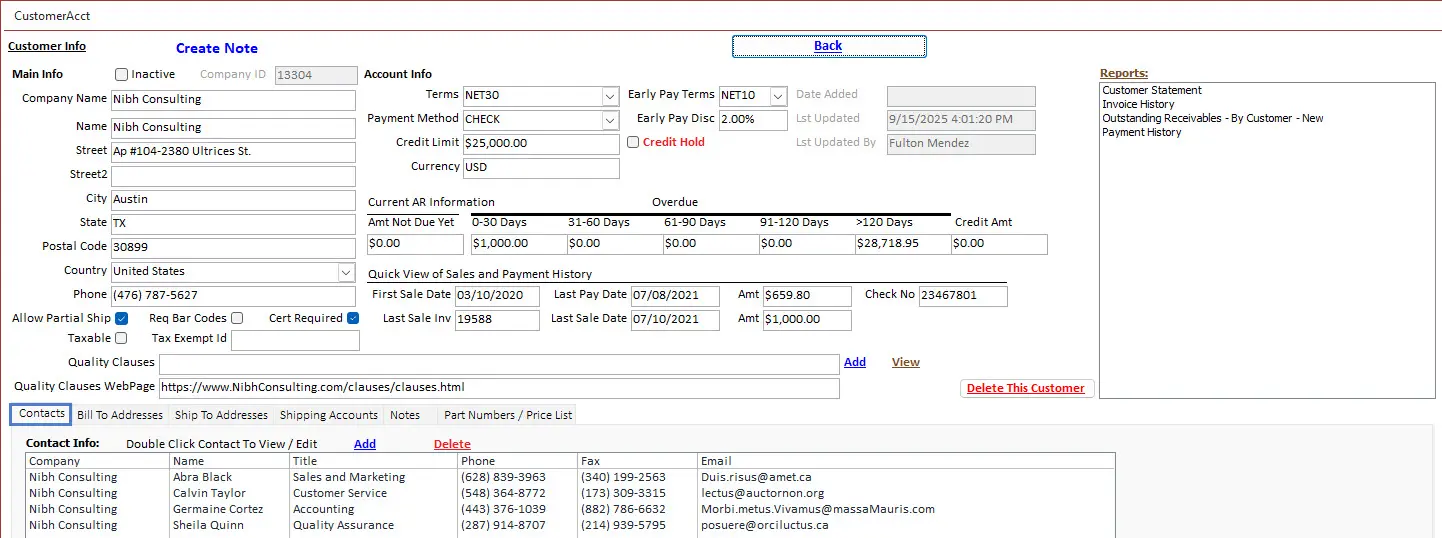
Customer Information and Contacts
Maintain customer details, purchasing contacts, Quality contacts, accounting contacts, phone numbers, email addresses, payment terms, and account information.
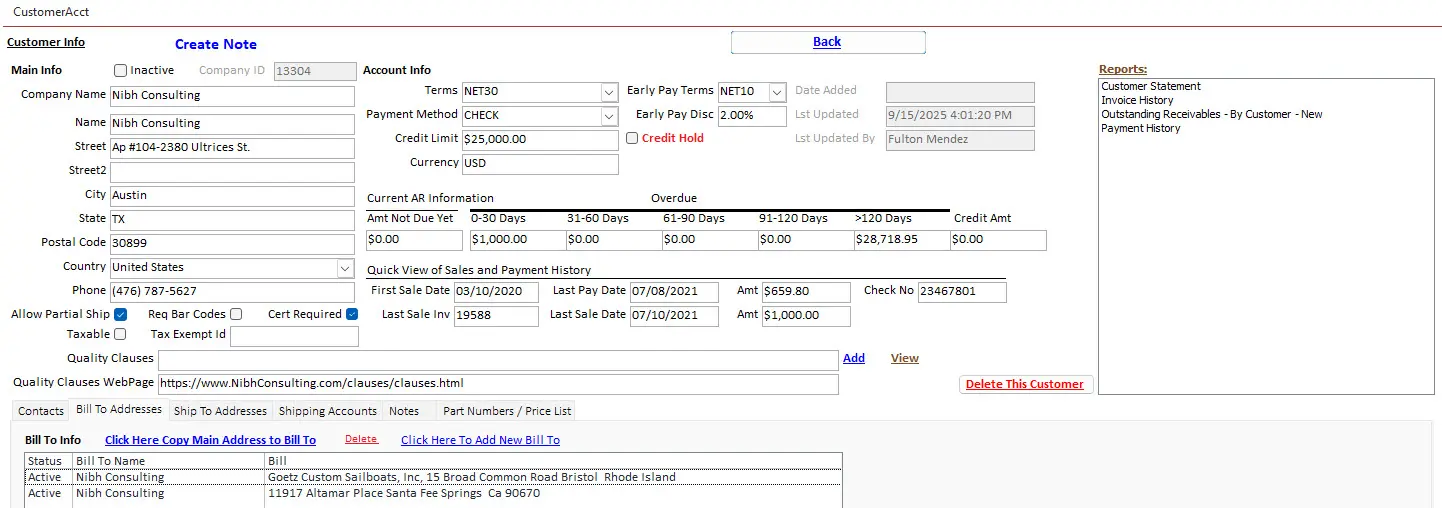
Bill-To Address Management
Manage multiple billing locations, Accounts Payable contacts, invoicing instructions, tax details, and payment requirements.
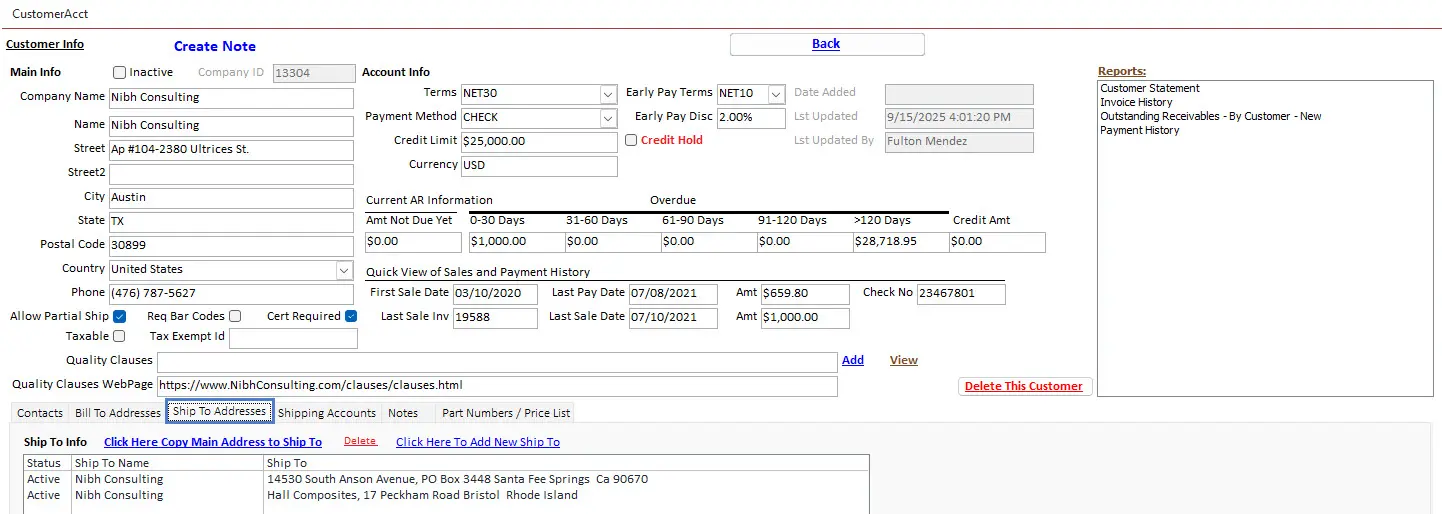
Ship-To Address Management
Track customer plants, warehouse locations, receiving contacts, dock instructions, freight terms, and delivery requirements.
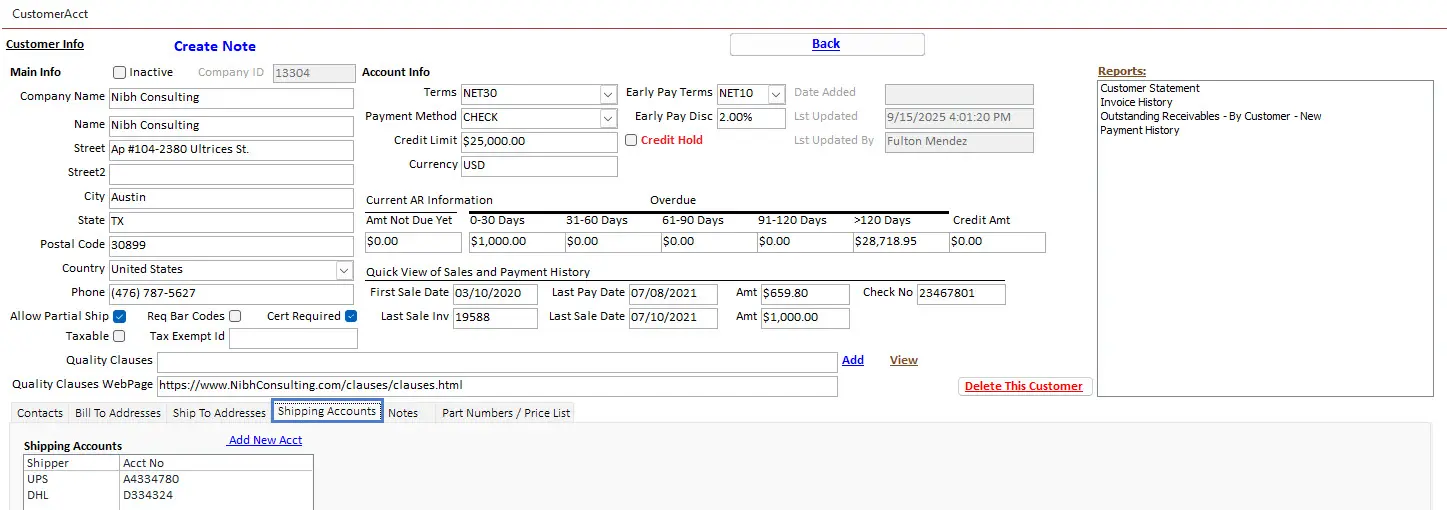
Customer Shipping Accounts
Maintain UPS, FedEx, DHL, freight, and other customer carrier-account information for shipment processing.
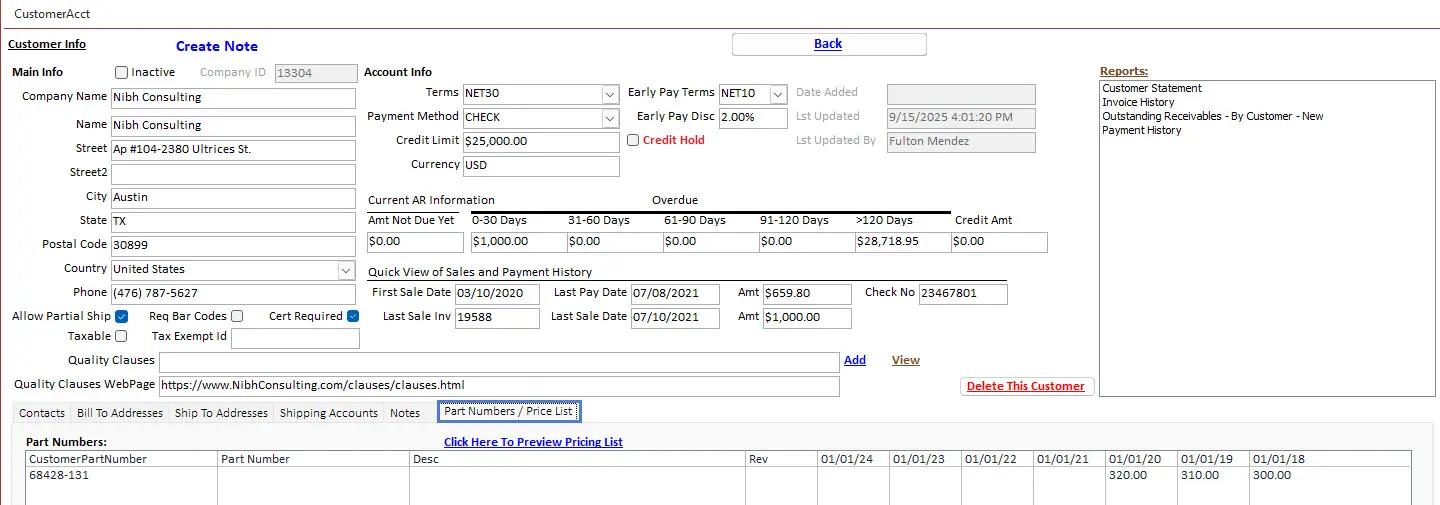
Customer Part Numbers and Pricing
Connect internal part numbers with customer-specific part numbers, revisions, descriptions, quantities, and pricing agreements.
Common Manufacturing Customer Management Problems
| Problem | Potential Result | Recommended Control |
|---|---|---|
| Customer Contacts Stored in Personal Outlook Accounts | Information is unavailable when employees are absent or leave the company. | Maintain shared controlled customer-contact records. |
| Bill-To and Ship-To Addresses Are Combined | Invoices or shipments may be sent to the wrong location. | Maintain separate address records and selections. |
| Customer Part Numbers Are Entered Manually | Order-entry, labeling, and shipping errors may occur. | Use controlled customer-to-internal part cross-references. |
| Pricing Is Stored in Spreadsheets | Expired or incorrect prices may be used. | Use customer, product, quantity, and effective-date pricing records. |
| Quality Requirements Are Kept in Attachments | Requirements may not reach Purchasing, Production, Inspection, or Shipping. | Record applicable clauses and flow them into operational records. |
| Shipping Accounts Are Looked Up Manually | Freight may be billed to the wrong account. | Store customer carrier accounts with the customer and Ship-To record. |
| Accounting Is Disconnected from Orders | Sales cannot see credit status or overdue balances. | Integrate customer orders, invoices, payments, and AR aging. |
| Customer History Is Spread Across Systems | Employees cannot see the complete relationship or current status. | Connect quotations, orders, shipments, invoices, quality, and communications. |
Customer Management Best Practices
- Assign every customer a unique account ID.
- Maintain separate customer contacts by responsibility.
- Control active and inactive contact status.
- Maintain separate Bill-To and Ship-To records.
- Store customer carrier and freight-account information.
- Connect customer part numbers with internal Item Master records.
- Preserve customer and internal revisions.
- Maintain customer-specific pricing with effective dates.
- Preserve pricing history.
- Record customer payment terms and credit limits.
- Connect customer quality clauses with Contract Review.
- Attach customer documents to applicable records.
- Flow customer requirements into Sales Orders and Work Orders.
- Maintain communication history for important decisions.
- Connect complaints with shipments and product genealogy.
- Monitor customer on-time delivery.
- Review Accounts Receivable and credit status.
- Protect customer information through role-based permissions.
- Periodically review customer records for accuracy.
- Use customer KPIs during Sales and Management Review.
Customer Management Software Selection Checklist
- Can multiple customer contacts be maintained?
- Can contacts be classified by department and responsibility?
- Can multiple Bill-To addresses be managed?
- Can multiple Ship-To addresses be managed?
- Can customer shipping accounts be stored?
- Can customer and internal part numbers be cross-referenced?
- Can customer revisions be tracked?
- Can customer-specific pricing be controlled?
- Can quantity breaks and effective dates be defined?
- Can pricing history be retained?
- Can customer quality clauses be stored and flowed down?
- Can contracts, drawings, and customer documents be attached?
- Can customer quotations and Sales Orders be viewed?
- Can customer demand be connected with MRP and planning?
- Can Work Orders be traced to customer orders?
- Can shipments and delivery performance be reviewed?
- Can invoices, payments, and AR aging be viewed?
- Can customer complaints and corrective actions be linked?
- Can users search and report across customer history?
- Is electronic audit history retained?
How Customer Management Integrates with Manufacturing ERP
| ERP Process | Customer Management Relationship |
|---|---|
| Quote Management | Uses customer contacts, part numbers, pricing, terms, requirements, and documents. |
| Contract Review | Evaluates the customer Purchase Order against quotations, requirements, and account conditions. |
| Sales Order Management | Receives approved customer, pricing, delivery, address, and requirement information. |
| Item Master | Connects internal products with customer part numbers, revisions, pricing, and documents. |
| MRP and Planning | Uses customer orders, schedules, and forecasts to calculate manufacturing demand. |
| Work Orders | Connects production with customer orders, product revisions, due dates, and requirements. |
| Quality Management | Maintains customer clauses, inspection requirements, complaints, and corrective actions. |
| Document Control | Stores customer contracts, drawings, specifications, instructions, and correspondence. |
| Shipping | Uses Ship-To addresses, carrier accounts, freight terms, packaging, and documentation requirements. |
| Accounts Receivable | Connects shipments with invoices, balances, payments, credit limits, and aging. |
| Traceability | Connects customers with shipped products, lots, serial numbers, Work Orders, and materials. |
| Management Reporting | Provides revenue, delivery, complaints, returns, receivables, and retention metrics. |
Customer Management with SimpleManufacturing™
SimpleManufacturing™ connects customer information with Quotations, Contract Reviews, Sales Orders, Item Master data, MRP, Work Orders, quality requirements, documents, shipments, invoices, Accounts Receivable, complaints, and product traceability.
| SimpleManufacturing™ Capability | Business Benefit |
|---|---|
| Customer Master Records | Centralizes account identity, status, terms, salesperson, credit, tax, and customer requirements. |
| Customer Contact Management | Maintains purchasing, Engineering, Quality, receiving, and Accounts Payable contacts. |
| Multiple Bill-To Addresses | Supports customer divisions, legal entities, and Accounts Payable locations. |
| Multiple Ship-To Addresses | Supports plants, warehouses, receiving locations, and special delivery instructions. |
| Customer Shipping Accounts | Provides carrier and freight-account information during shipment processing. |
| Part-Number Cross-References | Links internal products with customer part numbers, revisions, and descriptions. |
| Customer Pricing | Controls negotiated prices, quantity breaks, effective dates, and price history. |
| Quality Clause Management | Connects customer requirements with Contract Review, suppliers, production, inspections, and shipping. |
| Quotation and Order History | Provides complete commercial and demand history by customer. |
| Shipping History | Displays deliveries, tracking, documentation, and on-time performance. |
| Accounts Receivable Visibility | Shows invoices, balances, payment terms, credit status, and AR aging. |
| Complaint Management | Connects customer issues with shipments, products, Work Orders, and corrective actions. |
| Document Attachments | Stores contracts, Purchase Orders, drawings, clauses, pricing agreements, and communications. |
| Integrated Reporting | Provides customer revenue, order, delivery, quality, financial, and relationship reporting. |
| Electronic Audit History | Records significant changes, users, dates, approvals, and status history. |
One Customer Record Connected with the Complete Manufacturing Process
SimpleManufacturing™ gives Sales, Engineering, Quality, Planning, Production, Shipping, Accounting, and management access to consistent customer information and history.
Frequently Asked Questions About Customer Management Software
What is customer management software for manufacturing?
Customer management software centralizes customer contacts, addresses, part numbers, pricing, quality requirements, orders, shipments, invoices, receivables, documents, and communications.
Is customer management software the same as CRM?
It includes many CRM functions but also connects customer information with manufacturing processes such as Contract Review, Item Master data, Work Orders, quality clauses, shipping, invoicing, and traceability.
Can multiple customer contacts be stored?
Yes. Contacts can be maintained for Purchasing, Engineering, Quality, Accounts Payable, shipping, receiving, program management, and other responsibilities.
Can customers have multiple billing addresses?
Yes. Multiple Bill-To locations can be maintained for customer divisions, legal entities, and Accounts Payable departments.
Can customers have multiple shipping addresses?
Yes. Multiple Ship-To locations can be maintained with receiving contacts, dock instructions, carrier requirements, and packaging instructions.
Can customer shipping accounts be stored?
Yes. UPS, FedEx, DHL, freight, and other customer carrier accounts can be linked with the customer or shipping location.
Can customer part numbers be cross-referenced?
Yes. Customer part numbers, revisions, and descriptions can be connected with internal Item Master part numbers and revisions.
Can the software manage customer-specific pricing?
Yes. Pricing can be controlled by customer, product, revision, quantity, effective date, contract, and quotation.
Does the system retain pricing history?
Yes. New pricing can be added without changing the price used on previous quotations, orders, shipments, and invoices.
Can customer quality clauses be managed?
Yes. Customer clauses can be connected with Contract Review, supplier Purchase Orders, Work Orders, inspections, documentation, packaging, and shipment records.
Can customer documents be attached?
Yes. Contracts, Purchase Orders, drawings, specifications, quality clauses, pricing agreements, shipping guides, and correspondence can be linked with applicable records.
How does Customer Management integrate with quoting?
Quotation records can use customer contacts, part numbers, pricing, payment terms, requirements, and historical activity.
How does Customer Management integrate with Sales Orders?
Approved customer, pricing, address, delivery, product, and quality information can flow into the Sales Order.
Can customer orders be connected with Work Orders?
Yes. Work Orders can reference the customer, Sales Order, customer Purchase Order, product, revision, quantity, due date, and quality requirements.
Can customer shipments be tracked?
Yes. Shipment history can include Ship-To address, carrier, tracking, quantity, documentation, delivery date, and on-time performance.
Can the system display Accounts Receivable information?
Yes. Users can review invoices, balances, payment terms, credit limits, payment history, and Accounts Receivable aging.
Can customer complaints be connected with corrective action?
Yes. Complaints can be connected with customers, orders, shipments, products, lots, serial numbers, investigations, and corrective actions.
Can customer information support ISO 9001 and AS9100?
The software supports customer-requirement review, communication, quality-clause management, traceability, complaint handling, document control, and retained records.
Does software create ISO 9001 or AS9100 compliance?
No. Compliance depends on the organization’s quality-management system, procedures, implementation, competency, leadership, and objective evidence. Software supports those processes.
How does SimpleManufacturing™ manage customers?
SimpleManufacturing™ connects customer records with Quotations, Contract Review, Sales Orders, Item Master data, planning, Work Orders, quality, shipping, invoicing, receivables, complaints, and traceability.
Connect Customer Relationships with Manufacturing Operations
Effective customer management requires more than a contact list. Manufacturers need controlled customer addresses, contacts, part-number cross-references, pricing agreements, quality requirements, shipping accounts, order history, invoices, receivables, documents, and communications.
When customer information is integrated with Quotations, Contract Reviews, Sales Orders, Work Orders, quality, shipping, accounting, and product traceability, every department can work from the same approved information.
One Customer Record from Quotation Through Payment
SimpleManufacturing™ connects customer requirements, orders, production, delivery, quality, invoicing, payment, and history within one integrated manufacturing ERP system.
SimpleManufacturing™ customer management software is designed for small and mid-sized manufacturers requiring customer-specific pricing, order management, quality requirements, shipping controls, receivables visibility, and complete operational history.
Request a Customer Management Software Demonstration
Call SimpleManufacturing™ at 858-335-6421.