
What Is Shop Floor Tracking in ERP Software?
Shop floor tracking is the process of recording and monitoring production activity as manufacturing work is performed. It provides real-time visibility into Work Orders, routing operations, employee labor, completed quantities, scrap, downtime, work-center activity, material usage, inspections, and production status.
When shop floor activity is integrated with manufacturing ERP software, information entered by production employees immediately updates scheduling, Work Order progress, inventory, quality, labor cost, traceability, and management reporting.
Instead of relying on handwritten travelers, spreadsheets, whiteboards, or end-of-shift updates, manufacturers can view current production activity and respond to delays, shortages, bottlenecks, quality problems, and capacity constraints while the work is still in progress.
Shop floor tracking connects the production plan with the work actually performed, giving manufacturers an accurate, current view of labor, quantities, operations, materials, quality, and manufacturing performance.
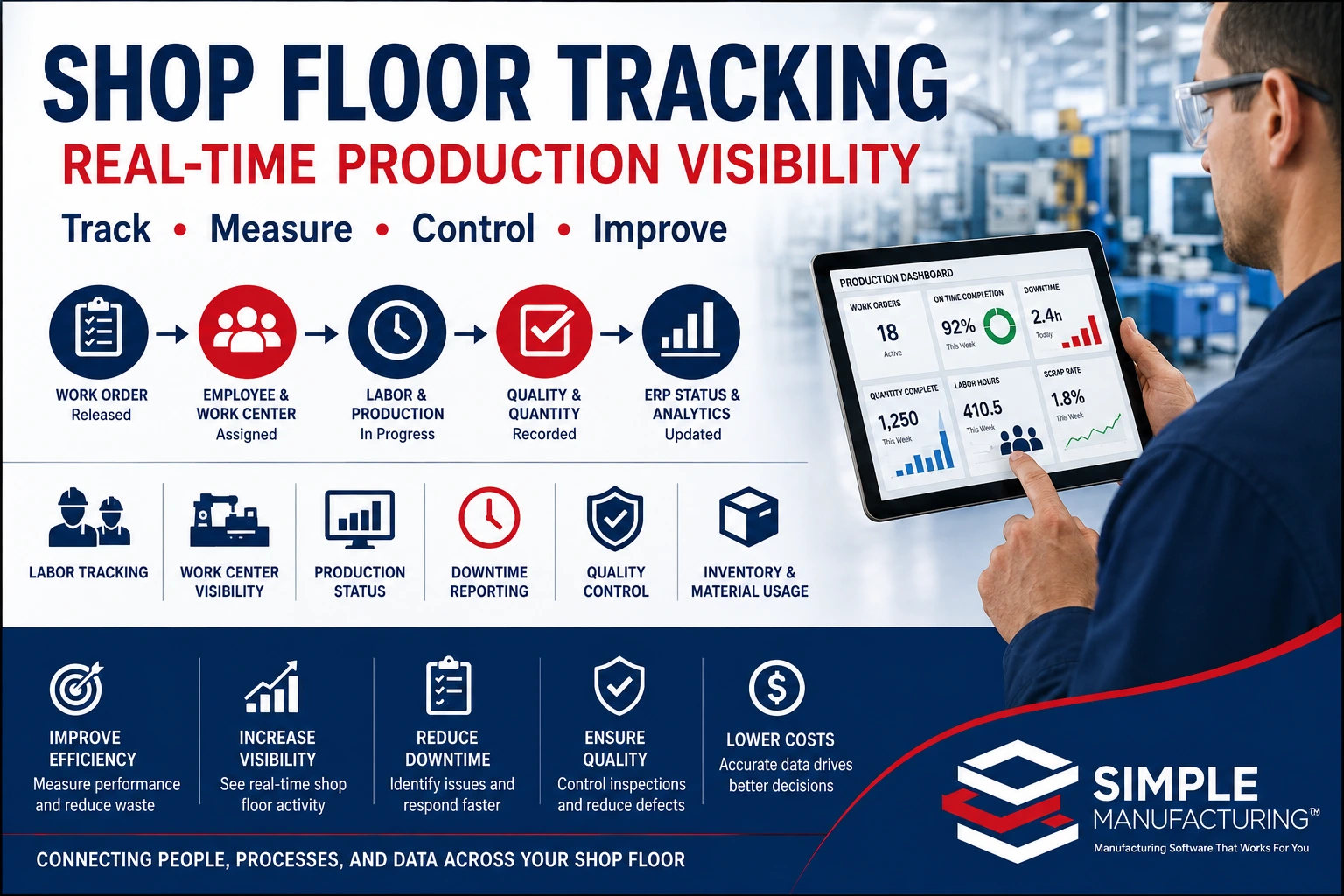
Shop floor tracking connects Work Orders, labor reporting, work centers, production quantities, quality activity, inventory transactions, scheduling, and manufacturing performance.
What Is Shop Floor Tracking?
Shop floor tracking is the real-time or near-real-time collection of manufacturing activity directly from the production floor.
The system records what employees and machines are doing, which Work Orders and operations are active, how much production has been completed, whether problems have occurred, and what work remains.
Information commonly tracked includes:
- Work Order status
- Current routing operation
- Employee labor hours
- Setup and production time
- Completed quantities
- Accepted and rejected quantities
- Scrap and rework
- Machine or work-center activity
- Downtime
- Material issues and consumption
- Inspection and test activity
- Production holds
- Operation start and completion dates
- Estimated and actual production performance
Shop Floor Tracking vs. Manual Production Reporting
Manual reporting usually records production after the activity has occurred. Integrated shop floor tracking updates the ERP system as employees start work, complete operations, report quantities, identify problems, or transfer production to the next step.
Shop Floor Tracking vs. Shop Floor Control
The terms shop floor tracking and shop floor control are related but not identical.
| Function | Primary Purpose | Examples |
|---|---|---|
| Shop Floor Tracking | Records and reports what is happening during production. | Labor hours, quantities, current operation, downtime, scrap, and Work Order progress. |
| Shop Floor Control | Directs and controls which work may be performed and how it moves through production. | Operation sequencing, employee qualification, inspection holds, Work Order release, and transfer authorization. |
| Manufacturing Execution | Coordinates detailed production execution using live information from employees, machines, materials, and quality processes. | Dispatching, labor collection, data capture, traceability, quality gates, and performance analysis. |
An integrated manufacturing ERP system can combine all three functions. It tells employees what work is authorized, records what they do, and uses the resulting information to control subsequent operations.
Why Shop Floor Visibility Matters
Manufacturers cannot manage production effectively when current status is known only through verbal updates, paper travelers, or spreadsheets updated at the end of the day.
Current Production Status
Supervisors can see which jobs are waiting, active, delayed, on hold, awaiting inspection, or complete.
Labor Accountability
Employee time is connected with the exact Work Order and routing operation performed.
Bottleneck Visibility
Queues, overdue operations, downtime, and excessive cycle times reveal production constraints.
Schedule Accuracy
Current operation progress provides better information for production scheduling and delivery forecasting.
Quality Control
Production can be stopped when inspection fails, equipment is unavailable, or a nonconformance requires review.
Actual Costing
Labor, machine time, material usage, scrap, and rework become part of the Work Order’s actual manufacturing cost.
How Shop Floor Tracking Works
Operation Released
Assigned Work
Activity Recorded
Status Updated
Schedules Updated
| Production Event | ERP Update |
|---|---|
| Employee Starts Setup | Records employee, Work Order, operation, work center, and setup start time. |
| Setup Completed | Records actual setup time and releases the production phase where applicable. |
| Production Begins | Updates operation status and employee or machine activity. |
| Quantity Reported | Updates completed, accepted, rejected, rework, and remaining quantities. |
| Downtime Reported | Records downtime reason, duration, equipment, and production impact. |
| Inspection Required | Creates or updates a quality task and may place production on hold. |
| Operation Completed | Records completion, actual time, quantities, and eligibility for the next operation. |
| Work Order Completed | Updates finished-goods inventory, traceability, actual cost, and production status. |
Work Order Integration
The Work Order provides the production structure used by the shop floor tracking system.
Employees may view:
- Work Order number
- Part number and revision
- Product description
- Customer or Sales Order
- Quantity required
- Quantity completed
- Remaining quantity
- Current routing operation
- Required materials
- Drawings and work instructions
- Inspection requirements
- Due date and priority
- Lot and serial-number requirements
- Production notes
The shop floor should work from the same controlled Work Order information used by Production Planning, Inventory, Quality, Scheduling, and management.
Learn more in our Manufacturing Work Order Management guide.
Tracking Production by Routing Operation
Manufacturing routing operations divide the Work Order into controlled production steps.
Examples include:
- Material preparation
- Setup
- Machining
- Fabrication
- Assembly
- Welding
- In-process inspection
- Testing
- Outside processing
- Final inspection
- Packaging
| Operation Information | Tracking Purpose |
|---|---|
| Operation Number | Identifies the sequence within the routing. |
| Work Center | Identifies where the operation is performed. |
| Employee | Identifies who performed the work. |
| Machine | Identifies equipment used. |
| Planned Setup Time | Provides the estimate for preparation activity. |
| Actual Setup Time | Records actual preparation activity. |
| Planned Run Time | Provides the estimated production duration. |
| Actual Run Time | Records actual production duration. |
| Quantity Completed | Records operation output. |
| Operation Status | Identifies waiting, active, held, complete, or rejected work. |
Learn more in our Manufacturing Routing Software guide.
Employee Labor Tracking
Employees can start and stop labor against the specific Work Order operation being performed.
Labor records may include:
- Employee
- Work Order
- Operation
- Work center
- Machine
- Start time
- Stop time
- Setup hours
- Production hours
- Inspection hours
- Rework hours
- Indirect labor hours
- Completed quantity
- Rejected quantity
- Labor rate
- Extended labor cost
| Labor Category | Example Activity |
|---|---|
| Setup Labor | Preparing equipment, tooling, programs, fixtures, and material. |
| Direct Production Labor | Machining, assembly, fabrication, testing, or other product activity. |
| Inspection Labor | First-piece, in-process, final, or receiving inspection. |
| Rework Labor | Correcting controlled nonconforming product. |
| Indirect Labor | Meetings, maintenance, training, cleanup, or other non-Work Order activity. |
Learn more in our Employee Time Tracking for Manufacturing guide.
Measuring Labor Efficiency
Because labor is recorded by Work Order and operation, managers can compare planned labor with actual performance.
| Labor Metric | Business Use |
|---|---|
| Estimated vs. Actual Setup Hours | Identifies setup improvement opportunities. |
| Estimated vs. Actual Run Hours | Measures production efficiency and routing accuracy. |
| Labor Hours per Unit | Compares production performance between jobs and employees. |
| Rework Labor | Measures the cost of correcting defects. |
| Indirect Labor | Identifies time not charged directly to production. |
| Labor Utilization | Compares available labor time with productive time. |
Actual Labor Improves Future Planning
Historical setup and production times can improve routing standards, production schedules, customer quotations, staffing decisions, and capacity estimates.
Production Quantity Reporting
Shop floor employees report quantities as operations are performed.
| Quantity Type | Meaning |
|---|---|
| Quantity Started | Units introduced into the operation. |
| Quantity Completed | Units completing the operation. |
| Quantity Accepted | Units meeting applicable requirements. |
| Quantity Rejected | Units failing inspection or testing. |
| Quantity Scrapped | Units permanently removed from production. |
| Quantity Reworked | Units requiring additional controlled processing. |
| Quantity Remaining | Units still required for the operation or Work Order. |
Accurate quantity reporting improves Work Order status, WIP visibility, production scheduling, finished-goods planning, and customer delivery forecasts.
Work Center Activity Monitoring
A work center represents a production department, resource group, machine group, or operational area.
Shop floor tracking can show:
- Current Work Orders
- Operations waiting in queue
- Operations currently active
- Completed operations
- Past-due operations
- Employees assigned
- Machines in use
- Available capacity
- Downtime
- Setup and production performance
- Average queue time
- Production throughput
Queue Visibility
Review work waiting to be performed and prioritize according to due date, Work Order priority, or material readiness.
Capacity Visibility
Compare assigned production hours with available employee and machine capacity.
Performance Visibility
Compare estimated times, actual times, output, downtime, and quality performance.
Bottleneck Visibility
Identify growing queues, overdue operations, recurring downtime, and excessive processing time.
Machine and Equipment Tracking
Shop floor activity may be connected with the machine or equipment used to perform the operation.
Machine-related records can include:
- Machine ID
- Work center
- Work Order and operation
- Employee
- Setup time
- Run time
- Idle time
- Downtime
- Downtime reason
- Quantity produced
- Scrap quantity
- Machine rate
- Maintenance status
- Calibration status when applicable
Do Not Assign Work to Unavailable Equipment
Equipment that is under maintenance, out of calibration, damaged, or otherwise unavailable should be visible to Production Scheduling and shop floor employees.
Downtime Reporting
Downtime is time during which an employee, machine, operation, or Work Order cannot proceed as planned.
Common downtime reasons include:
- Machine failure
- Tooling failure
- Material shortage
- Waiting for inspection
- Waiting for engineering
- Waiting for customer approval
- Missing document or program
- Employee unavailable
- Scheduled maintenance
- Quality hold
- Supplier or outside-processing delay
- Power or network interruption
| Downtime Field | Purpose |
|---|---|
| Start and Stop Time | Measures the duration of the event. |
| Reason Code | Supports consistent classification and reporting. |
| Work Order and Operation | Identifies the affected production activity. |
| Machine or Work Center | Identifies the affected resource. |
| Description | Provides additional information about the event. |
| Responsible Department | Identifies who must respond. |
| Corrective Action | Connects significant recurring issues with improvement activity. |
Identifying Production Bottlenecks
A bottleneck occurs when one resource or process limits the throughput of the overall production system.
Indicators may include:
- Growing operation queues
- Repeatedly past-due operations
- High machine utilization with low output
- Excessive setup time
- Repeated downtime
- Waiting for inspection
- Insufficient qualified employees
- Outside-processing delays
- Unbalanced routing times
- Repeated rework
Shop floor data allows managers to identify bottlenecks using actual production activity rather than assumptions or anecdotal reports.
Real-Time Production Status
Current production status helps management answer questions such as:
- Which Work Orders are currently active?
- Which operation is each job performing?
- How many units have been completed?
- How much production remains?
- Which jobs are late?
- Which jobs are on hold?
- Which jobs are waiting for material?
- Which jobs are waiting for inspection?
- Which jobs are at outside processing?
- Which customer deliveries may be affected?
| Production Status | Meaning |
|---|---|
| Released | The Work Order or operation is authorized but has not started. |
| Setup | Employees are preparing tools, machines, programs, or materials. |
| In Process | Production activity is underway. |
| Awaiting Inspection | Production requires quality acceptance. |
| On Hold | Work is temporarily blocked. |
| Outside Processing | Work is at or awaiting an external supplier. |
| Operation Complete | The current routing operation is complete. |
| Work Order Complete | Accepted production has been received into finished goods. |
Production Scheduling Integration
Production schedules are more reliable when they use current shop floor activity.
Shop floor updates can affect:
- Operation start dates
- Projected completion dates
- Work-center capacity
- Machine availability
- Employee availability
- Queue priorities
- Customer delivery forecasts
- Outside-processing schedules
- Material need dates
Schedule
Execution
Quantity, and Status
Completion Forecast
Schedule
Learn more in our Manufacturing Production Scheduling guide.
Material Usage and Inventory Integration
Shop floor tracking can connect material activity with the Work Order and operation where the material is used.
Material transactions may include:
- Material allocation
- Material picking
- Material issue
- FIFO cost-layer consumption
- Lot or serial-number consumption
- Material substitution
- Additional material request
- Unused material return
- Scrapped material
- Customer-owned material usage
Production Reporting and Inventory Must Agree
When material is physically consumed but not recorded, inventory is overstated and Work Order cost is understated. Integrated transactions keep quantity, cost, traceability, and WIP current.
Learn more in our Inventory Control Software guide.
Quality Management Integration
Shop floor tracking should include quality requirements within the production process.
Employees may be required to complete:
- First-piece inspection
- In-process inspection
- Final inspection
- Functional testing
- Measurement recording
- Inspection checklist completion
- Lot or serial-number verification
- Process certification verification
- Nonconformance reporting
Completed
Test Required
Rejected
Rework, or Hold
Do Not Allow Unverified Production to Move Forward
When a routing operation requires inspection, the system should prevent transfer or completion until the required quality record is accepted or an authorized disposition is recorded.
Scrap, Rework, and Nonconformance Reporting
Shop floor employees are often the first to identify a production problem.
The employee should be able to report:
- Work Order and operation
- Part number and revision
- Quantity affected
- Lot or serial number
- Defect category
- Requirement
- Actual condition
- Machine or equipment
- Material involved
- Photographs or attachments
- Immediate containment
Reported defects may create:
- Nonconformance record
- Quality hold
- Rework operation
- Scrap transaction
- Engineering review
- Corrective-action evaluation
- Customer-approval request
Employee Qualification and Training Control
A shop floor tracking system can verify that employees are qualified before they begin certain operations.
Qualifications may include:
- Machine-operation authorization
- Welding certification
- Inspection qualification
- Special-process training
- Customer-program training
- Safety training
- Document-revision training
- Equipment-specific authorization
Integrating training with shop floor activity reduces the risk of employees performing controlled work without current qualification.
Drawings, Instructions, and Document Control
Employees should have access to the current approved documents required for the selected Work Order and operation.
Documents may include:
- Engineering drawings
- Work instructions
- Setup instructions
- CNC programs
- Assembly procedures
- Inspection plans
- Customer specifications
- Material specifications
- Test procedures
- Photographs and visual aids
- Packaging instructions
Avoid Uncontrolled Local Copies
Shop floor access should display or open the current controlled revision rather than relying on printed or locally stored documents that may become obsolete.
Lot and Serial Number Traceability
Shop floor tracking can capture which materials, employees, equipment, operations, and inspection results were associated with each production lot or serialized unit.
Serial Number
Routing Operations
and Inspections
Lot or Serial
Shipment
Traceability records may identify:
- Supplier
- Purchase Order
- Material receipt
- Material lot, heat, batch, or serial number
- Work Order
- Routing operations
- Employees
- Machines and equipment
- Inspection and test results
- Outside-processing suppliers
- Finished-product lot or serial number
- Customer shipment
Learn more in our Lot and Serial Number Traceability guide.
Outside Processing Visibility
Work Orders may include routing operations performed by suppliers or specialized processors.
Shop floor and production-management users may track:
- Operation requiring outside processing
- Approved supplier or processor
- Purchase Order
- Quantity sent
- Date sent
- Expected return date
- Quantity received
- Supplier certification
- Inspection status
- Actual processing cost
- Next routing operation
This prevents jobs from disappearing from the production schedule while they are outside the facility.
Shop Floor Tracking and Actual Manufacturing Cost
Shop floor transactions provide important elements of actual Work Order cost.
| Cost Component | Shop Floor Source |
|---|---|
| Direct Labor | Employee setup, production, inspection, and rework time. |
| Machine Cost | Machine or equipment hours multiplied by applicable rates. |
| Material Cost | Actual FIFO inventory layers and quantities consumed. |
| Scrap Cost | Material, labor, and processing lost through rejected production. |
| Rework Cost | Additional labor, material, inspection, and processing required. |
| Outside Processing | Supplier services connected with routing operations. |
Accurate labor and production reporting improves Work in Process valuation, actual unit cost, quotation history, margin analysis, and Finished Goods inventory valuation.
Learn more in our Actual Work Order Costing guide.
Shop Floor Dashboards
Dashboards can provide role-specific views for employees, supervisors, planners, Quality, and management.
Employee Dispatch List
Shows assigned operations, priorities, due dates, documents, and material readiness.
Supervisor Dashboard
Shows active jobs, employees, quantities, downtime, holds, late operations, and bottlenecks.
Work Center Dashboard
Shows queue, available capacity, setup activity, active operations, and overdue work.
Quality Dashboard
Shows inspections required, rejected quantities, open nonconformances, and production holds.
Planning Dashboard
Shows operation progress, projected completion dates, material shortages, and schedule risks.
Management Dashboard
Shows throughput, labor efficiency, downtime, scrap, on-time completion, WIP, and productivity trends.
Shop Floor Tracking KPIs
| KPI | What It Measures |
|---|---|
| Schedule Adherence | Actual production progress compared with the planned schedule. |
| Work Order Cycle Time | Time from Work Order release through completion. |
| Operation Cycle Time | Time required to complete an individual routing operation. |
| Labor Efficiency | Estimated labor compared with actual labor. |
| Labor Utilization | Available employee time compared with productive time. |
| Machine Utilization | Available equipment time compared with productive operating time. |
| Setup Time | Actual setup duration by machine, product, employee, or operation. |
| Throughput | Accepted production completed during a defined period. |
| First-Pass Yield | Percentage accepted without rework. |
| Scrap Rate | Quantity or value lost during production. |
| Rework Rate | Quantity requiring additional processing. |
| Downtime Rate | Production time lost to unplanned or planned interruptions. |
| Queue Time | Time work waits before an operation begins. |
| On-Time Work Order Completion | Percentage completed by the planned date. |
Overall Equipment Effectiveness and Shop Floor Data
Some manufacturers use Overall Equipment Effectiveness to evaluate equipment performance through availability, performance, and quality.
| OEE Element | Shop Floor Data Used |
|---|---|
| Availability | Scheduled production time, downtime, and operating time. |
| Performance | Actual output compared with ideal or planned production rate. |
| Quality | Accepted quantity compared with total produced quantity. |
OEE can be useful when data definitions are consistent and measurements are appropriate for the equipment and production environment. It should be combined with other metrics rather than treated as the only measure of manufacturing performance.
Common Shop Floor Tracking Problems
| Problem | Possible Result | Better Control |
|---|---|---|
| Employees Report Labor at the End of the Shift | Production status remains outdated and time is reconstructed from memory. | Use start-and-stop reporting during production. |
| Work Orders Tracked on Whiteboards | Planning, Quality, Inventory, and management do not share current status. | Use a centralized ERP production dashboard. |
| Quantities Are Not Reported by Operation | Managers cannot identify where production is delayed or lost. | Record quantities at applicable routing steps. |
| Downtime Reasons Are Free-Form | Trend analysis becomes inconsistent. | Use controlled reason codes with optional comments. |
| Employees Use Obsolete Instructions | Production may be completed against the wrong revision. | Link controlled documents with the Work Order operation. |
| Material Consumption Is Not Recorded | Inventory and Work Order cost become inaccurate. | Integrate shop floor material issues and returns. |
| Inspection Is Separate from Production | Work may move forward without required acceptance. | Use routing-based quality gates. |
| Scrap and Rework Are Hidden | Efficiency and cost reports appear better than actual performance. | Record rejected quantities, dispositions, and rework activity. |
| Every Employee Sees Every Function | The interface becomes confusing and creates security risk. | Use role-based shop floor screens. |
Shop Floor Tracking Best Practices
- Use one controlled Work Order and routing structure.
- Provide each employee with a simple role-based interface.
- Display the correct part number and revision.
- Show only authorized and released production work.
- Use current controlled drawings and instructions.
- Verify employee training and qualifications.
- Verify machine and measuring-equipment availability.
- Record setup and run time separately.
- Record labor as the work is performed.
- Report completed, rejected, scrap, and rework quantities.
- Use controlled downtime reason codes.
- Connect material issues and returns with production activity.
- Maintain lot and serial-number traceability.
- Integrate inspections and quality holds.
- Prevent operation transfer when required approvals are incomplete.
- Track outside-processing operations.
- Provide real-time Work Order and work-center dashboards.
- Compare planned and actual production times.
- Analyze labor, machine, scrap, downtime, and throughput trends.
- Use historical performance to improve routings and schedules.
- Keep shop floor reporting fast and easy to use.
- Avoid unnecessary data entry that does not support a business decision.
- Train employees on why accurate production reporting matters.
Barcode and Shop Floor Data Collection
Barcode scanning can reduce manual entry and help employees select the correct Work Order, operation, material, lot, serial number, or employee record.
Barcodes may be used for:
- Employee identification
- Work Order selection
- Routing operation selection
- Material issue
- Lot and serial-number capture
- Machine selection
- Location transfer
- Quantity reporting
- Inspection identification
- Finished-goods receipt
Scanning Should Support Validation
The system should verify that the scanned Work Order, material, lot, operation, employee, or location is valid for the transaction rather than simply accepting any barcode value.
Shop Floor Terminals and Hardware
Shop floor tracking can be delivered through several types of production-floor devices.
| Device | Typical Use |
|---|---|
| Windows Workstation | Detailed production reporting, documents, inspections, and Work Order review. |
| Touchscreen Terminal | Simple employee dispatching, labor start and stop, quantity entry, and status updates. |
| Barcode Scanner | Rapid identification of employees, Work Orders, materials, lots, and operations. |
| Tablet | Mobile production, inspection, maintenance, and supervisor activity. |
| Machine Interface | Automated operating, cycle, quantity, or downtime data when supported. |
| Label Printer | Material, WIP, lot, serial, inspection, and finished-product labels. |
Hardware selection should consider the production environment, gloves, dust, vibration, moisture, available space, network coverage, and the amount of information employees must enter.
Real-Time vs. Batch Production Reporting
| Reporting Method | Advantages | Limitations |
|---|---|---|
| Real-Time Reporting | Provides current status, immediate problem visibility, and accurate labor timing. | Requires accessible terminals, employee adoption, and reliable procedures. |
| End-of-Shift Batch Reporting | May require fewer shop floor terminals. | Status is delayed, time is estimated, and errors may increase. |
| Supervisor Entry | Provides centralized control over reporting. | Creates an administrative bottleneck and separates records from the employee performing the work. |
| Automated Machine Collection | Can capture detailed run and downtime information with limited manual entry. | Requires compatible equipment, integration, validation, and contextual employee or Work Order data. |
Many manufacturers use a hybrid approach that combines employee reporting with automated machine data where it creates measurable value.
Implementing Shop Floor Tracking
Processes and Goals
Routings, and Data
Employee Screens
Validate
Improve
Define the Business Objectives
Determine which decisions the new shop floor information must support, such as delivery status, labor cost, downtime, bottlenecks, or production efficiency.
Standardize Work Orders and Routings
Accurate operation sequences, estimates, work centers, documents, and quality requirements are necessary for meaningful reporting.
Simplify the Employee Interface
Employees should be able to locate work, start and stop labor, report quantities, identify problems, and access instructions with minimal navigation.
Pilot with a Controlled Area
Begin with a department, work center, product family, or production team before expanding throughout the facility.
Validate the Data
Compare system records with observed shop floor activity and correct unclear procedures, routing errors, and reporting gaps.
Use the Information
Employees are more likely to report accurately when management uses the information to solve production problems rather than merely collecting data.
How Shop Floor Tracking Integrates with Manufacturing ERP
| ERP Process | Shop Floor Relationship |
|---|---|
| Sales Orders | Provide customer demand, due dates, and order priorities. |
| Item Master | Provides product identity, revision, units, and control requirements. |
| Bills of Materials | Provide required production materials. |
| MRP | Creates purchasing and manufacturing requirements. |
| Work Orders | Authorize production and provide quantity, materials, routing, and quality requirements. |
| Production Scheduling | Assigns operations to work centers, employees, machines, and dates. |
| Inventory | Records material issues, consumption, returns, scrap, and finished-goods receipts. |
| Quality Management | Controls inspections, nonconformances, rework, and production holds. |
| Document Control | Provides current drawings, procedures, and work instructions. |
| Employee Training | Verifies qualifications before controlled work begins. |
| Maintenance | Identifies machine availability, downtime, and required service. |
| Costing | Uses actual labor, machine, material, scrap, and processing activity. |
| Shipping | Uses completed finished-goods inventory to fulfill customer demand. |
Shop Floor Tracking with SimpleManufacturing™
SimpleManufacturing™ connects shop floor activity with Work Orders, manufacturing routings, production scheduling, employee labor, inventory, quality management, document control, lot and serial traceability, actual costing, and finished-goods completion.
| SimpleManufacturing™ Capability | Business Benefit |
|---|---|
| Employee Work Queue | Shows released and assigned Work Order operations. |
| Labor Start and Stop | Records employee setup and production time by operation. |
| Quantity Reporting | Records completed, accepted, rejected, scrap, and rework quantities. |
| Routing Status | Shows current and remaining operations. |
| Work Center Visibility | Displays queue, current work, employees, capacity, and late operations. |
| Material Integration | Connects material issues, FIFO cost, lots, serials, substitutions, and returns. |
| Quality Integration | Connects inspections, tests, nonconformances, rework, and holds. |
| Document Access | Provides current drawings, specifications, and instructions. |
| Employee Qualification | Supports verification of training and controlled-operation eligibility. |
| Downtime Reporting | Records duration, reason, equipment, and production impact. |
| Lot and Serial Traceability | Connects materials, employees, operations, inspections, and finished products. |
| Actual Labor Cost | Adds employee time and applicable labor rates to the Work Order. |
| Production Dashboards | Provides current status, bottlenecks, quantities, due dates, holds, and performance. |
| Finished-Goods Completion | Creates accepted inventory with quantity, cost, and genealogy. |
One Production Record from Work Assignment Through Completion
SimpleManufacturing™ keeps employees, materials, routing operations, quantities, machines, quality activity, traceability, labor cost, and production status connected with the Work Order being performed.
Frequently Asked Questions About Shop Floor Tracking
What is shop floor tracking?
Shop floor tracking is the process of recording and monitoring Work Order activity, employee labor, production quantities, routing operations, machine activity, quality, downtime, and manufacturing status as work is performed.
What is shop floor tracking in ERP software?
ERP-integrated shop floor tracking updates production, inventory, labor, scheduling, quality, traceability, costing, and management reporting from the same production transactions.
What information is tracked on the shop floor?
Manufacturers commonly track employees, Work Orders, operations, setup time, production time, quantities, machines, downtime, scrap, rework, inspections, materials, lots, serial numbers, and production status.
Why is shop floor visibility important?
It helps manufacturers identify current production status, late jobs, material shortages, bottlenecks, downtime, quality problems, labor performance, and delivery risks.
What is the difference between shop floor tracking and shop floor control?
Tracking records what is happening. Control determines which work is authorized, which sequence must be followed, and whether work can move to the next operation.
How is labor tracked?
Employees start and stop time against a Work Order and routing operation, recording setup, production, inspection, rework, or indirect labor.
Can shop floor tracking calculate labor cost?
Yes. Employee hours can be multiplied by applicable labor rates and accumulated as part of actual Work Order cost.
How are production quantities reported?
Employees can report started, completed, accepted, rejected, scrap, rework, and remaining quantities by Work Order operation.
What is a work center?
A work center is a production department, machine group, resource group, or operational area where one or more routing operations are performed.
How does shop floor tracking identify bottlenecks?
Growing queues, overdue operations, high downtime, excessive setup, low throughput, and work waiting for inspection or material can identify production constraints.
What is downtime reporting?
Downtime reporting records when production stops, how long the interruption lasted, which resource was affected, and why the event occurred.
Can shop floor tracking support barcode scanning?
Yes. Barcodes can identify employees, Work Orders, operations, materials, lots, serial numbers, machines, locations, and completed products.
How does shop floor tracking support quality?
It can create inspection tasks, record measurements, report nonconformances, place production on hold, control rework, and prevent operation completion until acceptance.
How does shop floor tracking support traceability?
It connects material lots and serial numbers with Work Orders, employees, machines, routing operations, inspections, finished products, and customer shipments.
Does shop floor tracking replace production scheduling?
No. Scheduling creates the production plan. Shop floor tracking reports actual execution and provides current information used to revise that plan.
Can shop floor data update inventory?
Yes. Production transactions may record material issues, consumption, returns, scrap, WIP movement, and finished-goods completion.
What is real-time production reporting?
Real-time reporting updates the ERP system as employees start work, complete operations, report quantities, or identify problems rather than waiting until the end of a shift.
What KPIs can be calculated?
Common metrics include labor efficiency, labor utilization, machine utilization, setup time, throughput, first-pass yield, scrap rate, downtime, cycle time, queue time, and on-time completion.
What equipment is required?
Manufacturers may use Windows workstations, touchscreens, tablets, barcode scanners, label printers, machine interfaces, or a combination of devices.
How does SimpleManufacturing™ support shop floor tracking?
SimpleManufacturing™ connects employee labor, Work Orders, routing operations, production quantities, materials, quality, documents, training, traceability, actual costing, and finished-goods completion.
Connect the Production Schedule with Actual Shop Floor Activity
Shop floor tracking gives manufacturers current information about Work Orders, employees, routing operations, quantities, machines, materials, quality activity, downtime, and production performance.
When that information is connected with manufacturing ERP software, each production transaction updates planning, inventory, scheduling, traceability, costing, quality, and management reporting.
Assign, Track, Measure, and Improve
Integrated shop floor visibility helps manufacturers reduce delays, improve labor accountability, identify bottlenecks, maintain accurate production status, control quality, and make better operational decisions.
SimpleManufacturing™ provides integrated shop floor tracking designed for small and mid-sized manufacturers requiring Work Order control, production scheduling, labor reporting, routing management, quality integration, inventory accuracy, actual costing, and complete product traceability.