
Shop Floor Tracking Software for Manufacturers
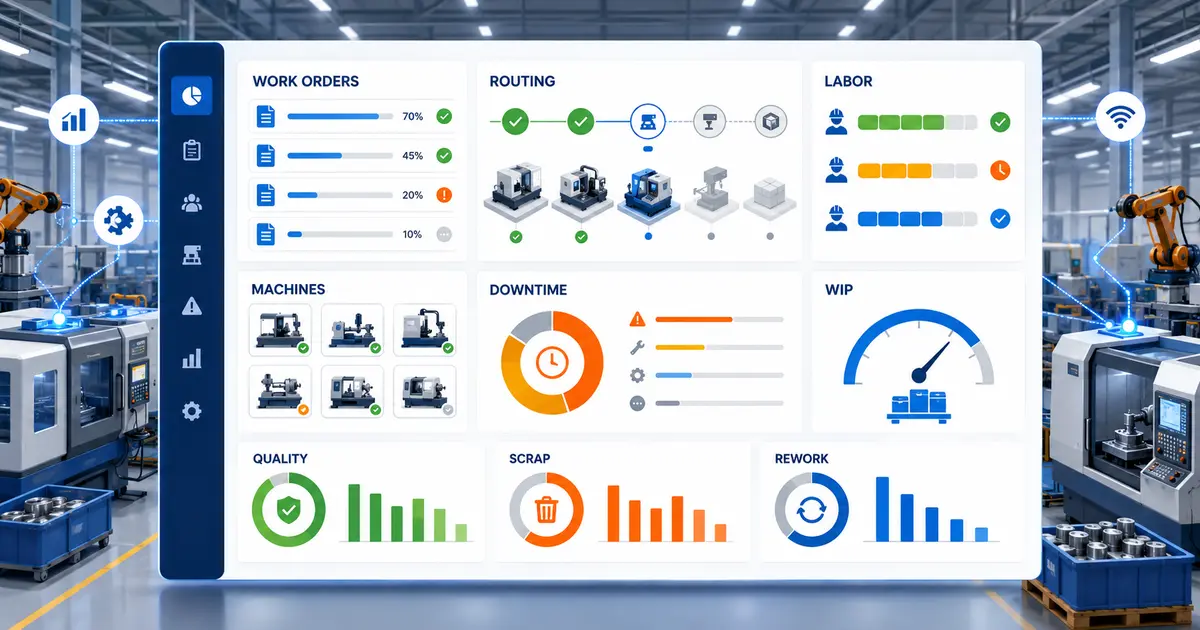
SimpleManufacturing™ Shop Floor Tracking Software gives small and mid-sized manufacturers real-time visibility into Work Orders, routing progress, employee labor, machines, work centers, production quantities, downtime, WIP, scrap, rework, and current manufacturing status.
Production information loses much of its value when it is written on paper, entered into spreadsheets after the work is complete, or stored separately from Work Orders, inventory, scheduling, quality, and traceability. Supervisors need to know what is happening while production is still in progress.
SimpleManufacturing™ connects shop floor reporting directly with Work Orders, manufacturing routings, labor management, machines, inventory, scheduling, quality, MRP, traceability, and manufacturing dashboards.
Current Production Information Instead of End-of-Shift Guesswork
Shop floor activity updates the manufacturing record as employees perform work, report quantities, move through routing operations, identify downtime, and complete production.
What Is Shop Floor Tracking Software?
Shop floor tracking software records and reports manufacturing activity directly from the production floor. It connects the planned Work Order and routing sequence with the labor, machine activity, quantities, downtime, material movement, quality events, and production status that actually occur.
Manufacturers may use shop floor tracking to monitor:
- Work Orders waiting, active, held, delayed, or complete
- Current routing operation and production step
- Employee setup, production, inspection, and rework labor
- Machine and work-center activity
- Completed, accepted, rejected, scrapped, and rework quantities
- Work-in-Process inventory and production progress
- Downtime events and reason codes
- Production schedules, priorities, and due dates
- Material availability and inventory transactions
- Lot and serial-number traceability
- Quality holds and inspection activity
- Estimated and actual production performance
Shop floor tracking connects the production plan with the work actually performed, giving management a current view of manufacturing status and performance.
Common Shop Floor Visibility Challenges
Many manufacturers know what was scheduled but cannot see what is actually happening without walking the floor, calling supervisors, reviewing paper travelers, or waiting for employees to enter information later.
| Shop Floor Challenge | Potential Manufacturing Impact |
|---|---|
| Delayed Production Entry | Schedules and customer updates are based on information that is already out of date. |
| Paper Labor Collection | Employee hours may be incomplete, difficult to verify, or disconnected from the operation performed. |
| Limited Routing Visibility | Supervisors cannot quickly determine which operation each job has reached. |
| Unrecorded Downtime | Recurring machine, material, quality, or process delays remain difficult to identify. |
| Manual Quantity Reporting | Completed, rejected, scrap, and remaining quantities may not reflect current production. |
| Disconnected Quality Records | Inspection, holds, nonconformance, and rework activity may not remain connected with the job. |
| Weak WIP Visibility | Management cannot reliably see how much work is waiting, active, held, or nearing completion. |
| Separate Spreadsheets | Production, labor, scheduling, and inventory teams may work from different information. |
Production Reporting Should Occur at the Point of Work
When the physical activity happens first and the system is updated hours or days later, production status, labor, inventory, scheduling, and costing can become unreliable.
How Shop Floor Tracking Works
Routing Released
Assigned Work
Quantity Recorded
Status Updated
Schedules Updated
| Production Event | Shop Floor Update |
|---|---|
| Setup Started | Identifies the employee, Work Order, routing step, work center, machine, and start time. |
| Production Started | Updates the active job and operation so supervisors can see what is in process. |
| Quantity Reported | Updates completed, accepted, rejected, scrap, rework, and remaining quantities. |
| Downtime Reported | Records the affected job, machine or work center, duration, and downtime reason. |
| Operation Transferred | Moves production into the next routing step and updates Work Order progress. |
| Production Completed | Updates Work Order status, finished quantity, labor, WIP, traceability, and actual manufacturing history. |
Real-Time Work Order Tracking
The Work Order provides the production structure used by the shop floor. It identifies the manufactured item, required quantity, due date, materials, routing operations, instructions, labor, machines, quality requirements, and completion activity.
Real-time Work Order visibility helps supervisors answer:
- Which Work Orders are currently active?
- Which operation is each job performing?
- Which employees and machines are assigned?
- How many units have been completed?
- How much production remains?
- Which jobs are past due or at risk?
- Which jobs are waiting for material, inspection, or outside processing?
- Which jobs are on hold?
- Which jobs are ready to move to the next step?
Learn more about the complete production record in Manufacturing Work Order Management Software.
Routing and Operation Tracking
Manufacturing routings organize production into a controlled sequence of steps. Shop floor tracking shows the current routing operation, completed operations, remaining work, and the instructions or requirements associated with each step.
Current Operation
See which production, inspection, or outside-processing step the Work Order has reached.
Operation Instructions
Give employees access to the descriptions, instructions, and visual information required for the step.
Operation Transfer
Move production through the defined process and update the current Work Order status.
Quality Steps
Connect designated QA operations with the required in-process inspection activity.
Outside Processing
Identify subcontracted operations within the production sequence and purchasing workflow.
Machine Assignment
Show the machine associated with each applicable routing operation.
Explore the complete operation structure in Manufacturing Routing Software.
Employee Labor Collection on the Shop Floor
Employees can record setup, production, inspection, rework, and indirect labor against the applicable Work Order and routing operation. This gives production and accounting a direct connection between employee time, job progress, completed quantities, and actual labor cost.
| Labor Information | Manufacturing Use |
|---|---|
| Employee | Identifies who performed the manufacturing activity. |
| Work Order and Operation | Assigns labor to the exact job and routing step. |
| Start and Stop Time | Calculates actual labor hours. |
| Labor Category | Separates setup, production, inspection, rework, and indirect activity. |
| Production Quantity | Connects employee time with the output reported. |
| Labor Rate | Supports actual Work Order labor cost. |
Learn more in Manufacturing Labor Management Software.
Machine and Work Center Activity
Shop floor tracking can associate production activity with the machine or work center performing the operation. This helps supervisors understand which resources are active, waiting, unavailable, or contributing to a production constraint.
Machine and work-center visibility may include:
- Current Work Orders and routing operations
- Assigned employees
- Setup and production activity
- Machine utilization
- Downtime events and reasons
- Completed and scrap quantities
- Operations waiting in queue
- Past-due production activity
- Work-center performance
See Production by Resource, Not Only by Job
Work-center and machine views help supervisors identify growing queues, recurring downtime, overloaded resources, and production bottlenecks affecting multiple Work Orders.
Manufacturing Downtime Tracking
Downtime is the period during which an employee, machine, operation, or Work Order cannot proceed as planned. Recording downtime consistently gives management evidence for investigating recurring production delays.
Common downtime reasons include:
- Machine or tooling failure
- Material shortage
- Waiting for inspection
- Quality hold or nonconformance
- Waiting for engineering information
- Missing instructions, drawings, or programs
- Employee unavailable
- Outside-processing delay
- Scheduled maintenance
- Production priority change
| Downtime Field | Purpose |
|---|---|
| Start and Stop Time | Measures the duration of the production interruption. |
| Reason Code | Supports consistent classification and trend reporting. |
| Work Order and Operation | Identifies the affected production activity. |
| Machine or Work Center | Identifies the affected manufacturing resource. |
| Comments | Provides context for investigation and corrective action. |
Production Quantity, Scrap, and Rework Reporting
Employees report production quantities as operations are performed. Accurate quantity reporting improves Work Order status, WIP visibility, production scheduling, material planning, finished-goods forecasting, and delivery estimates.
| Quantity Type | Meaning |
|---|---|
| Quantity Started | Units introduced into the operation or production process. |
| Quantity Completed | Units completing the reported operation. |
| Quantity Accepted | Units meeting applicable production or inspection requirements. |
| Quantity Rejected | Units failing inspection or production requirements. |
| Quantity Scrapped | Units permanently removed from production. |
| Quantity Reworked | Units requiring additional controlled processing. |
| Quantity Remaining | Units still required for the operation or Work Order. |
Work-in-Process Visibility
Work in Process includes manufacturing jobs and quantities that have started but are not yet completed as finished goods. Shop floor tracking helps management see where WIP is located within the routing and why it may be waiting.
Waiting Work
See operations queued for labor, machines, materials, inspection, or outside processing.
Active Work
Identify jobs, employees, machines, and operations currently in production.
Held Work
Identify jobs stopped by quality, material, engineering, customer, or process conditions.
Completed Work
Review operation and production quantities already completed.
Barcode-Based Shop Floor Data Collection
Barcode scanning can reduce manual entry by helping employees identify Work Orders, operations, employees, materials, inventory locations, lots, serial numbers, machines, and production transactions.
Barcode-assisted transactions may support:
- Employee identification
- Work Order and routing-step selection
- Labor start and stop activity
- Material issue and return
- Inventory-location verification
- Lot and serial-number capture
- Production quantity reporting
- Operation transfer and completion
Capture the Transaction Where the Work Happens
Point-of-work data collection reduces delayed entry and helps keep physical manufacturing activity synchronized with the ERP record.
Shop Floor Tracking Integrated with Manufacturing ERP
Work Order Management
Connect production reporting with jobs, items, materials, routing, quantities, status, and actual cost.
Manufacturing Routing
Track progress through production, inspection, outside-processing, and machine-assigned operations.
Labor Management
Record employee time by Work Order, operation, work center, and production activity.
Inventory Control
Connect material issues, returns, scrap, WIP, completion, locations, lots, and serials.
Production Scheduling
Use current production status, routing progress, machines, labor, and delays to improve schedules.
Manufacturing Traceability
Connect employees, operations, materials, lots, serial numbers, production, and finished goods.
Quality Management
Connect inspections, holds, nonconformance, rework, corrective action, and production records.
Material Requirements Planning
Connect production progress and material activity with purchasing and manufacturing planning.
Shop Floor Tracking Software Features
Work Order Tracking
Monitor current job, status, priority, routing step, quantity, and due date.
Labor Collection
Record employee time by job, operation, work center, and labor category.
Machine Tracking
Associate machines with routing operations, employee activity, quantities, and downtime.
Routing Visibility
See current, completed, held, and remaining manufacturing operations.
Downtime Reporting
Record duration, reason, job, operation, machine, and work-center impact.
WIP Visibility
Review work waiting, active, held, delayed, transferred, and completed.
Quantity Reporting
Record completed, accepted, rejected, scrap, rework, and remaining quantities.
Barcode Scanning
Reduce manual entry for employees, jobs, operations, materials, locations, lots, and serials.
Production Dashboards
Review current production, queues, delays, priorities, labor, machines, and performance.
Industries Using Shop Floor Tracking Software
Aerospace Manufacturing
Connect controlled routing, employees, machines, inspections, material genealogy, and production history.
Electronics Manufacturing
Track assembly, inspection, testing, rework, quantities, component traceability, and completion.
Medical Device Manufacturing
Maintain production, employee, operation, quality, and traceability records within controlled processes.
CNC Machine Shops
Track setup, run time, machine activity, routing progress, downtime, quantities, and actual job performance.
Contract Manufacturing
Monitor customer-specific jobs, priorities, routing requirements, labor, materials, and delivery status.
Industrial Equipment
Track fabrication, machining, assembly, testing, outside processing, inspection, and completion.
Frequently Asked Questions About Shop Floor Tracking Software
What is shop floor tracking software?
Shop floor tracking software records manufacturing activity directly from production, including Work Orders, routing progress, employee labor, machines, quantities, downtime, WIP, scrap, rework, quality, and current production status.
How does shop floor tracking integrate with Work Orders?
The Work Order provides the job, item, quantity, due date, materials, routing, instructions, machines, and quality requirements. Shop floor activity updates the Work Order as production is performed.
Can shop floor software track employee labor?
Yes. Employees can record setup, production, inspection, rework, and indirect labor against the applicable Work Order and routing operation.
Can manufacturers track machines and work centers?
Yes. Production activity can be associated with machines and work centers to review active jobs, assigned employees, quantities, utilization, queues, and downtime.
What is manufacturing downtime tracking?
Downtime tracking records when production cannot proceed, including the duration, reason, affected Work Order, operation, machine, or work center.
What production quantities can be reported?
Manufacturers can report quantities started, completed, accepted, rejected, scrapped, reworked, and remaining for the applicable operation or Work Order.
How does barcode scanning support the shop floor?
Barcodes help identify employees, Work Orders, routing operations, materials, locations, lots, serial numbers, machines, and production transactions while reducing manual entry.
What is WIP visibility?
WIP visibility shows manufacturing work that has started but is not yet complete, including jobs and quantities waiting, active, held, delayed, transferred, or nearing completion.
How does SimpleManufacturing™ provide shop floor visibility?
SimpleManufacturing™ connects shop floor reporting with Work Orders, routing, labor, machines, inventory, scheduling, quality, MRP, traceability, costing, and manufacturing dashboards.
Connect the Production Plan with Real-Time Shop Floor Activity
Shop floor tracking helps manufacturers replace delayed paper and spreadsheet reporting with current production information connected directly to the Work Order and manufacturing ERP system.
One Current View of Jobs, Operations, Labor, Machines, WIP, and Production
SimpleManufacturing™ connects Work Orders, routing progress, employee labor, machines, quantities, downtime, inventory, scheduling, quality, traceability, and actual manufacturing activity within one integrated ERP platform.
SimpleManufacturing™ Shop Floor Tracking Software is designed for small and mid-sized manufacturers that need practical real-time production visibility without disconnected travelers, spreadsheets, and duplicate entry.
Request a Shop Floor Tracking Software Demonstration
Call SimpleManufacturing™ at 858-335-6421.